Animating a Helicopter Realistically

CaptainCatholic wrote on 12/6/2014, 1:36 PM
Hello all!

I'm using the version of HitFilm 2 Ultimate that is bundled in with the Sony Vegas Pro 12 Suite to animate a 3D helicopter. I'm very impressed with this software! I'm very happy with the way the helicopter looks in the video (i.e. the lighting is good enough for me, although if anyone sees anything that can be improved, any advice is appreciated!).

However, I'm having some difficulty with animating the helicopter - I can't seem to get it to move in a realistic way. This is probably because I am not familiar with how a real helicopter should move so to speak!

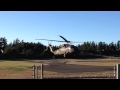
Here is a video clip of what I have so far:


You'll notice that the helicopter goes from Point A (bottom left side of the screen) to Point B (mid-right side of the screen). I just used two keyframes for position and orientation to achieve this effect. It looks very static, and once it gets to Point B, it just stays there as if it's 'levitating.'

Once it gets to Point B, I'd like it to mainly stay stationary - however, I would think that a real helicopter would move around just a bit due to the wind and the rotors spinning and whatnot. The problem is, when I add a few keyframes to make it move around a bit, it looks like it's bouncing around in a game of pong rather than moving slightly in the wind.

Does anyone have any recommendations for me?

Any help would be greatly appreciated! Thanks so much!
Tony
PS: Obviously I did not add the helicopter sound yet! Haha. Coming soon :) (though if anyone has good recommendations for a royalty-free helicopter sound, that'd also be helpful! Man I'm really asking for a lot of favors haha).
Comments

farss wrote on 12/6/2014, 1:58 PM
You're right the movement is not realistic for something that massive. I suspect you just need to work on the keyframes you've already tried adding to get it right.

The other thing that could use some attention is the lighting of the model, as it comes up out of the valley it should have more light.

For not free but very affordable sound effects try Sound Dogs.

Bob.
larry-peter wrote on 12/6/2014, 3:07 PM
I like the way you animated the "lift" but the stop and hover are tricky to make realistic. Manually keyframing it can be done if you can "unthink" it enough to get some subtle random motion. It's difficult to introduce chaos when thinking is involved.

I'm not familiar with the HitFilm interface, but if there is a way to introduce a noise element (in After Effects, you would use an expression, in 3DMax you'd apply noise to the transform controller) to the animation track, it would probably look more realistic than keyframing.

Keep in mind also that virtually nothing in real world motion involves straight lines - everything is a curve. Motion paths, acceleration, deceleration - think curves.
Byron K wrote on 12/6/2014, 3:19 PM
Pretty neat animation. I love rotor craft, to me they are a mechanical wonder of engineering, a craft that is NOT meant to fly but beats the air into submission.

I was an AH1S crew chief and flight platoon sgt. on these things. The thing to keep in mind about helicopters is that since they are "hanging" from a center shaft, you'll have pitch and yaw and depending on conditions the collective (up and down) motion affecting the how the aircraft moves.

So in your particular clip all you need to do is add a very little bit of gentle forward, left/right and a little bit of smooth up then down motion w/ a little pitch and yaw at the end, this will make this animation look more realistic. You don't need a lot as to over exaggerate the movements. The key here is smoooooth motions. (;

Also, If there's any way to get the rotor blades to form a slight "V" shape If you watch rotor wings in flight they all have that V shaped main rotor.

Here's a good video of what I'm referring to. Notice the slight movements left t/right, fore/aft and up/down during hovering.


Cool clip so far, I'd like to see the final result (;
GeeBax wrote on 12/6/2014, 4:25 PM
I am not sure if it was what Byron said in his previous post, but apart from the machine coming to a dead stop in the air, the rotors should be upswept, whereas they appear slightly downswept. Otherwise, very good.
Kit wrote on 12/6/2014, 5:43 PM
Very nice, where did you get the helicopter from? I wish I could get Hit Film to install. I agree with atom12 that you need bobbling. The helicopter won't stay stationary. I'd be looking at very small adjustments via keyframe. To create a random effect you could roll a dice or use playing cards to determine direction - daft idea I guess.
JackW wrote on 12/6/2014, 9:11 PM
Nice animation. I don't have a problem with the motion but I think the helicopter should be slightly further away from the viewer relative to its size. It seems to me that the perspective isn't quite right.

Jack
CaptainCatholic wrote on 12/6/2014, 10:27 PM
Hello all!

Wow, thank you all so much for your detailed posts, I sincerely appreciate your help!! I will be sure to try out all of the suggestions you provided me with. Again, really appreciate it!

Kit, you asked where I got the helicopter from - you'll be glad to know it's literally entirely free from this website: http://tf3dm.com/3d-model/uh-60-blackhawk-helicopter-93546.html

Also, I watched this tutorial in order to learn how to import the model in my footage (HitFilm does a great job with tutorials - I knew nothing about 3D animation or camera solving or planar tracking until I watched their tutorials): http://tf3dm.com/3d-model/uh-60-blackhawk-helicopter-93546.html

Again, thanks so much all! Byron, I will be sure to post the final clip once it's finished, thanks for the interest! :)
CaptainCatholic wrote on 12/7/2014, 12:58 AM
Hello all! I just updated my animation with several of the suggestions I received here. Here are the results:


Looks a thousand times better! Wow! If anyone has any additional advice, feel free to let me know - you guys really know what you're talking about! Thanks once again!
Kit wrote on 12/7/2014, 2:30 AM
Thanks for the links. I agree the hovering looks way better.
farss wrote on 12/7/2014, 3:49 AM
Looks great, much better.

Maybe a tad less light on the tail rotor as it turns. I'd also suggest having it more lit with a global light once it's hovering as it's now the focus of attention.

Bob.

PeterDuke wrote on 12/7/2014, 4:54 PM
One thing that annoys me when watching news casts of video taken from a helicopter is that they play the sound of a helicopter rotor flutter as heard from the ground. The sound within a helicopter is just a constant engine roar. Please don't propagate this fallacy.
Lovelight wrote on 12/7/2014, 5:56 PM
That's Movie Magic.. The same way cows are used for horses and cats taped together are used for cows when shown on the silver screen. Please continue the fallacy.
mountainman wrote on 12/7/2014, 6:40 PM
https://www.dropbox.com/s/l7dtajk3mvp5xju/heli%20landing.wmv?dl=0

This is a Bell 429 landing. Fairly big heli. Watch as he makes very fine adjustments. Flying a chopper is like patting your head, rubbing your belly and balancing on a beach ball all at the same time. No quick movements, very gentle inputs.

j
CaptainCatholic wrote on 12/7/2014, 10:36 PM
Thanks again for all the input, everyone! Mountainman, great advice, the video is very helpful! Farss, I agree - I don't like the amount of light that's currently on the rear rotor. You mentioned a global light - currently, I have it set to a Point Light in HitFilm, and I can't seem to figure out which setting would constitute a global light in HitFilm. Do you happen to know? Thanks again!
farss wrote on 12/8/2014, 12:17 AM
[I]" Do you happen to know? "[/I]

Sorry, no, not familiar with Hitfilm. Most such apps though let you add multiple light sources of various kinds.

Bob.
Tech Diver wrote on 12/8/2014, 12:26 PM
I suggest adding some motion blur to the rotor blades for greater realism.

Peter