Can VEGAS have a script for One Click 3D Compositing Effect?

iEmby wrote on 10/19/2025, 1:08 AM

Hi Guys, Hello @jetdv

Can VEGAS have a script for One Click 3D Compositing Effect for exiting layers on timeline?

You can see this below link what i am saying.

Thankyou in Advance.

PROCESSOR
     

Operating System: Windows 11 Pro 64-bit (Always Updated)
System Manufacturer: ASUS
12th Gen Intel(R) Core(TM) i7-12700 (20 CPUs), ~2.1GHz - 4.90GHz
Memory: 32GB RAM
Page File: 11134MB used, 7934MB Available
DirectX Version: DirectX 12

-----------------------------------------------

MOTHERBOARD


ASUS PRIME H610-CS D4
Intel® H610 (LGA 1700)
Ready for 12th Gen Intel® Processors
Micro-ATX Motherboard with DDR4
Realtek 1 Gb Ethernet
PCH Heatsink
PCIe 4.0 | M.2 slot (32Gbps) 
HDMI® | D-Sub | USB 3.2 Gen 1 ports
SATA 6 Gbps | COM header
LPT header | TPM header
Luminous Anti-Moisture Coating
5X Protection III
(Multiple Hardware Safeguards
For all-round protection)

-----------------------------------------------
EXTERNAL GRAPHIC CARD
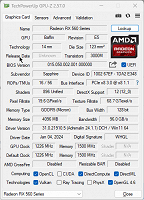
-----------------------------------------------

INTERNAL GRAPHIC CARD (iGPU)
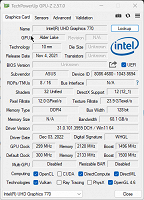
------------------------------------------------

LED - MONITOR

Monitor Name: Generic PnP Monitor
Monitor Model: HP 22es
Monitor Id: HWP331B
Native Mode: 1920 x 1080(p) (60.000Hz)
Output Type: HDMI

-----------------------------------------------

STORAGE DRIVE

Drive: C:
Free Space: 182.3 GB
Total Space: 253.9 GB
File System: NTFS
Model: WD Blue SN570 1TB (NVMe)

---------------O----------------

My System Info (PDF File).

https://drive.google.com/open?id=1-eoLmuXzshTRH_8RunAYAuNocKpiLoiV&usp=drive_fs


Also Check

Some useful creations by me including VEGAS Scripts

https://getopensofts.blogspot.com/


My YouTube Channel Dedicated to Only VEGAS Pro Tutorials

EDITROOM : My YouTube Channel (For VEGAS Tutorials)

Comments

jetdv wrote on 10/19/2025, 7:23 AM

I can give you a definite maybe. It depends on, exactly, what you're wanting the script to do and how flexible you want the script to be.

iEmby wrote on 10/19/2025, 7:26 AM

sir i just try to create with the help of Gemini

it is working. but i want to add some already made animate preset. if it is possible.
 

using System;
using System.Collections.Generic;
using System.Windows.Forms;
using ScriptPortal.Vegas;

public class EntryPoint
{
    const double BASE_WIDTH = 1920.0;
    const double BASE_HEIGHT = 1080.0;
    const double BASE_DEPTH = 54.0;
    const double SCALE_K = 0.000863;
    const double DEPTH_K = 0.000555;

    public void FromVegas(Vegas vegas)
    {
        List<VideoTrack> videoTracks = new List<VideoTrack>();
        foreach (Track track in vegas.Project.Tracks) //
            if (track is VideoTrack) videoTracks.Add(track as VideoTrack);

        if (videoTracks.Count == 0)
        {
            MessageBox.Show("No video tracks found in the project.", "Track Motion Depth", MessageBoxButtons.OK, MessageBoxIcon.Information);
            return;
        }

        ShowForm(vegas, videoTracks);
    }

    private void ShowForm(Vegas vegas, List<VideoTrack> videoTracks)
    {
        using (Form form = new Form())
        {
            form.Text = "Track Motion Depth Settings";
            form.StartPosition = FormStartPosition.CenterScreen;
            form.FormBorderStyle = FormBorderStyle.FixedDialog;
            form.MaximizeBox = false;
            form.MinimizeBox = false;

            int baseHeight = 200;
            int panelHeight = 0;

            RadioButton rbFix = new RadioButton() { Text = "Fix Depth", Left = 20, Top = 20, Checked = true, Width = 120 };
            RadioButton rbCustom = new RadioButton() { Text = "Custom Depth", Left = 150, Top = 20, Width = 120 };
            form.Controls.Add(rbFix);
            form.Controls.Add(rbCustom);

            Label lblDiff = new Label() { Text = "Depth difference per track:", Left = 20, Top = 60, Width = 150 };
            TextBox tbDiff = new TextBox() { Left = 180, Top = 60, Width = 80, Text = "500" };
            form.Controls.Add(lblDiff);
            form.Controls.Add(tbDiff);

            Panel panelCustom = new Panel() { Left = 20, Top = 90, Width = 340, AutoScroll = true, Visible = false, BorderStyle = BorderStyle.FixedSingle };
            form.Controls.Add(panelCustom);

            List<TextBox> customDiffBoxes = new List<TextBox>();

            for (int i = 0; i < videoTracks.Count; i++)
            {
                string trackName = string.IsNullOrWhiteSpace(videoTracks[i].Name) ? "Track " + (i + 1).ToString() : videoTracks[i].Name; //
                Label lbl = new Label() { Text = trackName, Left = 5, Top = i * 30 + 5, Width = 150 };
                TextBox tb = new TextBox() { Left = 160, Top = i * 30 + 5, Width = 50, Text = "0" };
                panelCustom.Controls.Add(lbl);
                panelCustom.Controls.Add(tb);
                customDiffBoxes.Add(tb);
                panelHeight = (i + 1) * 30 + 10;
            }

            panelCustom.Height = Math.Min(panelHeight, 200);

            rbFix.CheckedChanged += (s, e) =>
            {
                panelCustom.Visible = !rbFix.Checked;
                if (rbFix.Checked)
                {
                    form.Height = baseHeight;
                }
            };
            rbCustom.CheckedChanged += (s, e) =>
            {
                panelCustom.Visible = rbCustom.Checked;
                if (rbCustom.Checked)
                {
                    form.Height = Math.Max(baseHeight, panelCustom.Top + panelCustom.Height + 100);
                }
            };

            Button btnApply = new Button() { Text = "Apply", Dock = DockStyle.Bottom, Height = 40 };
            form.Controls.Add(btnApply);

            form.Height = baseHeight;
            form.Width = 400;

            btnApply.Click += (s, e) =>
            {
                try
                {
                    if (rbFix.Checked)
                    {
                        double diff = 0;
                        double.TryParse(tbDiff.Text, out diff);
                        ApplyFixDepth(videoTracks, diff);
                    }
                    else
                    {
                        List<double> diffs = new List<double>();
                        foreach (var tb in customDiffBoxes)
                        {
                            double val = 0;
                            double.TryParse(tb.Text, out val);
                            diffs.Add(val);
                        }
                        ApplyCustomDepth(videoTracks, diffs);
                    }

                    // --- BEGIN: Add new parent track ---
                    VideoTrack parentTrack = new VideoTrack(0, "3D Parent"); //
                    vegas.Project.Tracks.Add(parentTrack); //

                    // 1. Assign children FIRST
                    foreach (VideoTrack videoTrack in videoTracks)
                    {
                        videoTrack.CompositeNestingLevel = 1; //
                    }

                    // 2. Refresh UI
                    vegas.UpdateUI(); //

                    // 3. Set Parent Compositing Mode
                    parentTrack.SetParentCompositeMode(CompositeMode.SrcAlpha3D, false); //

                    // 4. Set the track's own Composite Mode as well
                    parentTrack.SetCompositeMode(CompositeMode.SrcAlpha3D, false); //

                    // 5. Ensure 3D Track Motion keyframe exists
                    if (parentTrack.TrackMotion.MotionKeyframes.Count == 0) //
                    {
                        parentTrack.TrackMotion.InsertMotionKeyframe(Timecode.FromSeconds(0.0)); //
                    }
                    // --- END: Add new parent track ---

                    form.Close();
                }
                catch (Exception ex)
                {
                    MessageBox.Show("An error occurred: " + ex.Message, "Script Error", MessageBoxButtons.OK, MessageBoxIcon.Error);
                }
            };

            form.ShowDialog();
        }
    }

    private void ApplyFixDepth(List<VideoTrack> videoTracks, double diff)
    {
        for (int i = 0; i < videoTracks.Count; i++)
        {
            double zPos = i * diff;
            ApplyTrackMotion(videoTracks[i], zPos);
        }
    }

    private void ApplyCustomDepth(List<VideoTrack> videoTracks, List<double> diffs)
    {
        for (int i = 0; i < videoTracks.Count; i++)
        {
            ApplyTrackMotion(videoTracks[i], diffs[i]);
        }
    }

    private void ApplyTrackMotion(VideoTrack track, double zPos)
    {
        double width = BASE_WIDTH * (1 + SCALE_K * zPos);
        double height = BASE_HEIGHT * (1 + SCALE_K * zPos);
        double depth = BASE_DEPTH * (1 + DEPTH_K * zPos);

        try
        {
            // Set composite mode to 3D Source Alpha (Child)
            if (track.CompositeMode != CompositeMode.SrcAlpha3D) //
                track.SetCompositeMode(CompositeMode.SrcAlpha3D, false); //
        }
        catch (Exception)
        {
            // Ignore errors
        }

        TrackMotionKeyframe keyframe; //
        if (track.TrackMotion.MotionKeyframes.Count == 0) //
        {
            keyframe = track.TrackMotion.InsertMotionKeyframe(Timecode.FromSeconds(0.0)); //
        }
        else
        {
            keyframe = track.TrackMotion.MotionKeyframes[0] as TrackMotionKeyframe; //
        }

        if (keyframe != null)
        {
            keyframe.PositionZ = zPos; //
            keyframe.Width = width; //
            keyframe.Height = height; //
            keyframe.Depth = depth; //
        }
    }
}

I want you to please make some improvements as per your experience sir.
thanks in advance.

Last changed by iEmby on 10/19/2025, 7:27 AM, changed a total of 1 times.

PROCESSOR
     

Operating System: Windows 11 Pro 64-bit (Always Updated)
System Manufacturer: ASUS
12th Gen Intel(R) Core(TM) i7-12700 (20 CPUs), ~2.1GHz - 4.90GHz
Memory: 32GB RAM
Page File: 11134MB used, 7934MB Available
DirectX Version: DirectX 12

-----------------------------------------------

MOTHERBOARD


ASUS PRIME H610-CS D4
Intel® H610 (LGA 1700)
Ready for 12th Gen Intel® Processors
Micro-ATX Motherboard with DDR4
Realtek 1 Gb Ethernet
PCH Heatsink
PCIe 4.0 | M.2 slot (32Gbps) 
HDMI® | D-Sub | USB 3.2 Gen 1 ports
SATA 6 Gbps | COM header
LPT header | TPM header
Luminous Anti-Moisture Coating
5X Protection III
(Multiple Hardware Safeguards
For all-round protection)

-----------------------------------------------
EXTERNAL GRAPHIC CARD

-----------------------------------------------

INTERNAL GRAPHIC CARD (iGPU)

------------------------------------------------

LED - MONITOR

Monitor Name: Generic PnP Monitor
Monitor Model: HP 22es
Monitor Id: HWP331B
Native Mode: 1920 x 1080(p) (60.000Hz)
Output Type: HDMI

-----------------------------------------------

STORAGE DRIVE

Drive: C:
Free Space: 182.3 GB
Total Space: 253.9 GB
File System: NTFS
Model: WD Blue SN570 1TB (NVMe)

---------------O----------------

My System Info (PDF File).

https://drive.google.com/open?id=1-eoLmuXzshTRH_8RunAYAuNocKpiLoiV&usp=drive_fs


Also Check

Some useful creations by me including VEGAS Scripts

https://getopensofts.blogspot.com/


My YouTube Channel Dedicated to Only VEGAS Pro Tutorials

EDITROOM : My YouTube Channel (For VEGAS Tutorials)
iEmby wrote on 10/19/2025, 8:44 AM

@jetdv sir how we can add keyframes to parenttrackmotion (not at its indivisual track motion).
pls help..
i am very close.

PROCESSOR
     

Operating System: Windows 11 Pro 64-bit (Always Updated)
System Manufacturer: ASUS
12th Gen Intel(R) Core(TM) i7-12700 (20 CPUs), ~2.1GHz - 4.90GHz
Memory: 32GB RAM
Page File: 11134MB used, 7934MB Available
DirectX Version: DirectX 12

-----------------------------------------------

MOTHERBOARD


ASUS PRIME H610-CS D4
Intel® H610 (LGA 1700)
Ready for 12th Gen Intel® Processors
Micro-ATX Motherboard with DDR4
Realtek 1 Gb Ethernet
PCH Heatsink
PCIe 4.0 | M.2 slot (32Gbps) 
HDMI® | D-Sub | USB 3.2 Gen 1 ports
SATA 6 Gbps | COM header
LPT header | TPM header
Luminous Anti-Moisture Coating
5X Protection III
(Multiple Hardware Safeguards
For all-round protection)

-----------------------------------------------
EXTERNAL GRAPHIC CARD

-----------------------------------------------

INTERNAL GRAPHIC CARD (iGPU)

------------------------------------------------

LED - MONITOR

Monitor Name: Generic PnP Monitor
Monitor Model: HP 22es
Monitor Id: HWP331B
Native Mode: 1920 x 1080(p) (60.000Hz)
Output Type: HDMI

-----------------------------------------------

STORAGE DRIVE

Drive: C:
Free Space: 182.3 GB
Total Space: 253.9 GB
File System: NTFS
Model: WD Blue SN570 1TB (NVMe)

---------------O----------------

My System Info (PDF File).

https://drive.google.com/open?id=1-eoLmuXzshTRH_8RunAYAuNocKpiLoiV&usp=drive_fs


Also Check

Some useful creations by me including VEGAS Scripts

https://getopensofts.blogspot.com/


My YouTube Channel Dedicated to Only VEGAS Pro Tutorials

EDITROOM : My YouTube Channel (For VEGAS Tutorials)

jetdv wrote on 10/19/2025, 1:13 PM

To access Parent Track Motion, instead of "track.TrackMotion" use "track.ParentTrackMotion". But you might want to check to verify it really is a "Parent" first!

iEmby wrote on 10/24/2025, 12:08 PM

@jetdv
sir i just make it but only one issue i am not able to do..
pls help..

it is adding key on individual level not on parent level..

pls check out this script and try once..

using System;
using System.Collections.Generic;
using System.Windows.Forms;
using ScriptPortal.Vegas;

public class EntryPoint
{
    // Constants for calculation
    const double BASE_WIDTH = 1920.0;
    const double BASE_HEIGHT = 1080.0;
    const double BASE_DEPTH = 54.0;
    const double SCALE_K = 0.000863; // Scale factor based on Z-position
    const double DEPTH_K = 0.000555; // Depth factor based on Z-position

    // Main entry point from VEGAS
    public void FromVegas(Vegas vegas)
    {
        // Find all video tracks in the project
        List<VideoTrack> videoTracks = new List<VideoTrack>();
        foreach (Track track in vegas.Project.Tracks) //
        {
            if (track is VideoTrack) // Check if the track is a video track
            {
                videoTracks.Add(track as VideoTrack);
            }
        }

        // Show message and exit if no video tracks are found
        if (videoTracks.Count == 0)
        {
            MessageBox.Show("No video tracks found in the project.", "Track Motion Depth", MessageBoxButtons.OK, MessageBoxIcon.Information);
            return;
        }

        // Show the settings form, passing the Vegas object and the list of tracks
        ShowForm(vegas, videoTracks);
    }

    // Displays the settings form
    private void ShowForm(Vegas vegas, List<VideoTrack> videoTracks)
    {
        // Use 'using' for proper form disposal
        using (Form form = new Form())
        {
            // Form basic setup
            form.Text = "Track Motion Depth Settings";
            form.StartPosition = FormStartPosition.CenterScreen;
            form.FormBorderStyle = FormBorderStyle.FixedDialog; // Prevent resizing
            form.MaximizeBox = false; // Disable maximize button
            form.MinimizeBox = false; // Disable minimize button

            // --- UI Elements ---

            // Radio buttons for mode selection
            RadioButton rbFix = new RadioButton() { Text = "Fix Depth", Left = 20, Top = 20, Checked = true, Width = 120 };
            RadioButton rbCustom = new RadioButton() { Text = "Custom Depth", Left = 150, Top = 20, Width = 120 };
            form.Controls.Add(rbFix);
            form.Controls.Add(rbCustom);

            // Controls for "Fix Depth" mode
            Label lblDiff = new Label() { Text = "Depth difference per track:", Left = 20, Top = 60, Width = 150 };
            TextBox tbDiff = new TextBox() { Left = 180, Top = 60, Width = 80, Text = "10" }; // Default difference value
            form.Controls.Add(lblDiff);
            form.Controls.Add(tbDiff);

            // --- NEW: Add Checkbox ---
            CheckBox cbAddNewParent = new CheckBox()
            {
                Text = "Add New Parent Track",
                Left = 20,
                Top = 95, // Position below FixDepth controls initially
                Width = 200,
                Checked = true // Default to checked (current behavior)
            };
            form.Controls.Add(cbAddNewParent);
            // --- END: Add Checkbox ---

            // Panel for "Custom Depth" mode controls (initially hidden)
            Panel panelCustom = new Panel() { Left = 20, Top = 125, Width = 340, AutoScroll = true, Visible = false, BorderStyle = BorderStyle.FixedSingle }; // Adjust Top position slightly
            form.Controls.Add(panelCustom);


            // List to hold TextBoxes for custom depth values
            List<TextBox> customDiffBoxes = new List<TextBox>();
            int panelHeight = 0; // Height required for custom panel content

            // Create Label and TextBox for each video track within the custom panel
            for (int i = 0; i < videoTracks.Count; i++)
            {
                // Use track name or generate one if empty
                string trackName = string.IsNullOrWhiteSpace(videoTracks[i].Name) ? "Track " + (i + 1).ToString() : videoTracks[i].Name; //
                Label lbl = new Label() { Text = trackName, Left = 5, Top = i * 30 + 5, Width = 150 };
                TextBox tb = new TextBox() { Left = 160, Top = i * 30 + 5, Width = 50, Text = "0" }; // Default custom value
                panelCustom.Controls.Add(lbl);
                panelCustom.Controls.Add(tb);
                customDiffBoxes.Add(tb);
                panelHeight = (i + 1) * 30 + 10; // Calculate required panel height
            }

            // Set custom panel height, limit to 200px max
            panelCustom.Height = Math.Min(panelHeight, 200);

            // Adjust initial form height based on checkbox addition
            int baseHeight = 230; // Increased base height

            // Event handlers for radio button changes (toggle panel visibility and resize form)
            rbFix.CheckedChanged += (s, e) =>
            {
                panelCustom.Visible = !rbFix.Checked;
                lblDiff.Visible = rbFix.Checked; // Show/Hide Fix controls
                tbDiff.Visible = rbFix.Checked;
                cbAddNewParent.Top = rbFix.Checked ? 95 : 50; // Move checkbox based on mode
                panelCustom.Top = rbFix.Checked ? 125 : 80; // Move panel based on mode
                if (rbFix.Checked)
                {
                    form.Height = baseHeight; // Reset form height for Fix mode
                }
            };
            rbCustom.CheckedChanged += (s, e) =>
            {
                panelCustom.Visible = rbCustom.Checked;
                lblDiff.Visible = !rbCustom.Checked; // Show/Hide Fix controls
                tbDiff.Visible = !rbCustom.Checked;
                cbAddNewParent.Top = rbCustom.Checked ? 50 : 95; // Move checkbox based on mode
                panelCustom.Top = rbCustom.Checked ? 80 : 125; // Move panel based on mode

                if (rbCustom.Checked)
                {
                    // Adjust form height based on panel visibility and checkbox
                    form.Height = Math.Max(baseHeight - 30, panelCustom.Top + panelCustom.Height + 100);
                }
            };

            // Apply button at the bottom
            Button btnApply = new Button() { Text = "Apply", Dock = DockStyle.Bottom, Height = 40 };
            form.Controls.Add(btnApply);

            // Set initial form size
            form.Height = baseHeight;
            form.Width = 400;

            // Event handler for the Apply button click
            btnApply.Click += (s, e) =>
            {
                try
                {
                    // Apply initial depth/scale to ALL tracks first
                    if (rbFix.Checked)
                    {
                        double diff = 0;
                        double.TryParse(tbDiff.Text, out diff); // Safely parse difference value
                        ApplyFixDepth(vegas, videoTracks, diff); // Pass vegas object
                    }
                    else
                    {
                        List<double> diffs = new List<double>();
                        foreach (var tb in customDiffBoxes)
                        {
                            double val = 0;
                            double.TryParse(tb.Text, out val); // Safely parse each custom value
                            diffs.Add(val);
                        }
                        ApplyCustomDepth(vegas, videoTracks, diffs); // Pass vegas object
                    }

                    VideoTrack actualParentTrack; // Variable to hold the track that will be the parent

                    if (cbAddNewParent.Checked)
                    {
                        // --- Create NEW Parent Track ---
                        actualParentTrack = new VideoTrack(0, "3D Parent"); //
                        vegas.Project.Tracks.Add(actualParentTrack); //

                        // Assign ALL original tracks as children
                        foreach (VideoTrack videoTrack in videoTracks)
                        {
                            videoTrack.CompositeNestingLevel = 1; //
                        }
                    }
                    else // Use existing top track as parent
                    {
                        if (videoTracks.Count > 0)
                        {
                            actualParentTrack = videoTracks[0]; // The top-most track
                            actualParentTrack.CompositeNestingLevel = 0; // Ensure it's level 0

                            // Assign tracks BELOW the top one as children
                            for (int i = 1; i < videoTracks.Count; i++)
                            {
                                videoTracks[i].CompositeNestingLevel = 1; //
                            }
                        }
                        else
                        {
                            // Should not happen due to initial check, but handle defensively
                            form.Close();
                            return;
                        }
                    }

                    // --- Configure the actualParentTrack ---
                    vegas.UpdateUI(); // Refresh UI
                    actualParentTrack.SetParentCompositeMode(CompositeMode.SrcAlpha3D, false); // Set Parent Mode
                    actualParentTrack.SetCompositeMode(CompositeMode.SrcAlpha3D, false); // Set Track Mode

                    // Apply animation ONLY to the actualParentTrack
                    ApplyParentAnimation(vegas, actualParentTrack);

                    form.Close(); // Close the form on success
                }
                catch (Exception ex)
                {
                    // Show error message if something goes wrong
                    MessageBox.Show("An error occurred: " + ex.Message, "Script Error", MessageBoxButtons.OK, MessageBoxIcon.Error);
                }
            };

            form.ShowDialog(); // Display the form modally
        } // Form is disposed here
    }

    // Applies fixed depth increments to tracks
    private void ApplyFixDepth(Vegas vegas, List<VideoTrack> videoTracks, double diff)
    {
        for (int i = 0; i < videoTracks.Count; i++)
        {
            double zPos = i * diff; // Calculate Z position based on track index
            ApplyTrackMotion(vegas, videoTracks[i], zPos); // Apply motion (pass vegas)
        }
    }

    // Applies custom depth values to tracks
    private void ApplyCustomDepth(Vegas vegas, List<VideoTrack> videoTracks, List<double> diffs)
    {
        for (int i = 0; i < videoTracks.Count; i++)
        {
            // Use provided depth value, ensure diffs list matches track count (or handle error)
            ApplyTrackMotion(vegas, videoTracks[i], (i < diffs.Count) ? diffs[i] : 0.0); // Apply motion (pass vegas)
        }
    }

    // Applies initial Track Motion settings (scale, depth based on Z) to a single track
    private void ApplyTrackMotion(Vegas vegas, VideoTrack track, double zPos)
    {
        // Calculate initial scale/depth based on Z position
        double initialWidth = BASE_WIDTH * (1 + SCALE_K * zPos);
        double initialHeight = BASE_HEIGHT * (1 + SCALE_K * zPos);
        double initialDepth = BASE_DEPTH * (1 + DEPTH_K * zPos);
        double initialZPos = zPos;

        // Set track composite mode to 3D Child
        try
        {
            if (track.CompositeMode != CompositeMode.SrcAlpha3D) //
                track.SetCompositeMode(CompositeMode.SrcAlpha3D, false); // Set as child
        }
        catch (Exception) { /* Ignore errors */ }

        // --- Handle Initial Keyframe ONLY ---
        TrackMotionKeyframe keyframe; //
        if (track.TrackMotion.MotionKeyframes.Count == 0) //
        {
            keyframe = track.TrackMotion.InsertMotionKeyframe(Timecode.FromSeconds(0.0)); // Create if none exists
        }
        else
        {
            keyframe = track.TrackMotion.MotionKeyframes[0] as TrackMotionKeyframe; // Get the first keyframe
            // Remove any extra keyframes on child tracks
            while (track.TrackMotion.MotionKeyframes.Count > 1)
            {
                track.TrackMotion.MotionKeyframes.RemoveAt(1); //
            }
            keyframe.Position = Timecode.FromSeconds(0.0); // Ensure first keyframe is at time 0
        }

        // Set initial values on the first keyframe
        if (keyframe != null)
        {
            keyframe.PositionZ = initialZPos; //
            keyframe.Width = initialWidth; //
            keyframe.Height = initialHeight; //
            keyframe.Depth = initialDepth; //
            keyframe.Type = VideoKeyframeType.Hold; // Use Hold interpolation as no animation is intended here
        }
    }

    // NEW: Function to apply animation specifically to the parent track
    private void ApplyParentAnimation(Vegas vegas, VideoTrack parentTrack)
    {
        TrackMotionKeyframe parentFirstKeyframe;
        if (parentTrack.TrackMotion.MotionKeyframes.Count == 0) //
        {
            parentFirstKeyframe = parentTrack.TrackMotion.InsertMotionKeyframe(Timecode.FromSeconds(0.0)); //
        }
        else
        {
            parentFirstKeyframe = parentTrack.TrackMotion.MotionKeyframes[0] as TrackMotionKeyframe; //
                                                                                                     // Clear any existing extra keyframes on the designated parent
            while (parentTrack.TrackMotion.MotionKeyframes.Count > 1)
            {
                parentTrack.TrackMotion.MotionKeyframes.RemoveAt(1); //
            }
            parentFirstKeyframe.Position = Timecode.FromSeconds(0.0); //
        }

        if (parentFirstKeyframe != null)
        {
            // Parent starts at default position/scale (relative to itself)
            parentFirstKeyframe.PositionZ = 0; //
            parentFirstKeyframe.Width = BASE_WIDTH; //
            parentFirstKeyframe.Height = BASE_HEIGHT; //
            parentFirstKeyframe.Depth = BASE_DEPTH; //
            parentFirstKeyframe.Type = VideoKeyframeType.Linear; //

            // Add Middle Keyframe to Parent
            Timecode projectLength = vegas.Project.Length; //
            long middleNanos = projectLength.Nanos / 2; //
            Timecode middleTime = Timecode.FromNanos(middleNanos); //

            if (middleTime > parentFirstKeyframe.Position && projectLength.Nanos > 0)
            {
                TrackMotionKeyframe parentMiddleKeyframe = parentTrack.TrackMotion.InsertMotionKeyframe(middleTime); //
                if (parentMiddleKeyframe != null)
                {
                    parentMiddleKeyframe.PositionZ = 0; // Keep Z the same
                    parentMiddleKeyframe.Width = BASE_WIDTH * 1.5;
                    parentMiddleKeyframe.Height = BASE_HEIGHT * 1.5;
                    parentMiddleKeyframe.Depth = BASE_DEPTH * 1.5; // Scale Depth too
                    parentMiddleKeyframe.Type = VideoKeyframeType.Linear; //
                }
            }

            // Add End Keyframe to Parent
            Timecode endTime = projectLength - Timecode.FromFrames(10); //
            Timecode lastKeyframeTime = parentFirstKeyframe.Position; //
            if (parentTrack.TrackMotion.MotionKeyframes.Count > 1 && middleTime > lastKeyframeTime) //
            {
                lastKeyframeTime = middleTime;
            }

            if (endTime > lastKeyframeTime && projectLength.FrameCount > 10) //
            {
                TrackMotionKeyframe parentEndKeyframe = parentTrack.TrackMotion.InsertMotionKeyframe(endTime); //
                if (parentEndKeyframe != null)
                {
                    // Reset to initial values
                    parentEndKeyframe.PositionZ = 0;
                    parentEndKeyframe.Width = BASE_WIDTH;
                    parentEndKeyframe.Height = BASE_HEIGHT;
                    parentEndKeyframe.Depth = BASE_DEPTH;
                    parentEndKeyframe.Type = VideoKeyframeType.Linear; //
                }
            }
        }
    }
}

thanks in advance

PROCESSOR
     

Operating System: Windows 11 Pro 64-bit (Always Updated)
System Manufacturer: ASUS
12th Gen Intel(R) Core(TM) i7-12700 (20 CPUs), ~2.1GHz - 4.90GHz
Memory: 32GB RAM
Page File: 11134MB used, 7934MB Available
DirectX Version: DirectX 12

-----------------------------------------------

MOTHERBOARD


ASUS PRIME H610-CS D4
Intel® H610 (LGA 1700)
Ready for 12th Gen Intel® Processors
Micro-ATX Motherboard with DDR4
Realtek 1 Gb Ethernet
PCH Heatsink
PCIe 4.0 | M.2 slot (32Gbps) 
HDMI® | D-Sub | USB 3.2 Gen 1 ports
SATA 6 Gbps | COM header
LPT header | TPM header
Luminous Anti-Moisture Coating
5X Protection III
(Multiple Hardware Safeguards
For all-round protection)

-----------------------------------------------
EXTERNAL GRAPHIC CARD

-----------------------------------------------

INTERNAL GRAPHIC CARD (iGPU)

------------------------------------------------

LED - MONITOR

Monitor Name: Generic PnP Monitor
Monitor Model: HP 22es
Monitor Id: HWP331B
Native Mode: 1920 x 1080(p) (60.000Hz)
Output Type: HDMI

-----------------------------------------------

STORAGE DRIVE

Drive: C:
Free Space: 182.3 GB
Total Space: 253.9 GB
File System: NTFS
Model: WD Blue SN570 1TB (NVMe)

---------------O----------------

My System Info (PDF File).

https://drive.google.com/open?id=1-eoLmuXzshTRH_8RunAYAuNocKpiLoiV&usp=drive_fs


Also Check

Some useful creations by me including VEGAS Scripts

https://getopensofts.blogspot.com/


My YouTube Channel Dedicated to Only VEGAS Pro Tutorials

EDITROOM : My YouTube Channel (For VEGAS Tutorials)

jetdv wrote on 10/24/2025, 2:14 PM

@iEmby That's because you're NOT looking at "Parent" track motion. See the changes here in bold (as I said, you have to look at ParentTrackMotion and your "ApplyParentAnimation" was only looking at TrackMotion):

    private void ApplyParentAnimation(Vegas vegas, VideoTrack parentTrack)
    {
        TrackMotionKeyframe parentFirstKeyframe;
        if (parentTrack.ParentTrackMotion.MotionKeyframes.Count == 0) //
        {
            parentFirstKeyframe = parentTrack.ParentTrackMotion.InsertMotionKeyframe(Timecode.FromSeconds(0.0)); //
        }
        else
        {
            parentFirstKeyframe = parentTrack.ParentTrackMotion.MotionKeyframes[0] as TrackMotionKeyframe; //
                                                                                                     // Clear any existing extra keyframes on the designated parent
            while (parentTrack.ParentTrackMotion.MotionKeyframes.Count > 1)
            {
                parentTrack.ParentTrackMotion.MotionKeyframes.RemoveAt(1); //
            }
            parentFirstKeyframe.Position = Timecode.FromSeconds(0.0); //
        }

        if (parentFirstKeyframe != null)
        {
            // Parent starts at default position/scale (relative to itself)
            parentFirstKeyframe.PositionZ = 0; //
            parentFirstKeyframe.Width = BASE_WIDTH; //
            parentFirstKeyframe.Height = BASE_HEIGHT; //
            parentFirstKeyframe.Depth = BASE_DEPTH; //
            parentFirstKeyframe.Type = VideoKeyframeType.Linear; //

            // Add Middle Keyframe to Parent
            Timecode projectLength = vegas.Project.Length; //
            long middleNanos = projectLength.Nanos / 2; //
            Timecode middleTime = Timecode.FromNanos(middleNanos); //

            if (middleTime > parentFirstKeyframe.Position && projectLength.Nanos > 0)
            {
                TrackMotionKeyframe parentMiddleKeyframe = parentTrack.ParentTrackMotion.InsertMotionKeyframe(middleTime); //
                if (parentMiddleKeyframe != null)
                {
                    parentMiddleKeyframe.PositionZ = 0; // Keep Z the same
                    parentMiddleKeyframe.Width = BASE_WIDTH * 1.5;
                    parentMiddleKeyframe.Height = BASE_HEIGHT * 1.5;
                    parentMiddleKeyframe.Depth = BASE_DEPTH * 1.5; // Scale Depth too
                    parentMiddleKeyframe.Type = VideoKeyframeType.Linear; //
                }
            }

            // Add End Keyframe to Parent
            Timecode endTime = projectLength - Timecode.FromFrames(10); //
            Timecode lastKeyframeTime = parentFirstKeyframe.Position; //
            if (parentTrack.ParentTrackMotion.MotionKeyframes.Count > 1 && middleTime > lastKeyframeTime) //
            {
                lastKeyframeTime = middleTime;
            }

            if (endTime > lastKeyframeTime && projectLength.FrameCount > 10) //
            {
                TrackMotionKeyframe parentEndKeyframe = parentTrack.ParentTrackMotion.InsertMotionKeyframe(endTime); //
                if (parentEndKeyframe != null)
                {
                    // Reset to initial values
                    parentEndKeyframe.PositionZ = 0;
                    parentEndKeyframe.Width = BASE_WIDTH;
                    parentEndKeyframe.Height = BASE_HEIGHT;
                    parentEndKeyframe.Depth = BASE_DEPTH;
                    parentEndKeyframe.Type = VideoKeyframeType.Linear; //
                }
            }
        }
    }


iEmby wrote on 10/24/2025, 11:47 PM

@jetdv thankyou sir..

But it is still not working..

Can u please check whenever u will be free..

Thankyou.

PROCESSOR
     

Operating System: Windows 11 Pro 64-bit (Always Updated)
System Manufacturer: ASUS
12th Gen Intel(R) Core(TM) i7-12700 (20 CPUs), ~2.1GHz - 4.90GHz
Memory: 32GB RAM
Page File: 11134MB used, 7934MB Available
DirectX Version: DirectX 12

-----------------------------------------------

MOTHERBOARD


ASUS PRIME H610-CS D4
Intel® H610 (LGA 1700)
Ready for 12th Gen Intel® Processors
Micro-ATX Motherboard with DDR4
Realtek 1 Gb Ethernet
PCH Heatsink
PCIe 4.0 | M.2 slot (32Gbps) 
HDMI® | D-Sub | USB 3.2 Gen 1 ports
SATA 6 Gbps | COM header
LPT header | TPM header
Luminous Anti-Moisture Coating
5X Protection III
(Multiple Hardware Safeguards
For all-round protection)

-----------------------------------------------
EXTERNAL GRAPHIC CARD

-----------------------------------------------

INTERNAL GRAPHIC CARD (iGPU)

------------------------------------------------

LED - MONITOR

Monitor Name: Generic PnP Monitor
Monitor Model: HP 22es
Monitor Id: HWP331B
Native Mode: 1920 x 1080(p) (60.000Hz)
Output Type: HDMI

-----------------------------------------------

STORAGE DRIVE

Drive: C:
Free Space: 182.3 GB
Total Space: 253.9 GB
File System: NTFS
Model: WD Blue SN570 1TB (NVMe)

---------------O----------------

My System Info (PDF File).

https://drive.google.com/open?id=1-eoLmuXzshTRH_8RunAYAuNocKpiLoiV&usp=drive_fs


Also Check

Some useful creations by me including VEGAS Scripts

https://getopensofts.blogspot.com/


My YouTube Channel Dedicated to Only VEGAS Pro Tutorials

EDITROOM : My YouTube Channel (For VEGAS Tutorials)

jetdv wrote on 10/25/2025, 6:05 AM

1. What's it not doing?

2. Is it at least adjusting the Parent Track Motion now?

iEmby wrote on 10/25/2025, 6:25 AM

1. What's it not doing?

It is adding keyframes to the parent track but on its track motion level not at parent track level.

2. Is it at least adjusting the Parent Track Motion now?

No sir.

You can check this clip for more clarity.

Thankyou sir.

PROCESSOR
     

Operating System: Windows 11 Pro 64-bit (Always Updated)
System Manufacturer: ASUS
12th Gen Intel(R) Core(TM) i7-12700 (20 CPUs), ~2.1GHz - 4.90GHz
Memory: 32GB RAM
Page File: 11134MB used, 7934MB Available
DirectX Version: DirectX 12

-----------------------------------------------

MOTHERBOARD


ASUS PRIME H610-CS D4
Intel® H610 (LGA 1700)
Ready for 12th Gen Intel® Processors
Micro-ATX Motherboard with DDR4
Realtek 1 Gb Ethernet
PCH Heatsink
PCIe 4.0 | M.2 slot (32Gbps) 
HDMI® | D-Sub | USB 3.2 Gen 1 ports
SATA 6 Gbps | COM header
LPT header | TPM header
Luminous Anti-Moisture Coating
5X Protection III
(Multiple Hardware Safeguards
For all-round protection)

-----------------------------------------------
EXTERNAL GRAPHIC CARD

-----------------------------------------------

INTERNAL GRAPHIC CARD (iGPU)

------------------------------------------------

LED - MONITOR

Monitor Name: Generic PnP Monitor
Monitor Model: HP 22es
Monitor Id: HWP331B
Native Mode: 1920 x 1080(p) (60.000Hz)
Output Type: HDMI

-----------------------------------------------

STORAGE DRIVE

Drive: C:
Free Space: 182.3 GB
Total Space: 253.9 GB
File System: NTFS
Model: WD Blue SN570 1TB (NVMe)

---------------O----------------

My System Info (PDF File).

https://drive.google.com/open?id=1-eoLmuXzshTRH_8RunAYAuNocKpiLoiV&usp=drive_fs


Also Check

Some useful creations by me including VEGAS Scripts

https://getopensofts.blogspot.com/


My YouTube Channel Dedicated to Only VEGAS Pro Tutorials

EDITROOM : My YouTube Channel (For VEGAS Tutorials)

ansonmccosh wrote on 10/30/2025, 12:22 PM

1. What's it not doing?

It is adding keyframes to the parent track but on its track motion level not at parent track level.

2. Is it at least adjusting the Parent Track Motion now?

No sir.

You can check this clip for more clarity.

Thankyou sir.

you finished work on this?

Intermediate Vegas User (VP22)

Windows 10 Version    10.0.19045 Build 19045

AMD Ryzen 7 5800X 8-Core Processor, 3801 Mhz, 8 Core(s), 16 Logical Processor(s)

32GB DDR4 3200 OLOy 

NVIDIA GeForce RTX 3070 12gb Driver  32.0.15.8157

B450M DS3H V2 Motherboard

Boris FX Continuum Complete 2025.5.1, Newblue FX Total FX360, Ignite Pro V4


jetdv wrote on 10/30/2025, 1:39 PM

@iEmby, Using the changes I sent you, this is what I got:

Parent Track Motion was changed but the individual Track Motion on each track was not.

If I switch back to your original code before I gave you the changes, I get exactly what you displayed. So you didn't put the code changes I made into your code. It certainly DOES change the Parent Track Motion with the changes I made. Now I'm guessing it's not changing them exactly how you wish them to be (as red is now filling the screen) but it DOES change the Parent Track Motion.

iEmby wrote on 11/1/2025, 5:31 PM

@jetdv thanks sir it worked..

PROCESSOR
     

Operating System: Windows 11 Pro 64-bit (Always Updated)
System Manufacturer: ASUS
12th Gen Intel(R) Core(TM) i7-12700 (20 CPUs), ~2.1GHz - 4.90GHz
Memory: 32GB RAM
Page File: 11134MB used, 7934MB Available
DirectX Version: DirectX 12

-----------------------------------------------

MOTHERBOARD


ASUS PRIME H610-CS D4
Intel® H610 (LGA 1700)
Ready for 12th Gen Intel® Processors
Micro-ATX Motherboard with DDR4
Realtek 1 Gb Ethernet
PCH Heatsink
PCIe 4.0 | M.2 slot (32Gbps) 
HDMI® | D-Sub | USB 3.2 Gen 1 ports
SATA 6 Gbps | COM header
LPT header | TPM header
Luminous Anti-Moisture Coating
5X Protection III
(Multiple Hardware Safeguards
For all-round protection)

-----------------------------------------------
EXTERNAL GRAPHIC CARD

-----------------------------------------------

INTERNAL GRAPHIC CARD (iGPU)

------------------------------------------------

LED - MONITOR

Monitor Name: Generic PnP Monitor
Monitor Model: HP 22es
Monitor Id: HWP331B
Native Mode: 1920 x 1080(p) (60.000Hz)
Output Type: HDMI

-----------------------------------------------

STORAGE DRIVE

Drive: C:
Free Space: 182.3 GB
Total Space: 253.9 GB
File System: NTFS
Model: WD Blue SN570 1TB (NVMe)

---------------O----------------

My System Info (PDF File).

https://drive.google.com/open?id=1-eoLmuXzshTRH_8RunAYAuNocKpiLoiV&usp=drive_fs


Also Check

Some useful creations by me including VEGAS Scripts

https://getopensofts.blogspot.com/


My YouTube Channel Dedicated to Only VEGAS Pro Tutorials

EDITROOM : My YouTube Channel (For VEGAS Tutorials)