Crash on adding GoPro Cineform media

Martin L wrote on 9/14/2017, 3:27 AM

I've recorded a seminar with three cameras. One of them is a GoPro Hero 4 Black. I used Protune in the GoPro and then converted the files to AVI in GoPro Studio, which I guess turns them into Cineform AVI's, at least their size about doubled.

I then added them to the Vegas Pro 14 timeline but when doing so Vegas crashes and shows this message:
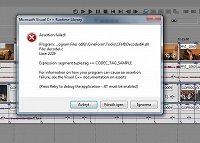
The error reporting dialogue says:
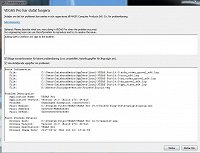
I happens both if I add the media straight to the timeline and also if I import the media first and then add to the timeline. The crash happens after pressing Try again a few times. If I press Ignore the clips seem to get to the timeline but most of them without video and/or audio.

So, what's wrong here?

Cheers Martin

Comments

Kinvermark wrote on 9/14/2017, 4:37 AM

I had this problem a while back . Seems in some cases Vegas ends up pointing to the wrong CFHDDecoder64.dll file. Search your hard drive for that file and copy the latest version in to the directory mentioned in the assertion error. (Obviously first rename the existing one to BACKUPcfhddecoder64.dll just in case you need to put it back.)

Also note that GoPro has made studio "end of life" so it is no longer available from them in the Quik ddownload package. Hang on to what you have got now.


Martin L wrote on 9/15/2017, 7:27 AM

Thanks! Somehow, after rebooting the files were on the timeline now. Didn't get to reinstall the decoder. The video is good and the audio is there too although it doesn't draw the graphic audio wave curves on the clips. Strange.

So, GoPro Studio is no longer there. Then what about Cineform?

Cliff Etzel wrote on 9/15/2017, 9:48 AM

Thanks! Somehow, after rebooting the files were on the timeline now. Didn't get to reinstall the decoder. The video is good and the audio is there too although it doesn't draw the graphic audio wave curves on the clips. Strange.

So, GoPro Studio is no longer there. Then what about Cineform?

I've transitioned over to converting my clips to 422MXF files using SONY Catalyst Prepare (I still use the non subscription 2015.1.2 version) My files are smaller compared to Cineform and play back smoothly in VP13 - I had a sneaking suspicion that Cineform was going to lose traction in the market. Others have said that editing with MXF files is in Vegas Pro's wheelhouse and I think they're right. I've not had a single issue since moving to using the higher quality MXF files (XVAC-L) - I loved Cineform back in the day but it's a non-player anymore since GoPro acquired it - sorta like their Karma drone.