Fundamental BUG with "Detect Scenes and Split"

Yelandkeil wrote on 10/1/2021, 7:09 AM

This exciting addon in VEGASpro19 has urgent bug to strangulate!

After you finished the detection and splitting, all scene-clips seem OK:
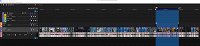
But redraw them onto timeline, they all have one blackhead frame.


I solved this problem momentarily so: Copy the splits from VEGAS19 to VEGAS18, there you see what's wrong --

 

With the free Quantize-to-Frames Script I can force every split really quantized.

 

After batch-render and reload into timeline, I get perfect scenesclip both in VEGAS18 and VEGAS19:


ASUS TUF Gaming B550plus (BIOS_3634)
- Thermaltake TOUGHPOWER GF1 850W 
- ADATA XPG GAMMIX S11PRO; 512GB/sys, 2TB/data 
- G.SKILL F4-3200C16Q-64GFX 
- AMD Ryzen9 5950x + LiquidFreezer II-360 
- XFX Speedster-MERC319-RX6900XT <-AdrenalinEdition 25.11.1
Samsung 2xLU28R55 HDR10 (300CD/m², 1499Nits/peak) ->2xDPort
ROCCAT Kave 5.1Headset/Mic ->Analog (AAFOptimusPack 6.0.9403.1)
LG DSP7 Surround 5.1Soundbar ->TOSLINK

Lumix DC-GH6/5s: HLG4k60p/30p, AWB, shutter=125, ISO=auto (250 - 6400)
DJI Mini 4 Pro: HLG4k60p, AWB, shutter=auto, ISO=auto
HERO5: ProtuneFlat2.7k60pLinear, WB=4800K, Shutter=auto, ISO=800

Win11Pro: 25H2-26200.7309; Direct3D® Driver: 9.17.11.0281
VEGASPro23 + XMediaRecode/Handbrake + DVDArchi7 
AcidPro10 + SoundForgePro14.0.065 + SpectraLayersPro7 
K-LitecodecPack19.2.5 (MPC Video Renderer for HDR10 Playback on PC) 

Comments

Vegas_Sebastian wrote on 10/1/2021, 8:47 AM

@Yelandkeil Which file format your are using? Do you utilize hardware decoding (Preference/File I/O)? Does it also happen w/wo hardware decoding?

Yelandkeil wrote on 10/1/2021, 9:23 AM

Hi, dear @Vegas_Sebastian

1, project (matched to source material)


2, preferences GPU acceleration, Flie I/O


3, Script TrimFrames: Head1 and Tails3; add regionMarker


4, batch render


5, import onto timeline


Copied the splittings to VEGAS18, then follow steps 3 and 4,

no output rendering has blackhead frame(s) in step 5.

Thanks a lot.

PS: sorry, the source material

Last changed by Yelandkeil on 10/1/2021, 9:25 AM, changed a total of 1 times.

ASUS TUF Gaming B550plus (BIOS_3634)
- Thermaltake TOUGHPOWER GF1 850W 
- ADATA XPG GAMMIX S11PRO; 512GB/sys, 2TB/data 
- G.SKILL F4-3200C16Q-64GFX 
- AMD Ryzen9 5950x + LiquidFreezer II-360 
- XFX Speedster-MERC319-RX6900XT <-AdrenalinEdition 25.11.1
Samsung 2xLU28R55 HDR10 (300CD/m², 1499Nits/peak) ->2xDPort
ROCCAT Kave 5.1Headset/Mic ->Analog (AAFOptimusPack 6.0.9403.1)
LG DSP7 Surround 5.1Soundbar ->TOSLINK

Lumix DC-GH6/5s: HLG4k60p/30p, AWB, shutter=125, ISO=auto (250 - 6400)
DJI Mini 4 Pro: HLG4k60p, AWB, shutter=auto, ISO=auto
HERO5: ProtuneFlat2.7k60pLinear, WB=4800K, Shutter=auto, ISO=800

Win11Pro: 25H2-26200.7309; Direct3D® Driver: 9.17.11.0281
VEGASPro23 + XMediaRecode/Handbrake + DVDArchi7 
AcidPro10 + SoundForgePro14.0.065 + SpectraLayersPro7 
K-LitecodecPack19.2.5 (MPC Video Renderer for HDR10 Playback on PC)