How to get same font as it is in final preview?

iEmby wrote on 2/10/2026, 7:35 AM

hi guys

pls check my critical project is on due date

and client demands this font

AKIRA EXPENDED

and this happened in VEGAS 22_250

pls help

thanks in advance

PROCESSOR
     

Operating System: Windows 11 Pro 64-bit (Always Updated)
System Manufacturer: ASUS
12th Gen Intel(R) Core(TM) i7-12700 (20 CPUs), ~2.1GHz - 4.90GHz
Memory: 32GB RAM
Page File: 11134MB used, 7934MB Available
DirectX Version: DirectX 12

-----------------------------------------------

MOTHERBOARD


ASUS PRIME H610-CS D4
Intel® H610 (LGA 1700)
Ready for 12th Gen Intel® Processors
Micro-ATX Motherboard with DDR4
Realtek 1 Gb Ethernet
PCH Heatsink
PCIe 4.0 | M.2 slot (32Gbps) 
HDMI® | D-Sub | USB 3.2 Gen 1 ports
SATA 6 Gbps | COM header
LPT header | TPM header
Luminous Anti-Moisture Coating
5X Protection III
(Multiple Hardware Safeguards
For all-round protection)

-----------------------------------------------
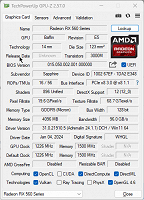
EXTERNAL GRAPHIC CARD
-----------------------------------------------

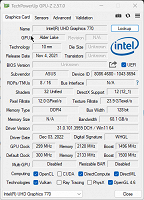
INTERNAL GRAPHIC CARD (iGPU)
------------------------------------------------

LED - MONITOR

Monitor Name: Generic PnP Monitor
Monitor Model: HP 22es
Monitor Id: HWP331B
Native Mode: 1920 x 1080(p) (60.000Hz)
Output Type: HDMI

-----------------------------------------------

STORAGE DRIVE

Drive: C:
Free Space: 182.3 GB
Total Space: 253.9 GB
File System: NTFS
Model: WD Blue SN570 1TB (NVMe)

---------------O----------------

Some useful creations by me including VEGAS Scripts

https://www.getopensofts.in/

My YouTube Channel Dedicated to Only VEGAS Pro Tutorials

EDITROOM : My YouTube Channel (For VEGAS Tutorials)

Comments

MikeS wrote on 2/10/2026, 7:56 AM

Ok, so Akira Expanded does not ship with Windows, so you have installed it separately, Did you install the OTF version, the TTF version or both? If just the OTF version, try installing the TTF versions as well

(also, can you confirm whether a render shows the correct font)

Vegas Pro Suite 22.0 Build 250
Boris FX Continuum for OFX 2025 Build 18.5.0.441 - 113
Boris FX Mocha Pro Plug-in 2025 v12.0.1 build 46
Windows 11 Pro - 64-Bit
ASUS PRIME Z390-P motherboard
Intel Core i7-97000K @ 3.6GHz
RAM 32GB (2x 16GB) 2666MHz DDR4
GeForce RTX 2070 SUPER

3POINT wrote on 2/10/2026, 8:12 AM

@iEmby Use "(Legacy) Text" for Fonts that are not shown correctly by "Title&Text". If "(Legacy) Text" is not shown in Media Generator, enable in Deprecated Features:

ps Be aware that you need a licence for using this font for commercial purposes.

Last changed by 3POINT on 2/10/2026, 8:27 AM, changed a total of 2 times.

3POINT, Theo Houben, Vegasuser since version 5 and co-founder and moderator of the Dutch Vegasforum https://vegasvideoforum.nl/index.php

Recware: DJI Osmo Pocket 3, DJI Mavic Mini, Samsung S24, PanasonicFZ300

Software: Vegaspro365+Vegasaur, Davinci Resolve 20

Hardware: i910900k, 32GB, GTX2080super, 2x1920x1200 display

Playware: Samsung Qled QE65Q6FN

iEmby wrote on 2/12/2026, 8:19 AM

Use "(Legacy) Text" for Fonts

@3POINT

I know this actually.

but I use text & titles bcoz scripts does not supports (Legacy) Text

PROCESSOR
     

Operating System: Windows 11 Pro 64-bit (Always Updated)
System Manufacturer: ASUS
12th Gen Intel(R) Core(TM) i7-12700 (20 CPUs), ~2.1GHz - 4.90GHz
Memory: 32GB RAM
Page File: 11134MB used, 7934MB Available
DirectX Version: DirectX 12

-----------------------------------------------

MOTHERBOARD


ASUS PRIME H610-CS D4
Intel® H610 (LGA 1700)
Ready for 12th Gen Intel® Processors
Micro-ATX Motherboard with DDR4
Realtek 1 Gb Ethernet
PCH Heatsink
PCIe 4.0 | M.2 slot (32Gbps) 
HDMI® | D-Sub | USB 3.2 Gen 1 ports
SATA 6 Gbps | COM header
LPT header | TPM header
Luminous Anti-Moisture Coating
5X Protection III
(Multiple Hardware Safeguards
For all-round protection)

-----------------------------------------------
EXTERNAL GRAPHIC CARD

-----------------------------------------------

INTERNAL GRAPHIC CARD (iGPU)

------------------------------------------------

LED - MONITOR

Monitor Name: Generic PnP Monitor
Monitor Model: HP 22es
Monitor Id: HWP331B
Native Mode: 1920 x 1080(p) (60.000Hz)
Output Type: HDMI

-----------------------------------------------

STORAGE DRIVE

Drive: C:
Free Space: 182.3 GB
Total Space: 253.9 GB
File System: NTFS
Model: WD Blue SN570 1TB (NVMe)

---------------O----------------

Some useful creations by me including VEGAS Scripts

https://www.getopensofts.in/

My YouTube Channel Dedicated to Only VEGAS Pro Tutorials

EDITROOM : My YouTube Channel (For VEGAS Tutorials)

3POINT wrote on 2/12/2026, 8:53 AM

What scripts do you need/use for Title&Text?

RedRob-CandlelightProdctns wrote on 2/12/2026, 9:36 AM

@iEmby Use "(Legacy) Text" for Fonts that are not shown correctly by "Title&Text". If "(Legacy) Text" is not shown in Media Generator, enable in Deprecated Features:

ps Be aware that you need a licence for using this font for commercial purposes.

This limitation of the newer Titles & Text (not all fonts showing/behaving properly) is a really old bug at this point and a real nuisance.

Is there a technical reason it can't be fixed, or just hasn't been a priority?

Vegas 21.300

My PC (for finishing):

Cyperpower PC Intel Core i7-7700K CPU @ 4.2GHz, 64GB mem @ 2133MHz RAM, RTX 5070ti, and Intel HD Graphics 630 driver version 31.0.101.2112 dated 7/21/22 w/16GB shared memory (currently not enabled in Vegas). Windows 10 Pro 64bit version 10.0.19045 Build 19045.

My main editing laptop:

Dell G15 Special Edition 5521, Bios 1.12 9/13/22, Windows 11 22H2 (10.0.22621)

12th Gen Intel Core i7-12700H (14 cores, 20 logical processors), 32 GB DDR5 4800MHz RAM, Intel Iris Xe Graphics, NVIDIA GeForce RTX 3070 Ti Laptop GPU w/8GB GDDR6 RAM, Realtek Audio


3POINT wrote on 2/12/2026, 10:05 AM

I think it hasn't priority, because according @VEGASDerek Title&Text is not further developed and according VEGAS Hub, a new Vegas Titler should be in planning...

iEmby wrote on 2/13/2026, 7:36 PM

What scripts do you need/use for Title&Text?

Insert Text On Markers From A Given Text.

Line by Line.

Similar As in Vegasaur

Also Changing All Text Once Together.

Similar Like In Vegasaur

PROCESSOR
     

Operating System: Windows 11 Pro 64-bit (Always Updated)
System Manufacturer: ASUS
12th Gen Intel(R) Core(TM) i7-12700 (20 CPUs), ~2.1GHz - 4.90GHz
Memory: 32GB RAM
Page File: 11134MB used, 7934MB Available
DirectX Version: DirectX 12

-----------------------------------------------

MOTHERBOARD


ASUS PRIME H610-CS D4
Intel® H610 (LGA 1700)
Ready for 12th Gen Intel® Processors
Micro-ATX Motherboard with DDR4
Realtek 1 Gb Ethernet
PCH Heatsink
PCIe 4.0 | M.2 slot (32Gbps) 
HDMI® | D-Sub | USB 3.2 Gen 1 ports
SATA 6 Gbps | COM header
LPT header | TPM header
Luminous Anti-Moisture Coating
5X Protection III
(Multiple Hardware Safeguards
For all-round protection)

-----------------------------------------------
EXTERNAL GRAPHIC CARD

-----------------------------------------------

INTERNAL GRAPHIC CARD (iGPU)

------------------------------------------------

LED - MONITOR

Monitor Name: Generic PnP Monitor
Monitor Model: HP 22es
Monitor Id: HWP331B
Native Mode: 1920 x 1080(p) (60.000Hz)
Output Type: HDMI

-----------------------------------------------

STORAGE DRIVE

Drive: C:
Free Space: 182.3 GB
Total Space: 253.9 GB
File System: NTFS
Model: WD Blue SN570 1TB (NVMe)

---------------O----------------

Some useful creations by me including VEGAS Scripts

https://www.getopensofts.in/

My YouTube Channel Dedicated to Only VEGAS Pro Tutorials

EDITROOM : My YouTube Channel (For VEGAS Tutorials)

Robert Johnston wrote on 2/17/2026, 11:02 PM

I've been able to use TypeTool 3 from FontLab (US $49) to open fonts and regenerate them so that they work in Vegas. @iEmby

Intel Core i7 10700K CPU @ 3.80GHz (to 4.65GHz), NVIDIA GeForce RTX 2060 SUPER 8GBytes. Memory 32 GBytes DDR4. Also Intel UHD Graphics 630. Mainboard: Dell Inc. PCI-Express 3.0 (8.0 GT/s) Comet Lake. Bench CPU Multi Thread: 5500.5 per CPU-Z.

Vegas Pro 21.0 (Build 108) with Mocha Vegas

Windows 11 not pro