Legacy Stabilizer is Still Better Than New Video Stabilization Effect

iEmby wrote on 1/30/2026, 12:06 PM

Hi everyone..

Please look at this clip

legacy stabilizer is more stable and newer video stabilizer effect messed up motion data.

what do u think?

PROCESSOR
     

Operating System: Windows 11 Pro 64-bit (Always Updated)
System Manufacturer: ASUS
12th Gen Intel(R) Core(TM) i7-12700 (20 CPUs), ~2.1GHz - 4.90GHz
Memory: 32GB RAM
Page File: 11134MB used, 7934MB Available
DirectX Version: DirectX 12

-----------------------------------------------

MOTHERBOARD


ASUS PRIME H610-CS D4
Intel® H610 (LGA 1700)
Ready for 12th Gen Intel® Processors
Micro-ATX Motherboard with DDR4
Realtek 1 Gb Ethernet
PCH Heatsink
PCIe 4.0 | M.2 slot (32Gbps) 
HDMI® | D-Sub | USB 3.2 Gen 1 ports
SATA 6 Gbps | COM header
LPT header | TPM header
Luminous Anti-Moisture Coating
5X Protection III
(Multiple Hardware Safeguards
For all-round protection)

-----------------------------------------------
EXTERNAL GRAPHIC CARD
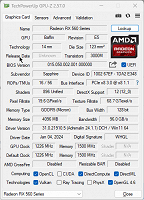
-----------------------------------------------

INTERNAL GRAPHIC CARD (iGPU)
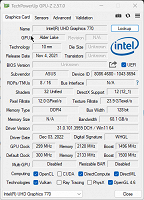
------------------------------------------------

LED - MONITOR

Monitor Name: Generic PnP Monitor
Monitor Model: HP 22es
Monitor Id: HWP331B
Native Mode: 1920 x 1080(p) (60.000Hz)
Output Type: HDMI

-----------------------------------------------

STORAGE DRIVE

Drive: C:
Free Space: 182.3 GB
Total Space: 253.9 GB
File System: NTFS
Model: WD Blue SN570 1TB (NVMe)

---------------O----------------

Some useful creations by me including VEGAS Scripts

https://www.getopensofts.in/

My YouTube Channel Dedicated to Only VEGAS Pro Tutorials

EDITROOM : My YouTube Channel (For VEGAS Tutorials)

Comments

3POINT wrote on 1/30/2026, 1:32 PM

what do u think?

Just start with the Basic Mode of Vegas video stabilisation (Expert Mode doesn't mean automatic better results when you don't know how to use it)

iEmby wrote on 1/30/2026, 11:19 PM

what do u think?

Just start with the Basic Mode of Vegas video stabilisation (Expert Mode doesn't mean automatic better results when you don't know how to use it)

I try expert mode after failing in basic mode..

still not good.

PROCESSOR
     

Operating System: Windows 11 Pro 64-bit (Always Updated)
System Manufacturer: ASUS
12th Gen Intel(R) Core(TM) i7-12700 (20 CPUs), ~2.1GHz - 4.90GHz
Memory: 32GB RAM
Page File: 11134MB used, 7934MB Available
DirectX Version: DirectX 12

-----------------------------------------------

MOTHERBOARD


ASUS PRIME H610-CS D4
Intel® H610 (LGA 1700)
Ready for 12th Gen Intel® Processors
Micro-ATX Motherboard with DDR4
Realtek 1 Gb Ethernet
PCH Heatsink
PCIe 4.0 | M.2 slot (32Gbps) 
HDMI® | D-Sub | USB 3.2 Gen 1 ports
SATA 6 Gbps | COM header
LPT header | TPM header
Luminous Anti-Moisture Coating
5X Protection III
(Multiple Hardware Safeguards
For all-round protection)

-----------------------------------------------
EXTERNAL GRAPHIC CARD

-----------------------------------------------

INTERNAL GRAPHIC CARD (iGPU)

------------------------------------------------

LED - MONITOR

Monitor Name: Generic PnP Monitor
Monitor Model: HP 22es
Monitor Id: HWP331B
Native Mode: 1920 x 1080(p) (60.000Hz)
Output Type: HDMI

-----------------------------------------------

STORAGE DRIVE

Drive: C:
Free Space: 182.3 GB
Total Space: 253.9 GB
File System: NTFS
Model: WD Blue SN570 1TB (NVMe)

---------------O----------------

Some useful creations by me including VEGAS Scripts

https://www.getopensofts.in/

My YouTube Channel Dedicated to Only VEGAS Pro Tutorials

EDITROOM : My YouTube Channel (For VEGAS Tutorials)

3POINT wrote on 1/31/2026, 1:14 AM

Be also aware that moving objects (persons in your clip) can give different results when a Stabilizer also tries to stabilize that movement. The legacy stabilizer doesn't AFAIK, so it could give a different result. I personally don't have much experience with using both stabilizers, I used always Prodad Mercalli 4 plugin for stabilization in Vegas.

andyrpsmith wrote on 1/31/2026, 5:05 AM

Used the legacy stabilizer since V13 and only in 2025 did I find a replacement - Mercalli OFX V6. The legacy option has its faults (just like all others do) but for my 4K XAVCS footage it was excellent at taking out typical rotation and mild shake without jelly wobble effects. It has one major failure mode in that it was originally designed for HD footage and is prone to crash about 10% of the time with 4K footage, so save before using - always. I found it gave best results with default settings. When it failed I tried other options including the newer Vegas stabilization which is prone to jelly wobble when dealing with more than minor shake (this is my own experience, others may be different when using different media). Things changed dramatically with OFX V6 with excellent results even with significant shake, V6 is also fast when using GPU, turbo mode works really well and AI mode also produces great results. Again this is my experience. I also had good results with an old New Blue stabilizer but it was painfully slow and not in the same league as OFX V6.

(Intel 3rd gen i5@4.1GHz, 32GB RAM, SSD, 1080Ti GPU, Windows 10) Not now used with Vegas.

13th gen i913900K - water cooled, 96GB RAM, 4TB M2 drive, 4TB games SSD, 2TB video SSD, GPU RTX 4080 Super, Windows 11 pro

iEmby wrote on 1/31/2026, 7:04 AM

I used always Prodad Mercalli 4 plugin for stabilization in Vegas.

agreed for Prodad Mercalli 4 but I think we can't batch stabilizing with this plugin like I can do with VEGAS stabilize both effects. like i want to add stabilizer on multiple videos together.

PROCESSOR
     

Operating System: Windows 11 Pro 64-bit (Always Updated)
System Manufacturer: ASUS
12th Gen Intel(R) Core(TM) i7-12700 (20 CPUs), ~2.1GHz - 4.90GHz
Memory: 32GB RAM
Page File: 11134MB used, 7934MB Available
DirectX Version: DirectX 12

-----------------------------------------------

MOTHERBOARD


ASUS PRIME H610-CS D4
Intel® H610 (LGA 1700)
Ready for 12th Gen Intel® Processors
Micro-ATX Motherboard with DDR4
Realtek 1 Gb Ethernet
PCH Heatsink
PCIe 4.0 | M.2 slot (32Gbps) 
HDMI® | D-Sub | USB 3.2 Gen 1 ports
SATA 6 Gbps | COM header
LPT header | TPM header
Luminous Anti-Moisture Coating
5X Protection III
(Multiple Hardware Safeguards
For all-round protection)

-----------------------------------------------
EXTERNAL GRAPHIC CARD

-----------------------------------------------

INTERNAL GRAPHIC CARD (iGPU)

------------------------------------------------

LED - MONITOR

Monitor Name: Generic PnP Monitor
Monitor Model: HP 22es
Monitor Id: HWP331B
Native Mode: 1920 x 1080(p) (60.000Hz)
Output Type: HDMI

-----------------------------------------------

STORAGE DRIVE

Drive: C:
Free Space: 182.3 GB
Total Space: 253.9 GB
File System: NTFS
Model: WD Blue SN570 1TB (NVMe)

---------------O----------------

Some useful creations by me including VEGAS Scripts

https://www.getopensofts.in/

My YouTube Channel Dedicated to Only VEGAS Pro Tutorials

EDITROOM : My YouTube Channel (For VEGAS Tutorials)

Dexcon wrote on 1/31/2026, 7:20 AM

... i want to add stabilizer on multiple videos together.

Why would you want to do that?

Stabilisation best works on individual events regardless of what stabiliser is usedi. What stab setting is best for one video event is unlikely to best for all other video events - example, a stab setting for a reasonably static shot may be totally inappropriate for a shot which zooms, pans or tilts.

Nonetheless, if you really want to apply the same stab setting to a lot of video events, you can always copy / paste the stab FX from the original video event to all the other selected video events on Vegas Pro's timeline.

Cameras: Sony FDR-AX100E; GoPro Hero 11 Black Creator Edition; Samsung S23 Ultra smart phone

Installed: Vegas Pro 13, 15, 16, 17, 18, 19, 20, 21, 22 & 23, HitFilm Pro 2021.3, DaVinci Resolve Studio 20.3, BCC 2026, Mocha Pro 2026, NBFX TotalFX 7, Neat NR 6, DVD Architect 6.0, MAGIX Travel Maps, Sound Forge Pro 16, SpectraLayers Pro 12, iZotope RX11 Advanced and many other iZ plugins, Vegasaur 4.0

Windows 11 25H2

Dell Alienware Aurora 11:

10th Gen Intel i9 10900KF - 10 cores (20 threads) - 3.7 to 5.3 GHz

NVIDIA GeForce RTX 2080 SUPER 8GB GDDR6 - liquid cooled

64GB RAM - Dual Channel HyperX FURY DDR4 XMP at 3200MHz

C drive: 2TB Samsung 990 PCIe 4.0 NVMe M.2 PCIe SSD

D: drive: 4TB Samsung 870 SATA SSD (used for media for editing current projects)

E: drive: 2TB Samsung 870 SATA SSD

F: drive: 6TB WD 7200 rpm Black HDD 3.5"

Dell Ultrasharp 32" 4K Color Calibrated Monitor


LAPTOP:

Dell Inspiron 5310 EVO 13.3"

i5-11320H CPU

C Drive: 1TB Corsair Gen4 NVMe M.2 2230 SSD (upgraded from the original 500 GB SSD)

Monitor is 2560 x 1600 @ 60 Hz

andyrpsmith wrote on 1/31/2026, 7:27 AM

I really agree with Dexcon about doing mass stabilization.

(Intel 3rd gen i5@4.1GHz, 32GB RAM, SSD, 1080Ti GPU, Windows 10) Not now used with Vegas.

13th gen i913900K - water cooled, 96GB RAM, 4TB M2 drive, 4TB games SSD, 2TB video SSD, GPU RTX 4080 Super, Windows 11 pro

3POINT wrote on 1/31/2026, 8:59 AM

(As usual) I don't agree, I used batch stabilization a lot in combination with Vegasaur:

For selected and trimmed events on the timeline, the default setting of Mercalli4 gave me in 95% a good stabilisation and for those other 5% I tweaked the settings and rerun the batch stabilisation just for those events.

3POINT wrote on 1/31/2026, 9:45 AM

Vegasaur Batch rendering with Mercalli 4 Plugin in action.