Mask

pioneer109 wrote on 1/1/2026, 5:38 AM

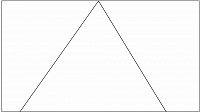
Seeking help please. Ok I've found found it in the tutorials I once watched a tutorial on creating this mask to show 3 videos at timed intervals. I would like to recreate this in a promo video I am doing but sadly I cannot find the tutorial. Is anybody able to point me to this tutorial please? Cheers John
Comments

Dexcon wrote on 1/1/2026, 5:52 AM

The following YT tutorial is unlikely to be the one that you saw but it does suggest a way to do triangle masking in Vegas Pro - but only 2 images at once:

I would think that rendering the 2 image video and then using the same technique to introduce the 3rd image could work.

Cameras: Sony FDR-AX100E; GoPro Hero 11 Black Creator Edition; Samsung S23 Ultra smart phone

Installed: Vegas Pro 13, 15, 16, 17, 18, 19, 20, 21, 22 & 23, HitFilm Pro 2021.3, DaVinci Resolve Studio 20.3, BCC 2026, Mocha Pro 2026, NBFX TotalFX 7, Neat NR 6, DVD Architect 6.0, MAGIX Travel Maps, Sound Forge Pro 16, SpectraLayers Pro 12, iZotope RX11 Advanced and many other iZ plugins, Vegasaur 4.0

Windows 11 25H2

Dell Alienware Aurora 11:

10th Gen Intel i9 10900KF - 10 cores (20 threads) - 3.7 to 5.3 GHz

NVIDIA GeForce RTX 2080 SUPER 8GB GDDR6 - liquid cooled

64GB RAM - Dual Channel HyperX FURY DDR4 XMP at 3200MHz

C drive: 2TB Samsung 990 PCIe 4.0 NVMe M.2 PCIe SSD

D: drive: 4TB Samsung 870 SATA SSD (used for media for editing current projects)

E: drive: 2TB Samsung 870 SATA SSD

F: drive: 6TB WD 7200 rpm Black HDD 3.5"

Dell Ultrasharp 32" 4K Color Calibrated Monitor


LAPTOP:

Dell Inspiron 5310 EVO 13.3"

i5-11320H CPU

C Drive: 1TB Corsair Gen4 NVMe M.2 2230 SSD (upgraded from the original 500 GB SSD)

Monitor is 2560 x 1600 @ 60 Hz

Gid wrote on 1/1/2026, 6:55 AM

@pioneer109 Hi, If you can't find a way to use VP's native tools (I find Bezier Mask - Curve a little awkward so normally use Mocha for any masking) -

You can do it like this.

I created a couple of png masks in GIMP, white with transparent backgrounds. Exported them separately.

Each mask has 'Multiply (Mask)' chosen & 'Mask generator' added.

Each mask + it's accompanied video is Parent/Child grouped.

Vegas Pro 18 - 22
Vegas Pro/Post 19
Boris Continuum & Sapphire, 
Silhouette Standalone + Plugin, 
Mocha Pro Standalone + Plugin, 
Boris Optics,
NewBlue TotalFX
Desktop PC Microsoft Windows 10 Pro - 64-Bit
ASUS PRO WS WRX80E-SAGE SE WIFI AMD Motherboard
AMD Ryzen Threadripper PRO 3975WX 3.5GHz 32 Core
Corsair iCUE H150i RGB PRO XT 360mm All-in-One Liquid CPU Cooler
RAM 256GB ( 8x Micron 32GB (1x 32GB) 2666MHz DDR4 RAM )
2x Western Digital Black SN850 2TB M.2-2280 SSD, 7000MB/s Read, 5100MB/s Write
(programs on one, project files on the other)
Graphics MSI GeForce RTX 3090 SUPRIM X 24GB OC GPU
ASUS ROG Thor 1200W Semi-Modular 80+ Platinum PSU 
Fractal Design Define 7 XL Dark TG Case with 3 Fans
Dell SE3223Q 31.5 Inch 4K UHD (3840x2160) Monitor, 60Hz, & an Acer 24" monitor.

At the moment my filming is done with a Samsung Galaxy S23 Ultra 5G & a GoPro Hero11 Black

I've been a Joiner/Carpenter for 40yrs, apprentice trained time served, I don't have an apprentice of my own so to share my knowledge I put videos on YouTube.

YouTube videos - https://www.youtube.com/c/Gidjoiner


Reyfox wrote on 1/1/2026, 7:31 AM

Here is video tutorial. You will have to stagger the videos with fades at the beginning of them.

Last changed by Reyfox on 1/1/2026, 7:32 AM, changed a total of 2 times.

Newbie😁

Vegas Pro 23 B356 (VP18-22 also installed)

Win 11 Pro 23H2 (Build 22631.6199)

AMD Ryzen 9 5950X 16 cores / 32 threads

64GB DDR4 3200 Patriot Viper

Sapphire RX6700XT 12GB Driver: 25.12.1

Gigabyte X570 Elite Motherboard

Panasonic G9, G7, FZ300

Boris FX Continuum Complete 2026, Newblue FX Total FX360, Ignite Pro V5, proDAD Vitascene V5 Pro and Mercalli V6 OFX