"Return To Sender!" You got a Contour Shuttle Pro? Mighty MACRO . . .

Grazie wrote on 7/23/2017, 2:16 AM

How often have you needed to either mouse click to get yourself back on TL or Ctrl+0 or . . . . and have lost your creative train of thought, urgency, flow, next edit etc etc . . . Well I have, countless times and it kinda stinks.

You gotta a Contour Shuttle Pro, with a Macro facility? Then from within an FX or Pan/Crop or Vegas Explorer or Trimmer or ANY Vegas Window Pane I can now get myself directly back on the T/L with the Cursor running - and just with a SINGLE CSP Button. I should have done this years and years ago.

I've set to the 2nd button on the first row, but of course you could hang it on ANY button you choose on the CSP buttons and here's the two line MACRO - simples!:
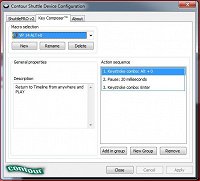
It's the simple things in life that can make such a difference

Comments

Grazie wrote on 7/23/2017, 2:53 AM

Update . . . Just reset to the BIG Button which I use as the PLAY/STOP Button.

bitman wrote on 7/23/2017, 4:00 AM

The contour shuttle pro is a great kit, but you do not need per se a contour for macro's: any decent gaming keyboard has special keys you can assign macro's to (including timings). Eg. Logitech G910.

Also any decent gaming mouse have tons of extra buttons you can assign macro keystrokes to.

APPS: VIDEO: VP23 (b356), VP 365 suite (VP 22 build 250), VP 21 build 315, VP 365 20, VP 19 post (latest build -651), (uninstalled VP 12,13,14,15,16 Suite,17, VP18 post), Vegasaur, a lot of NEWBLUE plugins, Mercalli 6.0, Respeedr, Vasco Da Gamma 18 HDpro XXL, Boris Continuum 2026, Davinci Resolve Studio 20,
SOUND: RX 10 advanced Audio Editor, Sound Forge Pro 18, Spectral Layers Pro 12, Audacity,
FOTO: Zoner studio X, DXO photolab (9), Luminar, Topaz...

  • OS: Windows 11 Pro 64, version 25H2
  • CPU: i9-13900K with Air Cooler: Noctua NH-D15 G2 HBC
  • RAM: DDR5 Corsair 64GB (5600-40 Vengeance)
  • Graphics card: Gigabyte GeForce RTX 5090 Aorus Xtreme WF AIO 32GB
  • Monitor: LG UltraGear 45GX950A 44.5" WUHD 5K2K OLED monitor (21:9), Resolution: 5120x2160, 165 Hz
  • C-drive: Corsair MP600 PRO XT NVMe SSD 4TB (PCIe Gen. 4)
  • Video drives: Samsung NVMe SSD 2TB (980 pro and 970 EVO plus) each 2TB
  • Mass Data storage & Backup: WD gold 6TB + WD Yellow 4TB
  • MOBO: Gigabyte Z690 AORUS MASTER
  • PSU: Corsair HX1500i, Case: Fractal Design Define 7 (PCGH edition)
  • Misc.: Logitech G915, Evoluent Vertical Mouse, shuttlePROv2


Grazie wrote on 7/23/2017, 4:21 AM

Macros are our friends! The Contour Shuttle Pro combines Friends and Shuttling!

Len Kaufman wrote on 7/23/2017, 10:14 AM

Thanx Grazie. I was wondering what I would do with the one button I had left on my Shuttle. Now, if I can only figure out what to do with all the extra time I will now have......

Grazie wrote on 7/23/2017, 10:32 AM

Now, if I can only figure out what to do with all the extra time I will now have......

There's a MACRO for that too!🍺🍺