The update is not user friendly

alifftudm95 wrote on 12/16/2019, 9:52 AM

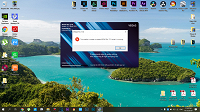
When I launch VEGAS Pro 17, I prompted with a notification for an Update Build 387. After a while downloading the new updates I click "Install update" after closing the software. But after exited the software, Theres no any installation windows popping out. So I click VEGAS to launch it and a error windows pop out telling me I cant install the new updates with the program running. Saddest part is I have to redownload the whole thing again which is super annoying. Can Magix make the updater,download the updates straight away and user just need to click "Updates" to just reinstall. Even if it failed, the downloaded packages is already saved in the PC.

I've been encounter this silly problem since VEGAS Pro 16 updates.
 

Editor and Colorist (Kinda) from Malaysia

MYPOST Member

Laptop

MacBook Pro M4 Max

16 Core CPU and 40 Core GPU

64GB Memory

2TB Internal SSD Storage

Anti-Glare 4K HDR Screen


PC DEKSTOP

CPU: Ryzen 9 5900x

GPU: RTX3090 24GB

RAM: 64GB 3200MHZ

MOBO: X570-E

Storage:

C DRIVE NVME M.2 1TB SSD GEN 4

D DRIVE NVME M.2 2TB SSD GEN 4

E DRIVE SATA SSD 2TB

F DRIVE SATA SSD 2TB

G DRIVE HDD 1TB

Monitor: Asus ProArt PA279CV 4K HDR (Bought on 30 August 2023)

Monitor: BenQ PD2700U 4K HDR (RIP on 30 August 2023)


Comments

fr0sty wrote on 12/16/2019, 9:54 AM

Easiest way to get around that would be to download the installer using the links posted in this forum, so you have a copy on your hard drive that doesn't get deleted when Vegas closes.

alifftudm95 wrote on 12/16/2019, 10:04 AM

That is what i always do. I need to do extra work to perform a simple updates. They should make it easier & user friendly when updating the software.

Editor and Colorist (Kinda) from Malaysia

MYPOST Member

Laptop

MacBook Pro M4 Max

16 Core CPU and 40 Core GPU

64GB Memory

2TB Internal SSD Storage

Anti-Glare 4K HDR Screen


PC DEKSTOP

CPU: Ryzen 9 5900x

GPU: RTX3090 24GB

RAM: 64GB 3200MHZ

MOBO: X570-E

Storage:

C DRIVE NVME M.2 1TB SSD GEN 4

D DRIVE NVME M.2 2TB SSD GEN 4

E DRIVE SATA SSD 2TB

F DRIVE SATA SSD 2TB

G DRIVE HDD 1TB

Monitor: Asus ProArt PA279CV 4K HDR (Bought on 30 August 2023)

Monitor: BenQ PD2700U 4K HDR (RIP on 30 August 2023)


fr0sty wrote on 12/16/2019, 10:09 AM

The updates always work for me, I just installed it just fine from within Vegas. I do agree that the update should not be deleted upon a crash, though.

Systems:

Desktop

AMD Ryzen 7 1800x 8 core 16 thread at stock speed

64GB 3000mhz DDR4

Geforce RTX 3090

Windows 10

Laptop:

ASUS Zenbook Pro Duo 32GB (9980HK CPU, RTX 2060 GPU, dual 4K touch screens, main one OLED HDR)

frmax wrote on 12/16/2019, 5:22 PM


@alextudm95  Same problem here; but if you don´t use option of immediate install and select to install after program termination, it should work (at least in my case)

I14900K, RTX 4070 Super, 64GB RAM, 4TB M2, 4TB SSD, VEGAS Pro 14-23 (Post), Magix ProX, Davinci Resolve Studio, Powerdirector 365
AMD 5900, RTX 3090 TI, 64GB RAM, 1 TB M2 SSD, 4 TB HD, VP 21 Post, VP22

Monitor LG 32UN880; Camera Sony FDR-AX53; Photo Canon EOS, Samsung S22 Ultra

aboammar wrote on 12/16/2019, 5:47 PM

@alifftudm95 Facing the same problem 😞

HP Z1 AIO Workstation G3

OS: Windows 10 Pro 64bit

Display: 23.6" UHD 4K

CPU: Xeon E3-1270 v5  quad-core @ 3.60GHz, 8MB cache, up to 4GHz with Intel Turbo Boost Technology

GPU: nVidia Quadro M2000M 4GB

RAM: 32GB DDR4 2133MHz ECC memory

System Drive: 1TB M.2 (2500MB/s)

Working Drive: 1TB M.2 (2500MB/s)

Storage Drive: 3GB SSD (500MB/s)

Video: Vegas Pro 16 Suite / DaVinci Resolve 16 Studio

Audio: PreSonus Studio One Pro 5

Graphics: CorelDraw Technical Suite 2020 / Xara Designer Pro X365

Image Editing: Corel PhotoPaint 2020 / Corel PaintShop Pro X9 Ultimate / PHASEONE Capture One Pro 11

3D Graphics: Maxon Cinema 4D Studio 10

Camera: Sony A7S II / A7 III

Website: www.innoviahouse.com

Vimeo: vimeo.com/innoviahouse

Cristian_Neagu wrote on 12/16/2019, 6:35 PM

The same thing happened to me. I found the solution by stopping the Windows 10 antivirus operation.