[Urgent] Error Code 17 during rendering - VEGAS Pro 23 Steam Edition

lee-mujin wrote on 12/22/2025, 5:12 PM

Hello,

I am a user of  VEGAS Pro 23 Steam Edition.
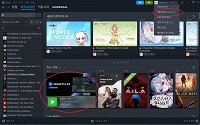
 

I am experiencing a persistent issue where rendering fails immediately with Error Code 17.

The Problem:

The software runs fine, but any attempt to render results in "Error Code 17".
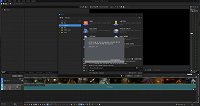


I have contacted support multiple times (Ticket#2025122117000021), but I only receive automated replies saying "information not sufficient."


My System Specs:

OS: Windows 11 (64-bit)

CPU/GPU: amd 5900 / RTX 3080

VEGAS Version: VEGAS Pro 23 (Steam Edition)

What I've Tried:

Verified integrity of game files on Steam.

Reset application data (Ctrl+Shift on startup).

Updated graphics drivers.

Could a MAGIX staff member please look into my ticket or provide a solution for this Steam-specific error?

Comments

EricLNZ wrote on 12/22/2025, 6:20 PM

@lee-mujin What format are you trying to render to?

onlyway wrote on 12/22/2025, 7:03 PM

베가스 프로 23 한글버전은 못보았는데요?! 정상적인 한글버전 설치하신건가요 아니면 한글패치 별도로 설치하신 건가요?

만일 영문버전 설치하신거에 한글패치 하신거라면, 정상적인 영문버전 상태에서 확인 부탁드려요.

EricLNZ wrote on 12/22/2025, 7:11 PM

베가스 프로 23 한글버전은 못보았는데요?! 정상적인 한글버전 설치하신건가요 아니면 한글패치 별도로 설치하신 건가요?

만일 영문버전 설치하신거에 한글패치 하신거라면, 정상적인 영문버전 상태에서 확인 부탁드려요.

Google translate from Korean

I haven't seen a Korean version of Vegas Pro 23! Did you install the normal Korean version, or did you install a separate Korean patch? If you installed the English version and applied the Korean patch, please check the English version in its normal state.

lee-mujin wrote on 12/23/2025, 1:16 AM

I am writing to update you that I have finally resolved Error Code 17.

The cause of the issue was the language setting of the Steam version. I did not apply any unofficial Korean patches; VEGAS Pro 23 was automatically installed in Korean by Steam.

After struggling for two days, I followed a suggestion to change the language setting to English via Steam Properties. Once I switched to the English version, the rendering process started working perfectly without any errors.

It appears to be a localization bug specifically in the Korean version of VEGAS Pro 23 (Steam Edition) that prevents the rendering engine or codec activation from functioning correctly.

I hope this information helps your technical team fix this bug for other Korean users. You can now close my ticket [Ticket#2025122117000021].

Thank you for your assistance.