VEGAS 23_302 | When Copying Event Error While Drawing Dragging Event.

iEmby wrote on 2/20/2026, 12:10 PM

hi guys

when i copy any event or group of events by ctrl + drag then it shows drawing error i think.

it show small part of dragging event little below of track at the line of track motion keys or FX keys.
 

i know its not a high priority error.

but i just noticed so posted.

thanks in advance.

pls check this clip for a look on this.

PROCESSOR
     

Operating System: Windows 11 Pro 64-bit (Always Updated)
System Manufacturer: ASUS
12th Gen Intel(R) Core(TM) i7-12700 (20 CPUs), ~2.1GHz - 4.90GHz
Memory: 32GB RAM
Page File: 11134MB used, 7934MB Available
DirectX Version: DirectX 12

-----------------------------------------------

MOTHERBOARD


ASUS PRIME H610-CS D4
Intel® H610 (LGA 1700)
Ready for 12th Gen Intel® Processors
Micro-ATX Motherboard with DDR4
Realtek 1 Gb Ethernet
PCH Heatsink
PCIe 4.0 | M.2 slot (32Gbps) 
HDMI® | D-Sub | USB 3.2 Gen 1 ports
SATA 6 Gbps | COM header
LPT header | TPM header
Luminous Anti-Moisture Coating
5X Protection III
(Multiple Hardware Safeguards
For all-round protection)

-----------------------------------------------
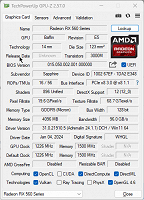
EXTERNAL GRAPHIC CARD
-----------------------------------------------

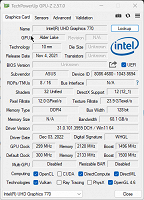
INTERNAL GRAPHIC CARD (iGPU)
------------------------------------------------

LED - MONITOR

Monitor Name: Generic PnP Monitor
Monitor Model: HP 22es
Monitor Id: HWP331B
Native Mode: 1920 x 1080(p) (60.000Hz)
Output Type: HDMI

-----------------------------------------------

STORAGE DRIVE

Drive: C:
Free Space: 182.3 GB
Total Space: 253.9 GB
File System: NTFS
Model: WD Blue SN570 1TB (NVMe)

---------------O----------------

Some useful creations by me including VEGAS Scripts

https://www.getopensofts.in/

My YouTube Channel Dedicated to Only VEGAS Pro Tutorials

EDITROOM : My YouTube Channel (For VEGAS Tutorials)

Comments

Dexcon wrote on 2/21/2026, 5:36 AM

This is not an error or bug IMO. That space (mini track) just beneath the video event on the timeline is only created when you have track level FX applied - which it seems that you do have because the fx icon in the track header is blue. If you click on the little down facing arrow in the far LH corner of the track header, that space will expand a bit and show a separate mini-track for each track level FX applied. I have no idea what the purpose is or the use might be for of these mini FX tracks. Nonetheless, those mini FX tracks form part of the total track height so copy/moving (via Ctrl+drag) moves the entire track height - including the mini FX tracks) to the new position.

Maybe the mini FX tracks contain keyframing information but that's only a guess - I just don't know.

Cameras: Sony FDR-AX100E; GoPro Hero 11 Black Creator Edition; Samsung S23 Ultra smart phone

Installed: Vegas Pro 13, 15, 16, 17, 18, 19, 20, 21, 22 & 23, HitFilm Pro 2021.3, DaVinci Resolve Studio 20.3, BCC 2026, Mocha Pro 2026, NBFX TotalFX 7, Neat NR 6, DVD Architect 6.0, MAGIX Travel Maps, Sound Forge Pro 16, SpectraLayers Pro 12, iZotope RX11 Advanced and many other iZ plugins, Vegasaur 4.0

Windows 11 25H2

Dell Alienware Aurora 11:

10th Gen Intel i9 10900KF - 10 cores (20 threads) - 3.7 to 5.3 GHz

NVIDIA GeForce RTX 2080 SUPER 8GB GDDR6 - liquid cooled

64GB RAM - Dual Channel HyperX FURY DDR4 XMP at 3200MHz

C drive: 2TB Samsung 990 PCIe 4.0 NVMe M.2 PCIe SSD

D: drive: 4TB Samsung 870 SATA SSD (used for media for editing current projects)

E: drive: 2TB Samsung 870 SATA SSD

F: drive: 6TB WD 7200 rpm Black HDD 3.5"

Dell Ultrasharp 32" 4K Color Calibrated Monitor


LAPTOP:

Dell Inspiron 5310 EVO 13.3"

i5-11320H CPU

C Drive: 1TB Corsair Gen4 NVMe M.2 2230 SSD (upgraded from the original 500 GB SSD)

Monitor is 2560 x 1600 @ 60 Hz

3POINT wrote on 2/21/2026, 6:47 AM

Good explanation @Dexcon I now understand what @iEmby means. Indeed the keyframe track of Track FX is part of the video track. So not a bug or whatever.