Vegas pro 16

solarisv wrote on 1/28/2020, 1:33 PM

Good evening,

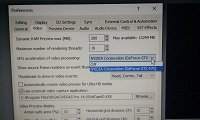
I have a problem with  "GPU acceleration" in vegas pro 16.
I have installed, on the same pc, vegas pro 14 suite and vegas pro 16 suite.
When I work with V14 I can work with GPU acceleration and I can use Smart Upscale.
On the same pc, I can't use smart upscale in V16 because I can't acrivate GPU acceleration.
Pc Work with Windows 10 and graphic card nvidia gtx970
What's the problem?
Thank you.
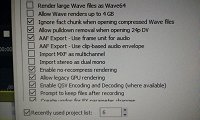
 Here a photos of V14 e V16 panels
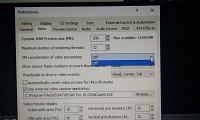
In the first and third photo the screenshot of V16. In the second photo V14.

Operating system: Windows 10 pro

processor: Intel (R) core (TM) i7 4790 CPU @ 3.60Ghz 3.60Ghz

Ram: 16gb

Video card: NVIDIA GeForce GTX970


Laptop:

System: 20BG0042IX (Lenovo Touch Pad w540)

Processor: Intel(R) Core(TM) i7 4910 MQ

Graphics: Intel Graphics 4600, NVIDIA Quadro K2100M

Ram: 16gb

Operating System: Windows 10 pro

Comments

j-v wrote on 1/28/2020, 1:51 PM

Maybe version 16 needs the newer drivers of your Nvidia.
Which version is installed?

met vriendelijke groet
Marten

Camera : Pan X900, GoPro Hero7 Hero Black, DJI Osmo Pocket, Samsung Galaxy A8
Desktop :MB Gigabyte Z390M, W11 home version 24H2, i7 9700 4.7Ghz,16 DDR4 GB RAM, Gef. GTX 1660 Ti with driver
566.14 Studiodriver and Intel HD graphics 630 with driver 31.0.101.2130
Laptop  :Asus ROG Str G712L, W11 home version 25H2, CPU i7-10875H, 16 GB RAM, NVIDIA GeForce RTX 2070 with Studiodriver 591.86 and Intel UHD Graphics 630 with driver 26.20.100.7985
Vegas software: VP 10 to 23 and VMS(pl) 10,12 to 17.
TV      :LG 4K 55EG960V

My slogan is: BE OR BECOME A STEM CELL DONOR!!! (because it saved my life in 2016)


solarisv wrote on 1/28/2020, 3:38 PM

I will try to update the drivers (they are not updated).

Thank you!

Operating system: Windows 10 pro

processor: Intel (R) core (TM) i7 4790 CPU @ 3.60Ghz 3.60Ghz

Ram: 16gb

Video card: NVIDIA GeForce GTX970


Laptop:

System: 20BG0042IX (Lenovo Touch Pad w540)

Processor: Intel(R) Core(TM) i7 4910 MQ

Graphics: Intel Graphics 4600, NVIDIA Quadro K2100M

Ram: 16gb

Operating System: Windows 10 pro

j-v wrote on 1/28/2020, 3:48 PM

You have to use the Studiodriver, this one

met vriendelijke groet
Marten

Camera : Pan X900, GoPro Hero7 Hero Black, DJI Osmo Pocket, Samsung Galaxy A8
Desktop :MB Gigabyte Z390M, W11 home version 24H2, i7 9700 4.7Ghz,16 DDR4 GB RAM, Gef. GTX 1660 Ti with driver
566.14 Studiodriver and Intel HD graphics 630 with driver 31.0.101.2130
Laptop  :Asus ROG Str G712L, W11 home version 25H2, CPU i7-10875H, 16 GB RAM, NVIDIA GeForce RTX 2070 with Studiodriver 591.86 and Intel UHD Graphics 630 with driver 26.20.100.7985
Vegas software: VP 10 to 23 and VMS(pl) 10,12 to 17.
TV      :LG 4K 55EG960V

My slogan is: BE OR BECOME A STEM CELL DONOR!!! (because it saved my life in 2016)


solarisv wrote on 1/29/2020, 4:11 AM

Ok, thank you!

Operating system: Windows 10 pro

processor: Intel (R) core (TM) i7 4790 CPU @ 3.60Ghz 3.60Ghz

Ram: 16gb

Video card: NVIDIA GeForce GTX970


Laptop:

System: 20BG0042IX (Lenovo Touch Pad w540)

Processor: Intel(R) Core(TM) i7 4910 MQ

Graphics: Intel Graphics 4600, NVIDIA Quadro K2100M

Ram: 16gb

Operating System: Windows 10 pro

solarisv wrote on 2/3/2020, 3:57 AM

Hi J-v,
I updated the drivers and now the problem is solved.
Thank you!

Operating system: Windows 10 pro

processor: Intel (R) core (TM) i7 4790 CPU @ 3.60Ghz 3.60Ghz

Ram: 16gb

Video card: NVIDIA GeForce GTX970


Laptop:

System: 20BG0042IX (Lenovo Touch Pad w540)

Processor: Intel(R) Core(TM) i7 4910 MQ

Graphics: Intel Graphics 4600, NVIDIA Quadro K2100M

Ram: 16gb

Operating System: Windows 10 pro