Vegas Pro version 22.

michel-plante wrote on 11/16/2025, 10:13 AM

Hi,

I don't visit this site often so I don't know if my message will be read by the Vegas community.

I had to reinstall my Vegas Pro 22 this morning because the Preview pane and tool boxes were always missing after the program startup.
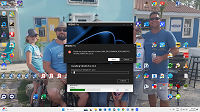
I'm getting an error when I have to choose the language as shown on the screen shot annexed. I ABSOLUTLY need Vegas working today for the deadline is not being respected on a project that was to be terminated yesterday. That error is preventing Vegas from installing correctly. Never had that type of problem with Vegas in the past?

Help will be more than appreciated...thank you.

Michel Plante


Hardware stuff:

I'm using a AMD Ryzen 7 5800X CPU

AMD Ryzen 7 5800X-Core Processor

ASUSTek PRIME B350-plus M.B.

MEMORY DDR4 16gb

GRAPHICS AMD Radeon RX 6600

Comments

ChrisD wrote on 11/16/2025, 10:32 AM

I am guessing that it is trying to add something to your documents or user profile, which is possibly forbidden by your security settings.

Windows Security --> Protection History. Review Protected Folder Access and either allow it or temporarily turn it off.

michel-plante wrote on 11/16/2025, 1:17 PM

Hi,

No...I'm simply trying to install Vegas Pro version 22. I attached a screen shot showing that Vegas cannot proceed with the language pack...nothing more.


Michel

LdM_Edit wrote on 11/17/2025, 6:31 AM

Are you able to select the language to install, and if so, what language are you selecting? The French language seems to have problems in VEGAS.

michel-plante wrote on 11/17/2025, 6:33 AM

Hi,

I had to install it, I'm already two days late with this project. Resolved...I DL the latest copy of V. 22. Being French speaking, I gave priority to the English language in Win 11 Settings. Installed V.22 as Administrator and Boom...it worked.

Have a Great day everyone..it was nice to visit after so long.

Michel Planté