video not loaded in trimmer bug (at double click)

bitman wrote on 9/16/2017, 9:25 AM

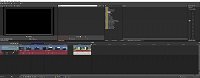
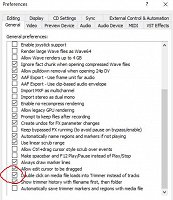
When ticking the general preference to "double click on media file loads into Trimmer instead of tracks", I expect this to work, but it still drops my clips to the timeline tracks. It seems to work fine if you have a default layout, but if you have a personalized layout, it does not work, the trimmer window remains empty. It is a bug that is easy to reproduce.

It does not seem to be limited to V15, but also applies to V14  
my layout <> default layout

APPS: VIDEO: VP 365 suite (VP 22 build 250) VP 21 build 315, VP 365 20, VP 19 post (latest build -651), (uninstalled VP 12,13,14,15,16 Suite,17, VP18 post), Vegasaur, a lot of NEWBLUE plugins, Mercalli 6.0, Respeedr, Vasco Da Gamma 17 HDpro XXL, Boris Continuum 2025, Davinci Resolve Studio 18, SOUND: RX 10 advanced Audio Editor, Sound Forge Pro 18, Spectral Layers Pro 10, Audacity, FOTO: Zoner studio X, DXO photolab (8), Luminar, Topaz...

  • OS: Windows 11 Pro 64, version 24H2 (since October 2024)
  • CPU: i9-13900K with Air Cooler: Noctua NH-D15 G2 HBC
  • RAM: DDR5 Corsair 64GB (5600-40 Vengeance)
  • Graphics card: Gigabyte GeForce RTX 5090 Aorus Xtreme WF AIO 32GB
  • Monitor: LG UltraGear 45GX950A 44.5" WUHD 5K2K OLED monitor (21:9), Resolution: 5120x2160, 165 Hz
  • C-drive: Corsair MP600 PRO XT NVMe SSD 4TB (PCIe Gen. 4)
  • Video drives: Samsung NVMe SSD 2TB (980 pro and 970 EVO plus) each 2TB
  • Mass Data storage & Backup: WD gold 6TB + WD Yellow 4TB
  • MOBO: Gigabyte Z690 AORUS MASTER
  • PSU: Corsair HX1500i, Case: Fractal Design Define 7 (PCGH edition)
  • Misc.: Logitech G915, Evoluent Vertical Mouse, shuttlePROv2


Comments

bitman wrote on 9/16/2017, 2:09 PM

@Cornico weird, maybe try my layout: you can add a new layout by placing my layout file in windows 10: local disk (C:) > Users > your name > AppData > Roaming > Vegas Pro > 15.0

This is by the way a handy means of copying your old saved layouts from V14 to V15 without manipulating windows and trying to dock them in the same way as V14

my layout: I just realized you can only upload pictures etc.. not configuration files here to try out.

APPS: VIDEO: VP 365 suite (VP 22 build 250) VP 21 build 315, VP 365 20, VP 19 post (latest build -651), (uninstalled VP 12,13,14,15,16 Suite,17, VP18 post), Vegasaur, a lot of NEWBLUE plugins, Mercalli 6.0, Respeedr, Vasco Da Gamma 17 HDpro XXL, Boris Continuum 2025, Davinci Resolve Studio 18, SOUND: RX 10 advanced Audio Editor, Sound Forge Pro 18, Spectral Layers Pro 10, Audacity, FOTO: Zoner studio X, DXO photolab (8), Luminar, Topaz...

  • OS: Windows 11 Pro 64, version 24H2 (since October 2024)
  • CPU: i9-13900K with Air Cooler: Noctua NH-D15 G2 HBC
  • RAM: DDR5 Corsair 64GB (5600-40 Vengeance)
  • Graphics card: Gigabyte GeForce RTX 5090 Aorus Xtreme WF AIO 32GB
  • Monitor: LG UltraGear 45GX950A 44.5" WUHD 5K2K OLED monitor (21:9), Resolution: 5120x2160, 165 Hz
  • C-drive: Corsair MP600 PRO XT NVMe SSD 4TB (PCIe Gen. 4)
  • Video drives: Samsung NVMe SSD 2TB (980 pro and 970 EVO plus) each 2TB
  • Mass Data storage & Backup: WD gold 6TB + WD Yellow 4TB
  • MOBO: Gigabyte Z690 AORUS MASTER
  • PSU: Corsair HX1500i, Case: Fractal Design Define 7 (PCGH edition)
  • Misc.: Logitech G915, Evoluent Vertical Mouse, shuttlePROv2


OldSmoke wrote on 9/16/2017, 3:09 PM

No problem here either with a two monitor setup. Have you tried the default windows layout (ATL-D-D) to see if it still doesn't work?

Last changed by OldSmoke on 9/16/2017, 3:10 PM, changed a total of 1 times.

Proud owner of Sony Vegas Pro 7, 8, 9, 10, 11, 12 & 13 and now Magix VP15&16.

System Spec.:
Motherboard: ASUS X299 Prime-A

Ram: G.Skill 4x8GB DDR4 2666 XMP

CPU: i7-9800x @ 4.6GHz (custom water cooling system)
GPU: 1x AMD Vega Pro Frontier Edition (water cooled)
Hard drives: System Samsung 970Pro NVME, AV-Projects 1TB (4x Intel P7600 512GB VROC), 4x 2.5" Hotswap bays, 1x 3.5" Hotswap Bay, 1x LG BluRay Burner

PSU: Corsair 1200W
Monitor: 2x Dell Ultrasharp U2713HM (2560x1440)

bitman wrote on 9/16/2017, 4:14 PM

I think I know now what the (or my) problem is. It is not the layout that is an issue, it is the way I select clips. I was expecting that double clicking on a media file in the explorer window would first dump it in the trimmer. With the explorer I mean File -> open (then browse to dir or file) -> then double click.

If I double click on media files already imported in the "project media window", then they get in the trimmer window first (provided the preference setting is set this way).

Therefor this is probably why it seemed to work for you, but not for me!

I am not sure now if this works as intended (double click to trimmer only for media files in the project media window) but not for explorer.

Last changed by bitman on 9/16/2017, 4:15 PM, changed a total of 1 times.

APPS: VIDEO: VP 365 suite (VP 22 build 250) VP 21 build 315, VP 365 20, VP 19 post (latest build -651), (uninstalled VP 12,13,14,15,16 Suite,17, VP18 post), Vegasaur, a lot of NEWBLUE plugins, Mercalli 6.0, Respeedr, Vasco Da Gamma 17 HDpro XXL, Boris Continuum 2025, Davinci Resolve Studio 18, SOUND: RX 10 advanced Audio Editor, Sound Forge Pro 18, Spectral Layers Pro 10, Audacity, FOTO: Zoner studio X, DXO photolab (8), Luminar, Topaz...

  • OS: Windows 11 Pro 64, version 24H2 (since October 2024)
  • CPU: i9-13900K with Air Cooler: Noctua NH-D15 G2 HBC
  • RAM: DDR5 Corsair 64GB (5600-40 Vengeance)
  • Graphics card: Gigabyte GeForce RTX 5090 Aorus Xtreme WF AIO 32GB
  • Monitor: LG UltraGear 45GX950A 44.5" WUHD 5K2K OLED monitor (21:9), Resolution: 5120x2160, 165 Hz
  • C-drive: Corsair MP600 PRO XT NVMe SSD 4TB (PCIe Gen. 4)
  • Video drives: Samsung NVMe SSD 2TB (980 pro and 970 EVO plus) each 2TB
  • Mass Data storage & Backup: WD gold 6TB + WD Yellow 4TB
  • MOBO: Gigabyte Z690 AORUS MASTER
  • PSU: Corsair HX1500i, Case: Fractal Design Define 7 (PCGH edition)
  • Misc.: Logitech G915, Evoluent Vertical Mouse, shuttlePROv2


OldSmoke wrote on 9/16/2017, 4:37 PM

I am not sure now if this works as intended (double click to trimmer only for media files in the project media window) but not for explorer.

Yes it does.

Proud owner of Sony Vegas Pro 7, 8, 9, 10, 11, 12 & 13 and now Magix VP15&16.

System Spec.:
Motherboard: ASUS X299 Prime-A

Ram: G.Skill 4x8GB DDR4 2666 XMP

CPU: i7-9800x @ 4.6GHz (custom water cooling system)
GPU: 1x AMD Vega Pro Frontier Edition (water cooled)
Hard drives: System Samsung 970Pro NVME, AV-Projects 1TB (4x Intel P7600 512GB VROC), 4x 2.5" Hotswap bays, 1x 3.5" Hotswap Bay, 1x LG BluRay Burner

PSU: Corsair 1200W
Monitor: 2x Dell Ultrasharp U2713HM (2560x1440)

Cornico wrote on 9/16/2017, 4:58 PM

 With the explorer I mean File -> open (then browse to dir or file) -> then double click.

That one works not the same way as media in Project Media or media in the Vegas Explorer. I see there the same as you see, but I always use for single mediafiles the Vegas Explorer and for groups of files the Project Media Importer.
Both work faster than your way-around.

I think that the option in Options/Preferences/General is only intended for mediafiles from the Vegas Explorer and from Project Media.

bitman wrote on 9/16/2017, 5:23 PM

Thanks all for the replies, the mystery is solved!

Last changed by bitman on 9/16/2017, 5:25 PM, changed a total of 2 times.

APPS: VIDEO: VP 365 suite (VP 22 build 250) VP 21 build 315, VP 365 20, VP 19 post (latest build -651), (uninstalled VP 12,13,14,15,16 Suite,17, VP18 post), Vegasaur, a lot of NEWBLUE plugins, Mercalli 6.0, Respeedr, Vasco Da Gamma 17 HDpro XXL, Boris Continuum 2025, Davinci Resolve Studio 18, SOUND: RX 10 advanced Audio Editor, Sound Forge Pro 18, Spectral Layers Pro 10, Audacity, FOTO: Zoner studio X, DXO photolab (8), Luminar, Topaz...

  • OS: Windows 11 Pro 64, version 24H2 (since October 2024)
  • CPU: i9-13900K with Air Cooler: Noctua NH-D15 G2 HBC
  • RAM: DDR5 Corsair 64GB (5600-40 Vengeance)
  • Graphics card: Gigabyte GeForce RTX 5090 Aorus Xtreme WF AIO 32GB
  • Monitor: LG UltraGear 45GX950A 44.5" WUHD 5K2K OLED monitor (21:9), Resolution: 5120x2160, 165 Hz
  • C-drive: Corsair MP600 PRO XT NVMe SSD 4TB (PCIe Gen. 4)
  • Video drives: Samsung NVMe SSD 2TB (980 pro and 970 EVO plus) each 2TB
  • Mass Data storage & Backup: WD gold 6TB + WD Yellow 4TB
  • MOBO: Gigabyte Z690 AORUS MASTER
  • PSU: Corsair HX1500i, Case: Fractal Design Define 7 (PCGH edition)
  • Misc.: Logitech G915, Evoluent Vertical Mouse, shuttlePROv2