49 Inch Monitor Work Space Alignment

jorgeemmanuel wrote on 5/15/2020, 10:07 PM

I have a 49 inch screen and I would like to see my larger preview image but I can't because I can't split the windows. I have artificially created how I would like to see my workspace at 49 inches, if someone knows how to configure it that way it would be very useful. Thanks
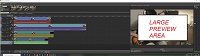
Hardware:

Samsung 49 inch Curved Monitor https://www.samsung.com/mx/monitors/led-chg90d/

Software:

Vegas Pro 16

Comments

NickHope wrote on 5/16/2020, 1:01 AM

Undock your Video Preview window by dragging its tab vertically (click and hold on the word "Video Preview" and drag the mouse up or down). Drag your main VEGAS window to be narrower. Then you can place your Video Preview window alongside your timeline.

Here's an example layout on a UHD display, with the Video Preview alongside the Timeline.

jorgeemmanuel wrote on 5/24/2020, 9:38 PM

Thanks to the help of "NickHope" I was able to realize the most suitable solution for my work area (49 inch monitor)

I have also noticed that sometimes the view is lost for some reason and the solution in this regard is to go to View, Window Design and Record a view to quickly access a predefined view. 


NickHope wrote on 5/24/2020, 11:45 PM

I always map windows layout 0 to my F10 key.

This line is from my keyboard customisation file at C:\Users\Nick\AppData\Roaming\VEGAS Pro\17.0\keyboard.ini

[Global]
View.WindowLayouts.Load.UserLayout0=F10