Device Explorer missing in VP23

bouldersoundguy wrote on 3/22/2026, 3:29 PM

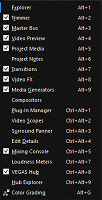
I recently upgraded from VP18 to VP23.0 (Build 302) and I can't find the Device Explorer to import AVCHD files. The manual directs me to the same place it was before (View>Window>Device Explorer), but it's simply not on the drop-down list. I still have VP18, so I have a workaround, but this seems like a pretty substantial limitation.


Comments

VEGASDerek wrote on 3/22/2026, 3:53 PM

Device Explorer is now a deprecated feature. You may still use it by going into Preferences, selecting the Deprecated Features tab and the checking Device Explorer. Then restart Vegas Pro and it will be available.

That said, as it is listed as a deprecated feature, it means that it is no longer supported and may be removed in a future version of Vegas Pro.

bouldersoundguy wrote on 3/22/2026, 4:13 PM

Device Explorer is now a deprecated feature. You may still use it by going into Preferences, selecting the Deprecated Features tab and the checking Device Explorer. Then restart Vegas Pro and it will be available.

That said, as it is listed as a deprecated feature, it means that it is no longer supported and may be removed in a future version of Vegas Pro.

Okay, thanks. What is the current method of importing (and stitching together) AVCHD files? The manual still directs users to the Device Explorer.

3POINT wrote on 3/22/2026, 4:19 PM

@bouldersoundguy As @VEGASDerek well explained, Device Explorer is still available, after enabling, in VP23.

I used AVCHD about more than 10 years ago and I never used the Device Explorer to import those files, I just imported the AVCHD files by copying the AVCHD files directly from the SD-memory card to the HD-disc of my PC with the regular Windows Explorer. So there's actual no need to use the Device Explorer for that purpose.

bouldersoundguy wrote on 3/22/2026, 4:27 PM

@bouldersoundguy As @VEGASDerek well explained, Device Explorer is still available, after enabling, in VP23.

I used AVCHD about more than 10 years ago and I never used the Device Explorer to import those files, I just imported the AVCHD files by copying the AVCHD files directly from the SD-memory card to the HD-disc of my PC with the regular Windows Explorer. So there's actual no need to use the Device Explorer for that purpose.

When I do that with recordings that extend over multiple files, I would get a 2 frame gap in the video and audio. Since I shoot live music events that lead to recordings over several files, that's a major flaw that severely degrades the ability to sync and edit. Device Explorer seamlessly reassembles the multiple files into a single gapless file.

3POINT wrote on 3/22/2026, 4:48 PM

@bouldersoundguy I never had recordings that extend over multiple files, so no experience with that shortcoming of recording in AVCHD...also I moved to 4k mp4 recording in 2016.

bouldersoundguy wrote on 3/22/2026, 4:51 PM

It might be more of a shortcoming of Windows. Macs natively recognize the separate segments as one recording. But if we used Macs, we wouldn't be here.

RogerS wrote on 3/22/2026, 5:59 PM

I'd keep a version of Vegas around that supports this (23 does) if it's ever removed.

Otherwise I'm sure there's some third-party software that could accomplish this and convert to a good editing format like ProRes?

EricLNZ wrote on 3/22/2026, 6:00 PM

Isn't it caused by FAT32 file size restriction so it isn't restricted to AVCHD but could also occur with long mp4 shoots?

@bouldersoundguy If unfortunately Device Explorer gets dropped from VP there is other software that can seamlessly join the files. I have a Canon AVCHD camera and use its software to download files and it will, if asked, join multiple files into a single large gapless file. I've only ever needed it once when shooting a long interview.

bouldersoundguy wrote on 3/22/2026, 6:11 PM

I'd keep a version of Vegas around that supports this (23 does) if it's ever removed.

Otherwise I'm sure there's some third-party software that could accomplish this and convert to a good editing format like ProRes?

I have 14, 18 and 23 on my desktop computer. If I looked at a couple of older computers, I would probably find 6 and 9, and maybe even Video Factory 2.0.

bouldersoundguy wrote on 3/22/2026, 6:15 PM

Isn't it caused by FAT32 file size restriction so it isn't restricted to AVCHD but could also occur with long mp4 shoots?

@bouldersoundguy If unfortunately Device Explorer gets dropped from VP there is other software that can seamlessly join the files. I have a Canon AVCHD camera and use its software to download files and it will, if asked, join multiple files into a single large gapless file. I've only ever needed it once when shooting a long interview.

My GoPros make long sequences of MP4 segments. The video doesn't have gaps, but the audio does. The solution there is to record raw audio in low processing mode. Actually, my real solution is to record audio on my Zoom H5 or Soundcraft UI24R.

RogerS wrote on 3/22/2026, 6:26 PM

I'd keep a version of Vegas around that supports this (23 does) if it's ever removed.

Otherwise I'm sure there's some third-party software that could accomplish this and convert to a good editing format like ProRes?

I have 14, 18 and 23 on my desktop computer. If I looked at a couple of older computers, I would probably find 6 and 9, and maybe even Video Factory 2.0.

23 is likely to work with Windows for the longest out of these as it targets 11.