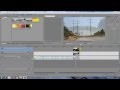
lets say two media events are cross faded into each other.
The plugin would all you to use an effect like say defocus, to start at the beginning of the cross fade reach a determined point and strength and then the opposite would happen on the the next clip effectively creating a new transition
In Boris Red there is the FEC Blur Dissolve effect that does what you describe. However, you can do this in Vegas with the normal cross-fade plus the blur effect, keyframed in each clip.
I mean it doesnt have to be a blur. This could be an awesome plugin, you could save settings for different effects or effect combinations and create many different easy to insert transitions
I don't fully understand what you are wanting to do, but you can most definitely create transitions, using crossfades, that are something other than crossfades. This tutorial shows one way to do this:
However, if that is not what you are looking for, then click on this link:
and scroll down to my user name ("johnmeyer"). This lets you use any transition as an fX. This is an odd discovery I came up with and may or may not apply to what you are trying to do.
Finally, here is a YouTube video which shows a variation of the idea I show in my little VEG file.
I think it may do almost exactly what you want.
Finally, there are lots of old tutorials showing how you can create your own custom transitions using a gradient mask.
Did you look at the YouTube tutorial that I posted directly above your last post? I put, in bold face, "I think it may do almost exactly what you want."
The YouTube tutorial you just created and posted is identical to the tutorial that I posted.
So, you are not asking for a plugin, nor are you asking how to do something. Instead, what you are asking for is a way to automate placing fX on two adjacent overlapped events and then keyframing them so that they only affect the portions of the events which are overlapped.
This sort of thing can be done with Vegas scripts. The first step would be to look at the several commercial scripts, such as Excalibur, Vegasur, and Ultimate S. Several of these do let you create fX presets and then apply these to events. There may be a way to create a workflow, using these scripts, that would let you apply these fX just to the end of one event and the beginning of the next event. There is a "bug" in how event keyframes behave when an event is shortened or lengthened by dragging the end of the event that might be exploited to simplify this workflow (they don't stay "stuck" to the end of the event).
" you are asking for is a way to automate placing fX on two adjacent overlapped events and then keyframing them so that they only affect the portions of the events which are overlapped."
Yes THIS
sorry I didn't watch the tutorial before making the video.