GH5 10-Bit Video Files - Green Solid Colour on Preview and Time-line

Steven-Lawrence wrote on 7/4/2019, 4:07 AM

Hey folks,

USING VEGAS 15.0 BUILD 416

I have searched the forum and have not found a specific answer to my problem.

Project Settings: (should 8 Bit and 32 Bit make a difference?)
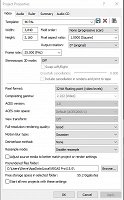
I am importing GH5 10 Bit Video Files :
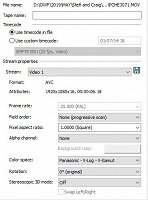
Please see video to see what the issue looks like.

All video files play no problem on my computer.

As a workaround I can convert these files using Handbrake but one of the big reasons we upgraded to Vegas 15 was to be able to edit these files natively.

Can anyone suggest what I am doing wrong?


Many thanks,

Steve

Comments

Wolfgang S. wrote on 7/4/2019, 6:47 AM

I think the answer was that GH5 10bit files are decode by Vegas Pro 16 only, but not by Vegas Pro 15. As far as I remember.

Desktop: PC AMD 3960X, 24x3,8 Mhz * RTX 3080 Ti (12 GB)* Blackmagic Extreme 4K 12G * QNAP Max8 10 Gb Lan * Resolve Studio 18 * Edius X* Blackmagic Pocket 6K/6K Pro, EVA1, FS7

Laptop: ProArt Studiobook 16 OLED * internal HDR preview * i9 12900H with i-GPU Iris XE * 32 GB Ram) * Geforce RTX 3070 TI 8GB * internal HDR preview on the laptop monitor * Blackmagic Ultrastudio 4K mini

HDR monitor: ProArt Monitor PA32 UCG-K 1600 nits, Atomos Sumo

Others: Edius NX (Canopus NX)-card in an old XP-System. Edius 4.6 and other systems

wwaag wrote on 7/4/2019, 8:04 AM

The ImportAssist tool in HappyOtterScripts https://tools4vegas.com/ supports import of 10bit GH5 footage into earlier versions of Vegas including V15. It can be either re-wrapped losslessly or transcoded.

AKA the HappyOtter at https://tools4vegas.com/. System 1: Intel i7-8700k with HD 630 graphics plus an Nvidia RTX4070 graphics card. System 2: Intel i7-3770k with HD 4000 graphics plus an AMD RX550 graphics card. System 3: Laptop. Dell Inspiron Plus 16. Intel i7-11800H, Intel Graphics. Current cameras include Panasonic FZ2500, GoPro Hero11 and Hero8 Black plus a myriad of smartPhone, pocket cameras, video cameras and film cameras going back to the original Nikon S.

Wolfgang S. wrote on 7/4/2019, 10:50 AM

Or you purchase now Vegas Pro 16 and get Vegas Pro 17 for free! :)

https://www.vegascreativesoftware.com/us/vegas-pro/

Desktop: PC AMD 3960X, 24x3,8 Mhz * RTX 3080 Ti (12 GB)* Blackmagic Extreme 4K 12G * QNAP Max8 10 Gb Lan * Resolve Studio 18 * Edius X* Blackmagic Pocket 6K/6K Pro, EVA1, FS7

Laptop: ProArt Studiobook 16 OLED * internal HDR preview * i9 12900H with i-GPU Iris XE * 32 GB Ram) * Geforce RTX 3070 TI 8GB * internal HDR preview on the laptop monitor * Blackmagic Ultrastudio 4K mini

HDR monitor: ProArt Monitor PA32 UCG-K 1600 nits, Atomos Sumo

Others: Edius NX (Canopus NX)-card in an old XP-System. Edius 4.6 and other systems

GJeffrey wrote on 7/4/2019, 5:41 PM

@Former user

Better use Waag scripts. That's exactely the same rewrapping command as i posted with a nice GUI.

Former user wrote on 7/4/2019, 5:53 PM

@GJeffrey Time marches on.

Steven-Lawrence wrote on 7/8/2019, 2:42 AM

Thanks folks. Obviously I read it wrong that 15.0 supported this.