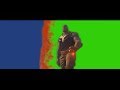
So I know how to use Chroma Key in Sony Vegas Pro 15 but I don't know hot to do a Blue Screen/Green Screen Effect at the same time like shown in this scene.
Like I want the Blue Screen Part to show an Image and then I want the Green Screen part to show another image.
You'd need some compositing experience to do that without nesting.
- Do your blue screen the usual way, main video on track # 1, background on track #2, use Chroma Key FX on the main video event.
- Add a track # 3 below and put the second background into it.
- Make track # 2 to a Compositing Child of track # 1.
- Use a second Chroma Key FX for the green screen as Track FX of Track # 1 while you switch the FX signal flow to have the Chroma Key FX being after the composite.
I'm still trying to get Marco's method to work. It's operator error on my part, I'm sure.
What I did was apply the Blue Screen chroma effect first for the first background, then rendered that clip out as an AVC clip (higher quality, 32 bit, etc), then imported that clip and applied the Green Screen chroma key to it for the second backgroud. My only suggestion is that your background clips probably shouldn't have green or blue elements in them depending on which key you're using, and also, when chroma keying, be sure to see how it looks with the Show Mask on, so you can be sure you are getting a good screen. The keyed elements should be as white as possible.
I just realized I made this way more complicated than it needed to be. I forgot that you can animate the chroma keyer, so all you have to do place your Thanos footage on Track 1, and your two background clips on Track 2. When you get to the part where the green key starts coming in, cut to the 2nd background clip on Track 2, and then animate the chroma keyer and change the color from blue to green. It is actually pretty quick and easy that way.
Here is a -> demo project which shows how to use two different chroma keys with two different backgrounds inside one Vegas Pro project. It works with Vegas Pro 14 and 15, for Vegas Pro 16 you would need to swap the composite fx order (seems to be a bug in VP16). One keyer is used to key a test pattern on the brick wall, the other keyer is used to key a noise texture in the sky. Though the keying quality is bad it should be fine to show how to use two different keyers at the same time.