Inconsistent screen height (dialog box) for customizing templates

Betovalle wrote on 12/1/2025, 5:15 PM

Hi,

There is an inconsistency on the screen (dialog box) when customizing templates activated in the "render as" option. "NORMALLY" in Vegas 22 I cannot reach the "template" field and in Vegas 23 I cannot access the content of the "video, audio, system and projects" tabs, nor the OK and Cancel buttons. My monitor is 19 inches!

note: Using the Alt+M keys and moving the mouse becomes impractical because it then returns to the initial position when you try to use the mouse again.
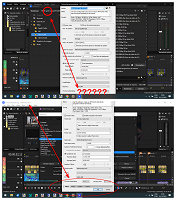
Thanks!

Comments

3POINT wrote on 12/1/2025, 10:44 PM

Minimum recommended screenresolution for using Vegaspro is 1920x1080.

RogerS wrote on 12/1/2025, 11:23 PM

Hmm. What is the zoom % in Windows display? Does a lower % help with this?
I had a sub HD monitor but it's in storage at the moment.

Betovalle wrote on 12/2/2025, 6:51 AM

Hi,

@3POINT I understand, it's recommended as it tends to be better and more comfortable!

@RogerS 100%. I opened a ticket. If they at least revert to the display as in version 22, that would help. I posted here to see if anyone had another solution. A vertical scroll bar would solve this issue, logically limiting the display to 1366 x 768, because the other configuration screens would have visible content.

Tks!