Make source frame numbers text larger?

MikeLV wrote on 1/16/2026, 11:33 AM

Under Preferences, Video
"Show source frame numbers on event thumbnails as:"

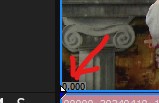
This setting displays the time location of the original video no matter where the event appears on the timeline. It's very useful for making edits that were noted during filming, i.e. I don't have to place the event at 0:00 on the timeline to line up with the paper notes. Vegas shows this figure on the bottom left hand corner of the video event. The problem is that it's really really small text. It doesn't get bigger when you make the track height taller either.

Question: Is there any setting or hack to make this figure's text size larger?
Comments

Robert Johnston wrote on 1/16/2026, 12:27 PM

@MikeLV I think your alternative is to use the Timecode FX on each event. That has an absolute frames option. Just remember to disable that effect before final rendering.

Intel Core i7 10700K CPU @ 3.80GHz (to 4.65GHz), NVIDIA GeForce RTX 2060 SUPER 8GBytes. Memory 32 GBytes DDR4. Also Intel UHD Graphics 630. Mainboard: Dell Inc. PCI-Express 3.0 (8.0 GT/s) Comet Lake. Bench CPU Multi Thread: 5500.5 per CPU-Z.

Vegas Pro 21.0 (Build 108) with Mocha Vegas

Windows 11 not pro

MikeLV wrote on 1/16/2026, 12:33 PM

Ah! Forgot about that effect, thanks!

For anyone else reading, I'd still like to know if there's a way to increase the text size for the overlay on the event in the timeline

MikeLV wrote on 1/16/2026, 12:55 PM

@Robert Johnston, actually, the timecode fx won't work, I think. As soon as you trim an event, the timecode resets to 0:00 at the beginning, not the actual timecode of the original video. For example, I could be at 10:00 on the timeline, and the timecode correctly shows the event starting at 0:00. But if I trim a minute off the front of that clip, I'm actually 1 minute into the original video file (as shown on the timeline thumbnail overlay) But the timecode FX goes to 0:00 instead of 1:00.

Robert Johnston wrote on 1/16/2026, 1:20 PM

@MikeLV Right. It would have to be a nested timeline that is being edited. That way the timecode wouldn't start a 0:00 when you trim. Also, source frame numbers don't always start at 0. The GoPro clip I'm looking at starts at 1521970. When I nest the timeline, the frame number starts a 0:00, not 1521970. So many complications.

Intel Core i7 10700K CPU @ 3.80GHz (to 4.65GHz), NVIDIA GeForce RTX 2060 SUPER 8GBytes. Memory 32 GBytes DDR4. Also Intel UHD Graphics 630. Mainboard: Dell Inc. PCI-Express 3.0 (8.0 GT/s) Comet Lake. Bench CPU Multi Thread: 5500.5 per CPU-Z.

Vegas Pro 21.0 (Build 108) with Mocha Vegas

Windows 11 not pro

MikeLV wrote on 1/16/2026, 2:14 PM

I don't mean frame numbers, just time, hours, minutes and seconds, that match up to my paper notes from the shoot. I don't know about nested timelines, but it sounds like it's over my head. I'll just squint until they make that text bigger 🤓

DMT3 wrote on 1/16/2026, 2:22 PM

You have to apply the timecode efx in the media pool, not on the timeline.

MikeLV wrote on 1/16/2026, 3:24 PM

@DMT3 Ah, that's the fix, thank you, no more squinting!