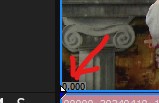
Under Preferences, Video
"Show source frame numbers on event thumbnails as:"
This setting displays the time location of the original video no matter where the event appears on the timeline. It's very useful for making edits that were noted during filming, i.e. I don't have to place the event at 0:00 on the timeline to line up with the paper notes. Vegas shows this figure on the bottom left hand corner of the video event. The problem is that it's really really small text. It doesn't get bigger when you make the track height taller either.
Question: Is there any setting or hack to make this figure's text size larger?