Mercalli 5 Plugin Update Problems

amendegw wrote on 6/23/2022, 11:46 AM

Does anyone have solution to this problem? I can't seem to be able to check for Mercalli 5 Plugin updates. The error message seems to indicate in might be a Firewall issue but I disabled my Firewall without success.
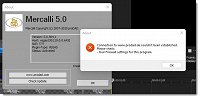
Some facts:

Vegas Pro 19 build 643
Windows 11 Home Version 10.0.22000
Mercalli Version: 5.0.504.1

My Computer:

System Model:        Alienware Area-51m R2 (laptop)
Processor:        Intel(R) Core(TM) i7-10700K CPU @ 3.80GHz, 3792 Mhz, 8 Core(s), 16 Logical Processor(s)
Installed Memory (RAM)    64.0 GB
Display Adapter:    NVIDIA GeForce RTX 2070 Super (8GB), Nvidia Studio Driver 512.96 May 2022)
Overclock Off

Display:        1920x1080 144 hertz
Storage (8TB Total):
    OS Drive:    PM981a NVMe SAMSUNG 2048GB
    Data Drive1:    Samsung SSD 970 EVO Plus 2TB
    Data Drive2:    Samsung SSD 860 EVO 4TB

Thanks in Advance,
...Jerry

System Model:     Alienware M18 R1
System:           Windows 11 Pro
Processor:        13th Gen Intel(R) Core(TM) i9-13980HX, 2200 Mhz, 24 Core(s), 32 Logical Processor(s)

Installed Memory: 64.0 GB
Display Adapter:  NVIDIA GeForce RTX 4090 Laptop GPU (16GB), Nvidia Studio Driver 566.14 Nov 2024
Overclock Off

Display:          1920x1200 240 hertz
Storage (8TB Total):
    OS Drive:       NVMe KIOXIA 4096GB
        Data Drive:     NVMe Samsung SSD 990 PRO 4TB
        Data Drive:     Glyph Blackbox Pro 14TB

Vegas Pro 22 Build 239

Cameras:
Canon R5 Mark II
Canon R3
Sony A9

Comments

j-v wrote on 6/23/2022, 12:40 PM

Here no problem. What is it that you want to know?
Newest version of that program is 5.0.516.3

met vriendelijke groet
Marten

Camera : Pan X900, GoPro Hero7 Hero Black, DJI Osmo Pocket, Samsung Galaxy A8
Desktop :MB Gigabyte Z390M, W11 home version 24H2, i7 9700 4.7Ghz,16 DDR4 GB RAM, Gef. GTX 1660 Ti with driver
566.14 Studiodriver and Intel HD graphics 630 with driver 31.0.101.2130
Laptop  :Asus ROG Str G712L, W11 home version 25H2, CPU i7-10875H, 16 GB RAM, NVIDIA GeForce RTX 2070 with Studiodriver 591.86 and Intel UHD Graphics 630 with driver 26.20.100.7985
Vegas software: VP 10 to 23 and VMS(pl) 10,12 to 17.
TV      :LG 4K 55EG960V

My slogan is: BE OR BECOME A STEM CELL DONOR!!! (because it saved my life in 2016)


amendegw wrote on 6/23/2022, 12:54 PM

@j-v, I'd like to know how I can successfully update my Mercalli Plugins. btw, proDAD sent me a link to a newer version (5.0.510.1) but I still can't use the "check updates" button to get the latest version.

...Jerry

Last changed by amendegw on 6/23/2022, 1:26 PM, changed a total of 2 times.

System Model:     Alienware M18 R1
System:           Windows 11 Pro
Processor:        13th Gen Intel(R) Core(TM) i9-13980HX, 2200 Mhz, 24 Core(s), 32 Logical Processor(s)

Installed Memory: 64.0 GB
Display Adapter:  NVIDIA GeForce RTX 4090 Laptop GPU (16GB), Nvidia Studio Driver 566.14 Nov 2024
Overclock Off

Display:          1920x1200 240 hertz
Storage (8TB Total):
    OS Drive:       NVMe KIOXIA 4096GB
        Data Drive:     NVMe Samsung SSD 990 PRO 4TB
        Data Drive:     Glyph Blackbox Pro 14TB

Vegas Pro 22 Build 239

Cameras:
Canon R5 Mark II
Canon R3
Sony A9

j-v wrote on 6/23/2022, 12:59 PM

Sorry for you, but that is your problem.
For me it was easy to check my installations.

met vriendelijke groet
Marten

Camera : Pan X900, GoPro Hero7 Hero Black, DJI Osmo Pocket, Samsung Galaxy A8
Desktop :MB Gigabyte Z390M, W11 home version 24H2, i7 9700 4.7Ghz,16 DDR4 GB RAM, Gef. GTX 1660 Ti with driver
566.14 Studiodriver and Intel HD graphics 630 with driver 31.0.101.2130
Laptop  :Asus ROG Str G712L, W11 home version 25H2, CPU i7-10875H, 16 GB RAM, NVIDIA GeForce RTX 2070 with Studiodriver 591.86 and Intel UHD Graphics 630 with driver 26.20.100.7985
Vegas software: VP 10 to 23 and VMS(pl) 10,12 to 17.
TV      :LG 4K 55EG960V

My slogan is: BE OR BECOME A STEM CELL DONOR!!! (because it saved my life in 2016)


Reyfox wrote on 6/23/2022, 3:30 PM

Like @amendegw, when I click on Update, I get the same error message you get..

But I am already using the latest version as listed on their website. Maybe download directly from proDAD and update that way? Why it doesn't work, I have no idea. But my version number is different than @j-v.

Last changed by Reyfox on 6/23/2022, 3:37 PM, changed a total of 2 times.

Newbie😁

Vegas Pro 23 B302 (VP18-22 also installed)

Win 11 Pro 23H2 (Build 22631.6199)

AMD Ryzen 9 5950X 16 cores / 32 threads

64GB DDR4 3200 Patriot Viper

Sapphire RX6700XT 12GB Driver: 25.12.1

Gigabyte X570 Elite Motherboard

Panasonic G9, G7, FZ300

Boris FX Continuum Complete 2026, Newblue FX Total FX360, Ignite Pro V5, proDAD Vitascene V5 Pro and Mercalli V6 OFX

diverG wrote on 6/24/2022, 4:56 PM

OT. Is mercalli 5 included with vp19 or a paid for addon. Currently using mercantile 4 standalone with vegas as the plug in was originally purchased for edius. Thanks.

Sys 1 Gig Z-890-UD, i9 285K @ 3.7 Ghz 64gb ram, 250gb SSD system, Plus 2x2Tb m2,  GTX 4060 ti, BMIP4k video out. Vegas 19 & V22(250), Edius 8.3WG and DVResolve 20.2 Studio. Win 11 Pro. Latest graphic drivers.

Sys 2 Laptop 'Clevo' i7 6700K @ 3.0ghz, 16gb ram, 250gb SSd + 2Tb hdd,   nvidia 940 M graphics. VP19, Plus Edius 8WG Win 10 Pro (22H2) Resolve18


amendegw wrote on 6/24/2022, 5:11 PM

@diverG I got it in a sale package from Magix when I upgraded to Vegas 19. Don't remember how much the Mercalli 5 added to my upgrade price but it was significantly lower than what proDAD charges. The downside is that this license is only good for 2 years.

...Jerry

System Model:     Alienware M18 R1
System:           Windows 11 Pro
Processor:        13th Gen Intel(R) Core(TM) i9-13980HX, 2200 Mhz, 24 Core(s), 32 Logical Processor(s)

Installed Memory: 64.0 GB
Display Adapter:  NVIDIA GeForce RTX 4090 Laptop GPU (16GB), Nvidia Studio Driver 566.14 Nov 2024
Overclock Off

Display:          1920x1200 240 hertz
Storage (8TB Total):
    OS Drive:       NVMe KIOXIA 4096GB
        Data Drive:     NVMe Samsung SSD 990 PRO 4TB
        Data Drive:     Glyph Blackbox Pro 14TB

Vegas Pro 22 Build 239

Cameras:
Canon R5 Mark II
Canon R3
Sony A9

Reyfox wrote on 6/25/2022, 11:04 AM

I downloaded the trial version of Mercalli Suite for Vegas. After the trial, I uninstalled and didn't bother with it any more. I have Mercalli 2 in another editor, in addition, my camera has excellent IBIS and I have a Ronin SC just in case.

I was contacted by a rep from proDAD, and he offered me an outstanding price I could not pass up for Suite for Vegas. And it's perpetual license too!

Newbie😁

Vegas Pro 23 B302 (VP18-22 also installed)

Win 11 Pro 23H2 (Build 22631.6199)

AMD Ryzen 9 5950X 16 cores / 32 threads

64GB DDR4 3200 Patriot Viper

Sapphire RX6700XT 12GB Driver: 25.12.1

Gigabyte X570 Elite Motherboard

Panasonic G9, G7, FZ300

Boris FX Continuum Complete 2026, Newblue FX Total FX360, Ignite Pro V5, proDAD Vitascene V5 Pro and Mercalli V6 OFX

Photo_G wrote on 6/26/2022, 9:07 AM

I get the same error here...also using the perpetual Suite version (5.0.510.1).