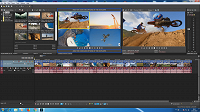
New Multicam Window (Request)

Former user wrote on 3/23/2019, 5:56 PM

The idea is to leave Multicam Legacy mode as it is and create this new option. So the user can choose to work in the conventional way or in this new way.

This layout change would be very useful mainly for users who only have one monitor.

It would allow you to see the cuts, crossfades and FX effects applied to the events in real time in the Main Preview.

It would no longer be necessary to switch between Enable Multicam Editing and Desable Multicam Editing (Ctrl + Shift + D) as it is traditionally done.

Comments

Reyfox wrote on 3/25/2019, 9:03 AM

...and don't forget audio sync.... I have a consumer editor that can sync audio up to 6 cameras and 2 audio clips with you decided which will be the "main" track that everything syncs to.

Newbie😁

Vegas Pro 22 B250 (VP18-21 also installed)

Win 11 Pro 23H2 (Build 22631.6199)

AMD Ryzen 9 5950X 16 cores / 32 threads

64GB DDR4 3200 Patriot Viper

Sapphire RX6700XT 12GB Driver: 25.12.1

Gigabyte X570 Elite Motherboard

Panasonic G9, G7, FZ300

Boris FX Continuum Complete 2025.5.1, Newblue FX Total FX360, Ignite Pro V5, proDAD Vitascene V5 Pro and Mercalli V6.

Former user wrote on 3/25/2019, 9:07 AM

...and don't forget audio sync.... I have a consumer editor that can sync audio up to 6 cameras and 2 audio clips with you decided which will be the "main" track that everything syncs to.

Yes.

that would be great and extremly useful as well.