screen estate reshuffle question

bitman wrote on 9/14/2017, 12:39 PM

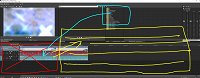
I would like to reshuffle my V15 windows. I have an ultra wide aspect screen, while it is great for gaming and video editing (long horizontal real estate helps with the timeline visible duration) I do suffer with vertical real estate due to that aspect ratio (and when using many tracks, on top of that the new horizontal extra info bar above each track worsens my situation), I would like to know if it is possible to shrink the timeline window horizontally to make space for other windows so I can expand the timeline vertically. I know it is a bit difficult to explain, so I attempt to visualize it below:
APPS: VIDEO: VP 365 suite (VP 22 build 250) VP 21 build 315, VP 365 20, VP 19 post (latest build -651), (uninstalled VP 12,13,14,15,16 Suite,17, VP18 post), Vegasaur, a lot of NEWBLUE plugins, Mercalli 6.0, Respeedr, Vasco Da Gamma 17 HDpro XXL, Boris Continuum 2025, Davinci Resolve Studio 18, SOUND: RX 10 advanced Audio Editor, Sound Forge Pro 18, Spectral Layers Pro 10, Audacity, FOTO: Zoner studio X, DXO photolab (8), Luminar, Topaz...

  • OS: Windows 11 Pro 64, version 24H2 (since October 2024)
  • CPU: i9-13900K with Air Cooler: Noctua NH-D15 G2 HBC
  • RAM: DDR5 Corsair 64GB (5600-40 Vengeance)
  • Graphics card: Gigabyte GeForce RTX 5090 Aorus Xtreme WF AIO 32GB
  • Monitor: LG UltraGear 45GX950A 44.5" WUHD 5K2K OLED monitor (21:9), Resolution: 5120x2160, 165 Hz
  • C-drive: Corsair MP600 PRO XT NVMe SSD 4TB (PCIe Gen. 4)
  • Video drives: Samsung NVMe SSD 2TB (980 pro and 970 EVO plus) each 2TB
  • Mass Data storage & Backup: WD gold 6TB + WD Yellow 4TB
  • MOBO: Gigabyte Z690 AORUS MASTER
  • PSU: Corsair HX1500i, Case: Fractal Design Define 7 (PCGH edition)
  • Misc.: Logitech G915, Evoluent Vertical Mouse, shuttlePROv2


Comments

VEGASDerek wrote on 9/14/2017, 3:24 PM

you are not able to dock items to the side of the timeline.

However, I would suggest you look into undocking the windows you want to have to the side, and then shrink the main window, so the timeline takes up less space.

bitman wrote on 9/15/2017, 2:13 AM

you are not able to dock items to the side of the timeline.

However, I would suggest you look into undocking the windows you want to have to the side, and then shrink the main window, so the timeline takes up less space.

Brilliant that works! Thanks a lot.

I haven't thought off that, I always worked Vegas maximized and alt-tab or minimize to get to the desktop, not un-maximize Vegas, shrink it and undock some of the Vegas sub-windows totally outside the Vegas program window. I am also happy about the fact you can save this (unconventional) layout as well.

APPS: VIDEO: VP 365 suite (VP 22 build 250) VP 21 build 315, VP 365 20, VP 19 post (latest build -651), (uninstalled VP 12,13,14,15,16 Suite,17, VP18 post), Vegasaur, a lot of NEWBLUE plugins, Mercalli 6.0, Respeedr, Vasco Da Gamma 17 HDpro XXL, Boris Continuum 2025, Davinci Resolve Studio 18, SOUND: RX 10 advanced Audio Editor, Sound Forge Pro 18, Spectral Layers Pro 10, Audacity, FOTO: Zoner studio X, DXO photolab (8), Luminar, Topaz...

  • OS: Windows 11 Pro 64, version 24H2 (since October 2024)
  • CPU: i9-13900K with Air Cooler: Noctua NH-D15 G2 HBC
  • RAM: DDR5 Corsair 64GB (5600-40 Vengeance)
  • Graphics card: Gigabyte GeForce RTX 5090 Aorus Xtreme WF AIO 32GB
  • Monitor: LG UltraGear 45GX950A 44.5" WUHD 5K2K OLED monitor (21:9), Resolution: 5120x2160, 165 Hz
  • C-drive: Corsair MP600 PRO XT NVMe SSD 4TB (PCIe Gen. 4)
  • Video drives: Samsung NVMe SSD 2TB (980 pro and 970 EVO plus) each 2TB
  • Mass Data storage & Backup: WD gold 6TB + WD Yellow 4TB
  • MOBO: Gigabyte Z690 AORUS MASTER
  • PSU: Corsair HX1500i, Case: Fractal Design Define 7 (PCGH edition)
  • Misc.: Logitech G915, Evoluent Vertical Mouse, shuttlePROv2


bitman wrote on 9/15/2017, 6:41 AM

A nice example of "thinking outside the box"!

APPS: VIDEO: VP 365 suite (VP 22 build 250) VP 21 build 315, VP 365 20, VP 19 post (latest build -651), (uninstalled VP 12,13,14,15,16 Suite,17, VP18 post), Vegasaur, a lot of NEWBLUE plugins, Mercalli 6.0, Respeedr, Vasco Da Gamma 17 HDpro XXL, Boris Continuum 2025, Davinci Resolve Studio 18, SOUND: RX 10 advanced Audio Editor, Sound Forge Pro 18, Spectral Layers Pro 10, Audacity, FOTO: Zoner studio X, DXO photolab (8), Luminar, Topaz...

  • OS: Windows 11 Pro 64, version 24H2 (since October 2024)
  • CPU: i9-13900K with Air Cooler: Noctua NH-D15 G2 HBC
  • RAM: DDR5 Corsair 64GB (5600-40 Vengeance)
  • Graphics card: Gigabyte GeForce RTX 5090 Aorus Xtreme WF AIO 32GB
  • Monitor: LG UltraGear 45GX950A 44.5" WUHD 5K2K OLED monitor (21:9), Resolution: 5120x2160, 165 Hz
  • C-drive: Corsair MP600 PRO XT NVMe SSD 4TB (PCIe Gen. 4)
  • Video drives: Samsung NVMe SSD 2TB (980 pro and 970 EVO plus) each 2TB
  • Mass Data storage & Backup: WD gold 6TB + WD Yellow 4TB
  • MOBO: Gigabyte Z690 AORUS MASTER
  • PSU: Corsair HX1500i, Case: Fractal Design Define 7 (PCGH edition)
  • Misc.: Logitech G915, Evoluent Vertical Mouse, shuttlePROv2