[Track Motion] Change motion along the X and Y axes separately?

SamJoex wrote on 4/20/2020, 11:34 PM

I wonder if VEGAS Pro's Track Motion module has a feature that allows you to change the track motion for the X and Y (and Z if 3D Source Alpha is enabled) axes separately, much like ProType Titler allows you to. It would be real neat feature to have, especially if you're doing an effect where characters are jumping but also turning around at different points.

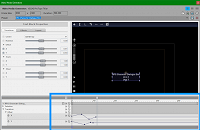
(EDIT: Such as here in ProType Titler:)
Last changed by SamJoex

YouTube: SamJoex
"Unleash your creativity!!"

Video Editor: VEGAS Pro 15 Suite, Build 416

Computer Specs:
[MSI Raider GE76 12UE]
OS: Windows 11 Home 64-Bit
CPU: Intel Core i7-12700H
RAM: 64GB DDR5-4800
GPU: NVIDIA GeForce RTX 3060 Laptop GPU
Storage: 3 TB NVMe SSD

Comments

fr0sty wrote on 4/20/2020, 11:58 PM

All 3 axis' should move independently of each other. You can set keyframes for each axis as well.

SamJoex wrote on 4/20/2020, 11:58 PM

Woah I just an idea on how this could be accomplished.

Have one axis' motion in Track Motion, and then the other axis' motion in Pan/Crop.

Still wonder if it's possible to do it entirely within Track Motion, though.

YouTube: SamJoex
"Unleash your creativity!!"

Video Editor: VEGAS Pro 15 Suite, Build 416

Computer Specs:
[MSI Raider GE76 12UE]
OS: Windows 11 Home 64-Bit
CPU: Intel Core i7-12700H
RAM: 64GB DDR5-4800
GPU: NVIDIA GeForce RTX 3060 Laptop GPU
Storage: 3 TB NVMe SSD

SamJoex wrote on 4/21/2020, 12:00 AM

All 3 axis' should move independently of each other. You can set keyframes for each axis as well.

Huh. Keyframes for each axis doesn't show up for me automatically.

For reference I should say I'm using VEGAS Pro 15. IDK if independent axes were introduced in a later version of VEGAS.

YouTube: SamJoex
"Unleash your creativity!!"

Video Editor: VEGAS Pro 15 Suite, Build 416

Computer Specs:
[MSI Raider GE76 12UE]
OS: Windows 11 Home 64-Bit
CPU: Intel Core i7-12700H
RAM: 64GB DDR5-4800
GPU: NVIDIA GeForce RTX 3060 Laptop GPU
Storage: 3 TB NVMe SSD

fr0sty wrote on 4/21/2020, 12:16 AM

Here I'm able to move the square shape around the screen as you say, even using 3D source alpha to make it spin when and where I want it to.

SamJoex wrote on 4/21/2020, 12:33 AM

Thank you for your demonstration, kind sir. However, I was more talking about something like this (courtesy of ProType Titler):

Here, in ProType Titler, I am able to set the motion of the X axis differently from the Y axis, as in the two axes change differently (as opposed to the normal Track Motion keyframes where the X and Y axes are changed together – if one of the axes do change). I can even have one axis have the Smooth effect and the other axis have the Linear effect.

Last changed by SamJoex on 4/21/2020, 12:35 AM, changed a total of 1 times.

YouTube: SamJoex
"Unleash your creativity!!"

Video Editor: VEGAS Pro 15 Suite, Build 416

Computer Specs:
[MSI Raider GE76 12UE]
OS: Windows 11 Home 64-Bit
CPU: Intel Core i7-12700H
RAM: 64GB DDR5-4800
GPU: NVIDIA GeForce RTX 3060 Laptop GPU
Storage: 3 TB NVMe SSD

fr0sty wrote on 4/21/2020, 12:58 AM

The X and Y axis do not change together in track motion, if I move the X axis and do nothing on the Y, there is no keyframe recorded for the Y, however, it seems what you are after is to be able to edit the keyframes individually, and yes, that would be something nice to see added, especially when it comes to using smoothing and such. Vegas Effects is capable of this.