Vegas backgrounds

terrabubble wrote on 11/9/2025, 5:35 AM

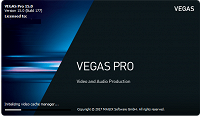
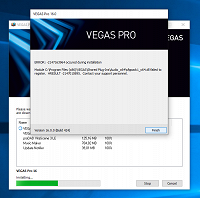
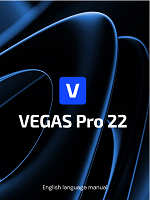
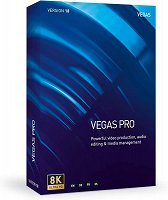
Lately, I've been curious about the backgrounds used in the splash screens, product boxes, PDF manuals, and installers for Vegas Pro and Movie Studio/Platinum in any version (8.0 & 23). Does anyone have all the original backgrounds from that program in HD, without the text and such? It would be nice to have them as desktop wallpaper, as they catch my eye.


Examples:
Comments

Dexcon wrote on 11/10/2025, 5:09 AM

It's hard to imagine that forum members (i.e. other Vegas Pro users) would have access to MAGIX's proprietary artwork/graphics ex-text-etc used for Vegas Pro program and promotional purposes. You might want to make your request directly to MAGIX to see if they will release to you what you are seeking.

Cameras: Sony FDR-AX100E; GoPro Hero 11 Black Creator Edition; Samsung S23 Ultra smart phone

Installed: Vegas Pro 13, 15, 16, 17, 18, 19, 20, 21, 22 & 23, HitFilm Pro 2021.3, DaVinci Resolve Studio 20.3, BCC 2026, Mocha Pro 2026, NBFX TotalFX 7, Neat NR 6, DVD Architect 6.0, MAGIX Travel Maps, Sound Forge Pro 16, SpectraLayers Pro 12, iZotope RX11 Advanced and many other iZ plugins, Vegasaur 4.0

Windows 11 25H2

Dell Alienware Aurora 11:

10th Gen Intel i9 10900KF - 10 cores (20 threads) - 3.7 to 5.3 GHz

NVIDIA GeForce RTX 2080 SUPER 8GB GDDR6 - liquid cooled

64GB RAM - Dual Channel HyperX FURY DDR4 XMP at 3200MHz

C drive: 2TB Samsung 990 PCIe 4.0 NVMe M.2 PCIe SSD

D: drive: 4TB Samsung 870 SATA SSD (used for media for editing current projects)

E: drive: 2TB Samsung 870 SATA SSD

F: drive: 6TB WD 7200 rpm Black HDD 3.5"

Dell Ultrasharp 32" 4K Color Calibrated Monitor


LAPTOP:

Dell Inspiron 5310 EVO 13.3"

i5-11320H CPU

C Drive: 1TB Corsair Gen4 NVMe M.2 2230 SSD (upgraded from the original 500 GB SSD)

Monitor is 2560 x 1600 @ 60 Hz

terrabubble wrote on 11/10/2025, 5:32 AM

Es difícil imaginar que los miembros del foro (es decir, otros usuarios de Vegas Pro) tuvieran acceso a las ilustraciones/gráficos, ex-texto, etc. patentados de MAGIX utilizados para el programa Vegas Pro y con fines promocionales. Es posible que desees realizar tu solicitud directamente a MAGIX para ver si te revelan lo que estás buscando.

Sorry for my ignorance. Where can I contact MAGIX specifically about this?

Dexcon wrote on 11/10/2025, 5:41 AM

Where can I contact MAGIX specifically about this?

I'm not exactly sure for something like your request but start off trying infoservice@magix.net.

Cameras: Sony FDR-AX100E; GoPro Hero 11 Black Creator Edition; Samsung S23 Ultra smart phone

Installed: Vegas Pro 13, 15, 16, 17, 18, 19, 20, 21, 22 & 23, HitFilm Pro 2021.3, DaVinci Resolve Studio 20.3, BCC 2026, Mocha Pro 2026, NBFX TotalFX 7, Neat NR 6, DVD Architect 6.0, MAGIX Travel Maps, Sound Forge Pro 16, SpectraLayers Pro 12, iZotope RX11 Advanced and many other iZ plugins, Vegasaur 4.0

Windows 11 25H2

Dell Alienware Aurora 11:

10th Gen Intel i9 10900KF - 10 cores (20 threads) - 3.7 to 5.3 GHz

NVIDIA GeForce RTX 2080 SUPER 8GB GDDR6 - liquid cooled

64GB RAM - Dual Channel HyperX FURY DDR4 XMP at 3200MHz

C drive: 2TB Samsung 990 PCIe 4.0 NVMe M.2 PCIe SSD

D: drive: 4TB Samsung 870 SATA SSD (used for media for editing current projects)

E: drive: 2TB Samsung 870 SATA SSD

F: drive: 6TB WD 7200 rpm Black HDD 3.5"

Dell Ultrasharp 32" 4K Color Calibrated Monitor


LAPTOP:

Dell Inspiron 5310 EVO 13.3"

i5-11320H CPU

C Drive: 1TB Corsair Gen4 NVMe M.2 2230 SSD (upgraded from the original 500 GB SSD)

Monitor is 2560 x 1600 @ 60 Hz

Steve_Rhoden wrote on 11/13/2025, 7:33 PM

@terrabubble Best you can do is search through google images to download all the Vegas past designs/splashes you want and then use photoshop to do the clean up.