Vegas2Handbrake PAR Weirdness

Cliff Etzel wrote on 7/1/2017, 12:42 PM

So I've come up with a puzzle I can't seem to solve with a project.

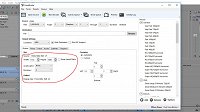
Sending the timeline to the latest release of Handbrake using the Vegas2Handbrake script has my resulting video PAR wonky.

Please see the image to understand what I'm referring to.

I've triple checked every single asset on the timeline in the project and nothing is out of the ordinary (All 1920x1080 30p video and stills). I've also opened previous projects and when activating the script, my PAR's show correctly - Any thoughts?
 

Comments

john_dennis wrote on 7/1/2017, 2:26 PM

My HB default 1920x1080 template looks like this and I rarely change it.

Cliff Etzel wrote on 7/1/2017, 2:26 PM

Thanks for catching that - I couldn't for the life of me figure out why it would do it for this project, but when I opened others, they displayed correctly.

Cliff Etzel wrote on 7/1/2017, 2:46 PM

My HB default 1920x1080 template looks like this and I rarely change it.

I have no idea why it randomly changed itself to cropping... My other projects I tested opened and rendered without issue - I would never have guessed to look at the cropping settings as I never touch them.

john_dennis wrote on 7/1/2017, 2:55 PM

One thing I learned when I was a field engineer: If $#1T can happen, it probably will. That's why I set the custom crop to 0 in the HB default template. 

Cliff Etzel wrote on 7/1/2017, 3:38 PM

One thing I learned when I was a field engineer: If $#1T can happen, it probably will. That's why I set the custom crop to 0 in the HB default template. 

I kept looking for any weird settings for at least 2 hours and I totally missed the cropping setting as I didn't even think to look there.. Out of sight, out of mind I guess...