Video Proxy for VEG project file...

set wrote on 4/9/2019, 6:20 PM

Just sharing,

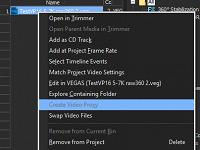
You can create a video proxy for nested project workflow, in case that VEG project is a bit 'heavy', and it will create .sfvp0 and .sfap0 beside your veg file.

But, it will not automatically updated if you change that veg project content. You need to delete .sfvp0 and .sfap0 files, and recreate video proxy.


Hope helps...

Comments

xberk wrote on 4/9/2019, 10:18 PM

Thanks for sharing. Never realized this.

Paul B .. PCI Express Video Card: EVGA VCX 10G-P5-3885-KL GeForce RTX 3080 XC3 ULTRA ,,  Intel Core i9-11900K Desktop Processor ,,  MSI Z590-A PRO Desktop Motherboard LGA-1200 ,, 64GB (2X32GB) XPG GAMMIX D45 DDR4 3200MHz 288-Pin SDRAM PC4-25600 Memory .. Seasonic Power Supply SSR-1000FX Focus Plus 1000W ,, Arctic Liquid Freezer II – 360MM .. Fractal Design case ,, Samsung Solid State Drive MZ-V8P1T0B/AM 980 PRO 1TB PCI Express 4 NVMe M.2 ,, Wundiws 10 .. Vegas Pro 19 Edit

Nicholas-Gibson wrote on 9/18/2020, 6:40 PM

Just sharing,

You can create a video proxy for nested project workflow, in case that VEG project is a bit 'heavy', and it will create .sfvp0 and .sfap0 beside your veg file.

But, it will not automatically updated if you change that veg project content. You need to delete .sfvp0 and .sfap0 files, and recreate video proxy.


Hope helps...

I have a nested VEG file in my current project, but the option to create a proxy for it is grayed out...

Why would this be?