Will not let me edit text

Annie-Vee wrote on 1/28/2020, 10:03 PM

Hello,

I just downloaded the trial version of Vegas Pro 17, and have been stuck on this one issue for an hour.
When I go to edit text, it only work for the first text box, and it lets me type in the text & change without any issues.
When I go to add in another piece of text, it will not change at all.
Here are some screenshots
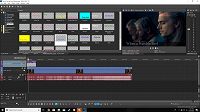
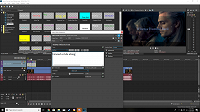
I have used Vegas products in the past, and this is the first time I am having this problem.

I am unsure if I am just doing something incorrectly or if it's just something along with the trial version.

Comments

Grazie wrote on 1/28/2020, 10:15 PM

@Annie-Vee - Ensure your .NET Framework is up to date.

adis-a3097 wrote on 1/28/2020, 10:26 PM

Hello,

I just downloaded the trial version of Vegas Pro 17, and have been stuck on this one issue for an hour.
When I go to edit text, it only work for the first text box, and it lets me type in the text & change without any issues.
When I go to add in another piece of text, it will not change at all.
Here are some screenshots

I have used Vegas products in the past, and this is the first time I am having this problem.

I am unsure if I am just doing something incorrectly or if it's just something along with the trial version.

When copy/paste your titles effect, make sure to have this ticked:


Grazie wrote on 1/28/2020, 10:45 PM

When copy/paste your titles effect, make sure to have this ticked:


@adis-a3097 - I understand that @Annie-Vee is ADDING Titles and Text directly from that Media Generators Pane not COPYING.

I've checked that it is working here, and it is. I can Edit Text and have it updated on Preview. @Annie-Vee you've just installed VP17. Do make sure you have .Net up to date and we can ignore that as an issue.

Last changed by Grazie on 1/28/2020, 10:49 PM, changed a total of 3 times.

Grazie

PC 10 64-bit 64gb * Intel Core i9 10900X s2066 * EVGA RTX 3080 XC3 Ultra 10GB - Studio Driver 551.23 * 4x16G CorsVengLPX DDR4 2666C16 * Asus TUF X299 MK 2


Cameras: Canon XF300 + PowerShot SX60HS Bridge

Annie-Vee wrote on 1/28/2020, 10:48 PM

I have also found now that if I "unclick" the italicize button it works - so I think there maybe an issue there with my .NET

I will check in the morning! Thank you all for the tips.

adis-a3097 wrote on 1/29/2020, 2:38 AM

You're welcome, @Annie-Vee!

@Grazie, a tip. Just in case. :)