Error when attempting to launch Vegas Effects

Jack S wrote on 4/13/2020, 12:00 PM

I finally bit the bullet and updated to Vegas Pro 17 build 421. Updated the latest versions of Effects and Image, de-registered and re-registered Vegas 17 as advised in the Post release notes. Attempted to edit a media event in Vegas Effects, Effects launched into the UI then closed down and the error as shown appeared.
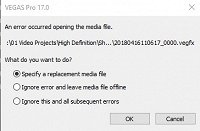
Attempted to edit another media event in Effects (the original one on the timeline was now a .vegfx file), the Effects UI opened then closed with the following error.
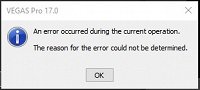
Has anyone had any luck updating Post? I can't see were I'm going wrong.

My system
Genshin Infinity Gaming PC
Motherboard Gigabyte H610M H: m-ATX w/, USB 3.2, 1 x M.2
Power Supply Corsair RM750X
Intel Core i7-13700K - 16-Core [8P @ 3.4GHz-5.4GHz / 8E @ 2.50GHz-4.20GHz]
30MB Cache + UHD Graphics, Ultimate OC Compatible
Case Fan 4 x CyberPowerPC Hyperloop 120mm ARGB & PWM Fan Kit
CPU Fan CyberPowerPC Master Liquid LITE 360 ARGB AIO Liquid Cooler, Ultimate OC Compatible
Memory 32GB (2 x 16GB) DDR5/5200MHz Corsair Vengeance RGB
MSI GeForce RTX 4060 Ti 8GB - Ray Tracing Technology, DX12, VR Ready, HDMI, DP
System drive 1TB WD Black SN770 M.2 NVMe PCIe SSD - 5150MB/s Read & 4900MB/s Write
Storage 2 x 2TB Seagate BarraCuda SATA-III 6.0Gb/s 7200RPM
Windows 11 Home (x64)
Monitors
Generic Monitor (PHL 222V8) connected to GeForce RTX 4060 Ti
Generic Monitor (SAMSUNG) connected to iGPU

Camcorder
SONY Handycam HDR-XR550VE

Comments

VEGASDerek wrote on 4/13/2020, 12:22 PM

Do you get when you launch VEGAS Effects as a stand alone application and not through VEGAS Pro? If so, what is the error?

Jack S wrote on 4/13/2020, 4:46 PM

Launching standalone I get the splash screen, then the blank UI for a few seconds and then a return to the desktop. Tried it twice with the same symptoms. Tomorrow, I'll uninstall all 3 apps, re-install and try again.

My system
Genshin Infinity Gaming PC
Motherboard Gigabyte H610M H: m-ATX w/, USB 3.2, 1 x M.2
Power Supply Corsair RM750X
Intel Core i7-13700K - 16-Core [8P @ 3.4GHz-5.4GHz / 8E @ 2.50GHz-4.20GHz]
30MB Cache + UHD Graphics, Ultimate OC Compatible
Case Fan 4 x CyberPowerPC Hyperloop 120mm ARGB & PWM Fan Kit
CPU Fan CyberPowerPC Master Liquid LITE 360 ARGB AIO Liquid Cooler, Ultimate OC Compatible
Memory 32GB (2 x 16GB) DDR5/5200MHz Corsair Vengeance RGB
MSI GeForce RTX 4060 Ti 8GB - Ray Tracing Technology, DX12, VR Ready, HDMI, DP
System drive 1TB WD Black SN770 M.2 NVMe PCIe SSD - 5150MB/s Read & 4900MB/s Write
Storage 2 x 2TB Seagate BarraCuda SATA-III 6.0Gb/s 7200RPM
Windows 11 Home (x64)
Monitors
Generic Monitor (PHL 222V8) connected to GeForce RTX 4060 Ti
Generic Monitor (SAMSUNG) connected to iGPU

Camcorder
SONY Handycam HDR-XR550VE

lan-mLMC wrote on 4/14/2020, 12:30 AM

Hello, you sould keeep "VegasEffectsServer.exe" runing in background if you want to import .vegfx to VEGAS Pro. You can check it through task manager.

If your "VegasEffectsServer.exe" doesn't run in background, you should check whether there is a file "VegasEffects.fio2007-config" in "C:\Program Files\VEGAS\VEGAS Pro 17.0".

"VegasEffects.fio2007-config" plays a critical role which makes VEGAS Pro be able to run "VegasEffectsServer.exe" and then import .vegfx.

VEGASDerek wrote on 4/14/2020, 8:34 AM

Launching standalone I get the splash screen, then the blank UI for a few seconds and then a return to the desktop. Tried it twice with the same symptoms. Tomorrow, I'll uninstall all 3 apps, re-install and try again.

Double check the system requirements for VEGAS Effects and see if they match your system. VEGAS Effects more strictly enforces requirements than VEGAS Pro does.

Jack S wrote on 4/14/2020, 9:33 AM

@lan-mLMC Thanks, I've checked and VegasEffectsServer.exe isn't running in the background yet VegasEffects.fio2007-config is present in C:\Program Files\VEGAS\VEGAS Pro 17.0.

@VEGASDerek I understand that but I had Vegas Effects running ok before performing the update.

I'll see what happens after I perform an uninstall/install operation.

Thanks to you both for your input.

My system
Genshin Infinity Gaming PC
Motherboard Gigabyte H610M H: m-ATX w/, USB 3.2, 1 x M.2
Power Supply Corsair RM750X
Intel Core i7-13700K - 16-Core [8P @ 3.4GHz-5.4GHz / 8E @ 2.50GHz-4.20GHz]
30MB Cache + UHD Graphics, Ultimate OC Compatible
Case Fan 4 x CyberPowerPC Hyperloop 120mm ARGB & PWM Fan Kit
CPU Fan CyberPowerPC Master Liquid LITE 360 ARGB AIO Liquid Cooler, Ultimate OC Compatible
Memory 32GB (2 x 16GB) DDR5/5200MHz Corsair Vengeance RGB
MSI GeForce RTX 4060 Ti 8GB - Ray Tracing Technology, DX12, VR Ready, HDMI, DP
System drive 1TB WD Black SN770 M.2 NVMe PCIe SSD - 5150MB/s Read & 4900MB/s Write
Storage 2 x 2TB Seagate BarraCuda SATA-III 6.0Gb/s 7200RPM
Windows 11 Home (x64)
Monitors
Generic Monitor (PHL 222V8) connected to GeForce RTX 4060 Ti
Generic Monitor (SAMSUNG) connected to iGPU

Camcorder
SONY Handycam HDR-XR550VE

Jack S wrote on 4/14/2020, 4:00 PM

Performed an uninstall/re-install but this made no difference. Uninstalled all and re-installed Vegas Pro 17 build 319 (the original release version) and the original release versions of Effects and Image.

Could then edit in Vegas Pro but with a demo watermark. This shows that the original problem was with the latest build of Vegas Pro 17.

All I have to do now is get Effects to be registered and I'll be back where I was before I updated Vegas Pro 17.

Serves me right for updating!

My system
Genshin Infinity Gaming PC
Motherboard Gigabyte H610M H: m-ATX w/, USB 3.2, 1 x M.2
Power Supply Corsair RM750X
Intel Core i7-13700K - 16-Core [8P @ 3.4GHz-5.4GHz / 8E @ 2.50GHz-4.20GHz]
30MB Cache + UHD Graphics, Ultimate OC Compatible
Case Fan 4 x CyberPowerPC Hyperloop 120mm ARGB & PWM Fan Kit
CPU Fan CyberPowerPC Master Liquid LITE 360 ARGB AIO Liquid Cooler, Ultimate OC Compatible
Memory 32GB (2 x 16GB) DDR5/5200MHz Corsair Vengeance RGB
MSI GeForce RTX 4060 Ti 8GB - Ray Tracing Technology, DX12, VR Ready, HDMI, DP
System drive 1TB WD Black SN770 M.2 NVMe PCIe SSD - 5150MB/s Read & 4900MB/s Write
Storage 2 x 2TB Seagate BarraCuda SATA-III 6.0Gb/s 7200RPM
Windows 11 Home (x64)
Monitors
Generic Monitor (PHL 222V8) connected to GeForce RTX 4060 Ti
Generic Monitor (SAMSUNG) connected to iGPU

Camcorder
SONY Handycam HDR-XR550VE