masking and tracking help for a newb...

wwjd wrote on 11/26/2019, 6:47 PM

teaching myself BIEZER masking and motion tracking tonight because I need it for a project right now. I get Masking, and I am sure the tracking is easy... but I cant get my head around the tracks logic.

Basically, I want to do is map over rear window of a car, with video I shot of a road so it looks like they are moving.

I'm thinking somehow use the Mask to open the hole and motion track the window to allow it trough from the track ABOVE it? or Below? So confused how to make this work.

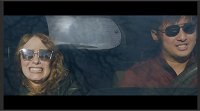
Here's an un graded pic to show what I am doing: The back window is the overlay moving video.

Ideas??
 

Comments

john_dennis wrote on 11/26/2019, 6:59 PM

It’s easy in Photoshop with stills...

...more complicated with moving images.

Mask the rear window and make it transparent. The scenery track goes below the main track.


wwjd wrote on 11/26/2019, 7:08 PM

Thanks, John. But I still need to biezer mask and TRACK that rear window right, since it moves around a bunch from the handheld camera work?

wwjd wrote on 11/26/2019, 7:18 PM

Well, the tracking is not keeping up, so this will be a manual tracking. :D Thanks anyway!

john_dennis wrote on 11/26/2019, 7:18 PM

Yes.

john_dennis wrote on 11/26/2019, 7:24 PM

Stabilize first?

wwjd wrote on 11/26/2019, 8:16 PM

well, it's herky jerky and pans around a bunch by design, but thanks. half of the tracked window goes our of frame and confuses it. I did it manually. what a treat! hahahaha but it mostly does what it needs to

fr0sty wrote on 11/26/2019, 10:14 PM

Best thing to do is get the track as close as you can and then manually tweak what it gets wrong. Also try the various tracking modes. Your scene is very difficult to track, though, as the window isn't very visible beneath the reflections on the window in front and as you said, it's jerky.

Last changed by fr0sty on 11/26/2019, 10:14 PM, changed a total of 1 times.

Systems:

Desktop

AMD Ryzen 7 1800x 8 core 16 thread at stock speed

64GB 3000mhz DDR4

Geforce RTX 3090

Windows 10

Laptop:

ASUS Zenbook Pro Duo 32GB (9980HK CPU, RTX 2060 GPU, dual 4K touch screens, main one OLED HDR)

wwjd wrote on 11/27/2019, 6:46 AM

the reflections on the front are added so I can work around that :D I have another shot to do so will try that next. thanks!

fr0sty wrote on 11/27/2019, 8:53 AM

Gary posted this helpful tutorial on how to do the planar motion tracking... while it is more complex than what you're going after, it will help to show the proper procedure to follow when motion tracking. You just don't need that particular tracking mode he is using because you aren't using an overlay that is at an angle from the camera... but you can try it anyway to see if it helps.

https://www.facebook.com/vegascreativesoftware/videos/2473856229516263/