Hello,
I am using VEGAS Pro 21 (Korean version) and have two issues that may be related.
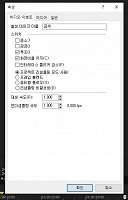
1) Video Event Properties UI text cut off
In the Video Event Properties window, the labels for Mute / Lock / Loop are cut off
(partially or completely). The checkboxes exist but the text is not readable.
2) Still image duration becomes infinite
When importing still images (PNG/JPG), the event duration sometimes shows 00:00:00:00
(infinite) and looping does not work correctly.
Notes:
- Reinstalling VEGAS and switching builds (315 → 300) did not fix it.
- Windows display scaling affects the UI visibility (100% shows more text than 125%),
but even at 100% it is still truncated.
Environment:
- VEGAS Pro 21 (Korean)
- Windows 10/11
Question:
Is there a way to fix the UI truncation and the still image infinite duration/loop issue
in the Korean version?
Thank you.