Velocity on a clip..the bar is too low!

Julius_ wrote on 9/26/2017, 3:34 PM

Anyone else have this nuisance?

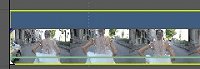
When you place a velocity on an event (clip), the green bar is not centered and too low to the bottom of the clip. It's hard to have a free-range velocity choice when trying to move that bar (I now have extra clicks to do to select 50%)...it should be centered so that when you move the bar it doesn't go from 100% to 0% ...if centered (as it was in V3 till V13), it's easier to pick 80-70-60-50-40%
 

Comments

altarvic wrote on 9/26/2017, 3:42 PM

+1

Kinvermark wrote on 9/26/2017, 5:45 PM

+2. It is quite awkward to use this bar accurately.

joseph-w wrote on 9/26/2017, 9:00 PM

I don't use the velocity envelope myself but I bet the odd centering is a result of the new top bar that's been added to each clip.


Members of Magix development team responded to similar complaints days after V15 release saying an option to disable the new top bar had already been coded in and that it would be in the first update to V15.

I would assume disabling that new bar which takes up about 1/3 of the clip space would restore envelope centering to the way it was in V14.

NickHope wrote on 9/26/2017, 9:03 PM

Agreed, it's more difficult to use now, but you can still hold <CTRL> while dragging it to give more control. Also you can right click a keyframe and choose a velocity from the menu, or type a number in.

Julius_ wrote on 9/26/2017, 9:08 PM

Thanks Joseph and Nick for that tip....the problem is also in V14..it was when they increased the velocity to over 300% that the bar was no longer centered. I like the hold <CTRL>...still a pain, but better than going in the menus

NickHope wrote on 9/26/2017, 10:37 PM

The <CTRL> thing also works for most, if not every, slider in Vegas Pro. Double-click to reset (both sliders and keyframes).

Former user wrote on 9/26/2017, 11:22 PM

A few other shortcuts. CTRL- finer movements, Shift- activates pencil so you can draw, ALT- allows horizontal movement without vertical, Rightclick to place node and manually enter velocity.

Kinvermark wrote on 9/26/2017, 11:40 PM

Also, if you work with a full screen timeline you can pull the track header down to make an absurdly large thumbnail so the line is easier to drag around. Then ctrl tilde to reset. I have been experimenting with velocity envelopes in combination with the new Vegasaur feature "convert velocity to twixtor keyframes." Pretty cool really.