How to animated picture in picture

wiel-gulpen wrote on 10/30/2025, 8:45 AM

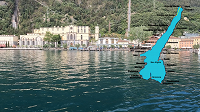
Last summer I was at lake Garda in Italy. Of course I filmed there a lot. Now I want to show which routes the boats took crossing the la.

So I uses two maps of Lake Garda at he top of the scene. With a paint program I made a yellow line from Lake Garda to Limone on one of the two (identical maps). With a transition (top down) the second map with line line (and the route) appears. But he result is not as smooth as I like!

How can I 'composite' that better and more smooth?

Greetings,

Wiel
 

Last changed by wiel-gulpen

Camera: Panasonic GH7, Gopro Hero 10, Zoom H2n, software Vegas Pro 16, 18 en 22 Suite, several Boris FX Continuum units 2020.5, Mercalli 6, Pinnacle Studio 22 Ult, IMGBurn, VdG 12, Blufftitler 17, Paintshop Pro 2018, Affinity Photo 2.6, Aquasoft Videovision 13. PC: Asus ROG Strix 390-E mobo, 9900K, 32Gb.intern, Asus Strix 2060S graphics, 2 M2 SSD,1 SATA SSD en 2 SATA HD.

Comments

3POINT wrote on 10/30/2025, 2:48 PM

@wiel-gulpen Take a look at this thread with tutorial: https://www.vegascreativesoftware.info/us/forum/route-animation-plugin-for-vegas-pro-by-peter-p-with-tutorial--116423/

MikeS wrote on 10/31/2025, 7:30 AM

Or, for about 20-25UKP these days, get hold of a copy of Magix Movie Studio Platinum which includes Magic Travel Maps. Discard Magix Movie Studio itself, and use Travel Maps as a stand alone application to generate an mp4 which can then be imported into Vegas Pro

There are other Magix products that include Travel Maps, but Movie Studio Platinum is about the cheapest way to get holdf of it, as far as I know

Vegas Pro Suite 22.0 Build 250
Boris FX Continuum for OFX 2025 Build 18.5.0.441 - 113
Boris FX Mocha Pro Plug-in 2025 v12.0.1 build 46
Windows 11 Pro - 64-Bit
ASUS PRIME Z390-P motherboard
Intel Core i7-97000K @ 3.6GHz
RAM 32GB (2x 16GB) 2666MHz DDR4
GeForce RTX 2070 SUPER

J-Toresen wrote on 10/31/2025, 2:17 PM

@MikeS

Photostory deluxe 2026 costs $39.99 (New purchase), and $29.99 (Upgrade). Magix Travel Maps is included. 
Travel Maps is not mentions in the spesification of Video deluxe 2026 Plus, but maybe it is included. The cost is the same for the two products. 

Jøran

Howard-Vigorita wrote on 10/31/2025, 2:32 PM

@wiel-gulpen It's not easy but Vegas can do it without extra plugins. Just use the media-generator solid color, like red, reducing the frame height down to 20 or so to turn it into a line. Then place it on a track above your map graphic... you can turn the map track into a composing child if you have other things you don't want affected below the map.

Next put pip-fx as an event-fx on the solid color event and animate Location and X-scale. I set the start-point like this in vp22 as Milan, pointing the Angle towards Venice, followed by setting the end point as a line that grows to Venice. Then repeated, stacking more similar segments above the map:

Ended up rendering like this:

MikeS wrote on 10/31/2025, 3:48 PM


Travel Maps is not mentions in the spesification of Video deluxe 2026 Plus, but maybe it is included.

Jøran

It is included, you just have to dive down into the full features comparison chart on the Magix website, where it is described as "Enhanced travel route animation with MAGIX Travel Maps".

To be honest, my pricing is for the UK, where Movie Studio is still available in cheap pre-2026 versions (e.g https://www.amazon.co.uk/Magix-639191910876-Movie-Studio-Platinum/dp/B09B2Y1HJP). Given we don't really care about Movie Studio itself and given that (currently) Travel Maps gets independently updated to the latest version there's no need to get the current, more expensive release of Movie Studio/Video Deluxe. But possibly other countries don't have the same access to old slightly older versions.

Vegas Pro Suite 22.0 Build 250
Boris FX Continuum for OFX 2025 Build 18.5.0.441 - 113
Boris FX Mocha Pro Plug-in 2025 v12.0.1 build 46
Windows 11 Pro - 64-Bit
ASUS PRIME Z390-P motherboard
Intel Core i7-97000K @ 3.6GHz
RAM 32GB (2x 16GB) 2666MHz DDR4
GeForce RTX 2070 SUPER

wiel-gulpen wrote on 11/1/2025, 4:51 AM

At first: everyone thanks for the suggestions.

I already own VdL 22 with Magix Travel Maps. I also own VasodaGama. The all deliver a moviefile in a format whatever.

That I do not won't. I only want the lake as showm in my snapshot with a smooth line as PiP.

So I will, at first, discover the options of 3Point and Howard.

Greetings,

Wiel

Camera: Panasonic GH7, Gopro Hero 10, Zoom H2n, software Vegas Pro 16, 18 en 22 Suite, several Boris FX Continuum units 2020.5, Mercalli 6, Pinnacle Studio 22 Ult, IMGBurn, VdG 12, Blufftitler 17, Paintshop Pro 2018, Affinity Photo 2.6, Aquasoft Videovision 13. PC: Asus ROG Strix 390-E mobo, 9900K, 32Gb.intern, Asus Strix 2060S graphics, 2 M2 SSD,1 SATA SSD en 2 SATA HD.

Dexcon wrote on 11/1/2025, 5:31 AM

Though not mentioned in your Signature, if you happen to have HitFilm Pro or the Ignite Pro plugin package (version 4.1 or above), you might find success with the 'Neon Path' FX which creates a neon-like animated path following user set keyframes - much the same as created in MAGIX Travel Maps. I used to use Neon Path before getting Travel Maps, but the caveat with Neon Path is that I'm sure how it would go over an alpha channel image (the map of Lake Garda) using either Ignite Pro as an FX plugin in Vegas Pro or in HitFilm Pro itself (both products now discontinued).

Also as the path progresses, the earlier track sections do tend to progressively decay in intensity; unfortunately, I never worked out if that decay could be avoided and the track kept solid throughout its path.

Last changed by Dexcon on 11/1/2025, 5:57 AM, changed a total of 1 times.

Cameras: Sony FDR-AX100E; GoPro Hero 11 Black Creator Edition; Samsung S23 Ultra smart phone

Installed: Vegas Pro 13, 15, 16, 17, 18, 19, 20, 21, 22 & 23, HitFilm Pro 2021.3, DaVinci Resolve Studio 20.3, BCC 2026, Mocha Pro 2026, NBFX TotalFX 7, Neat NR 6, DVD Architect 6.0, MAGIX Travel Maps, Sound Forge Pro 16, SpectraLayers Pro 12, iZotope RX11 Advanced and many other iZ plugins, Vegasaur 4.0

Windows 11 25H2

Dell Alienware Aurora 11:

10th Gen Intel i9 10900KF - 10 cores (20 threads) - 3.7 to 5.3 GHz

NVIDIA GeForce RTX 2080 SUPER 8GB GDDR6 - liquid cooled

64GB RAM - Dual Channel HyperX FURY DDR4 XMP at 3200MHz

C drive: 2TB Samsung 990 PCIe 4.0 NVMe M.2 PCIe SSD

D: drive: 4TB Samsung 870 SATA SSD (used for media for editing current projects)

E: drive: 2TB Samsung 870 SATA SSD

F: drive: 6TB WD 7200 rpm Black HDD 3.5"

Dell Ultrasharp 32" 4K Color Calibrated Monitor


LAPTOP:

Dell Inspiron 5310 EVO 13.3"

i5-11320H CPU

C Drive: 1TB Corsair Gen4 NVMe M.2 2230 SSD (upgraded from the original 500 GB SSD)

Monitor is 2560 x 1600 @ 60 Hz

J-Toresen wrote on 11/1/2025, 6:18 AM

Thank you for the heads up @MikeS

Jøran

MikeS wrote on 11/1/2025, 6:45 AM

>never worked out if that decay could be avoided and the track kept solid throughout its path

Indeed it can, by playing around with the evolution and extension properties. it's how I produced the below effect that was included in an electronic new year card

Vegas Pro Suite 22.0 Build 250
Boris FX Continuum for OFX 2025 Build 18.5.0.441 - 113
Boris FX Mocha Pro Plug-in 2025 v12.0.1 build 46
Windows 11 Pro - 64-Bit
ASUS PRIME Z390-P motherboard
Intel Core i7-97000K @ 3.6GHz
RAM 32GB (2x 16GB) 2666MHz DDR4
GeForce RTX 2070 SUPER

3POINT wrote on 11/1/2025, 6:50 AM

@wiel-gulpen Another (free) option has Davinci Resolve, where a route animation is quickly generated directly on a Map.png in the timeline:

LdM_Edit wrote on 11/1/2025, 7:18 AM

@wiel-gulpen Simply creating and animating a mask with the pan-crop tool or the bezier mask effect for the image that already has the path drawn can work. You can reveal the path however you want.

@Dexcon The last versions of HitFilm and VEGAS Effects have a "stroke" effect that allows you to draw a path over an open mask.

MikeS wrote on 11/1/2025, 7:58 AM

The all deliver a moviefile in a format whatever.

That I do not won't. I only want the lake as showm in my snapshot with a smooth line as PiP.


Not quite sure I understand the objection against using a moviefile as the source for your PiP.

Here, for example is a quick mockup of the solution I suggested. Took about 15 mins (most of which was searching for a suitable Lake Garda photo and a keyable Lake Garda map


Vegas Pro Suite 22.0 Build 250
Boris FX Continuum for OFX 2025 Build 18.5.0.441 - 113
Boris FX Mocha Pro Plug-in 2025 v12.0.1 build 46
Windows 11 Pro - 64-Bit
ASUS PRIME Z390-P motherboard
Intel Core i7-97000K @ 3.6GHz
RAM 32GB (2x 16GB) 2666MHz DDR4
GeForce RTX 2070 SUPER

john-brown wrote on 11/1/2025, 9:13 AM

@wiel-gulpen

Hi,

I already own VdL 22 with Magix Travel Maps. I also own VasodaGama. The all deliver a moviefile in a format whatever.

That I do not won't. I only want the lake as showm in my snapshot with a smooth line as PiP.

You already have the best programs on the market for your purpose, you just need to learn how to use them.

In both Travel Maps and Vasco da Gama, use your image instead of a map. You can import any image as the background. I would suggest putting your map on a green background, creating your animation with that as the background, then using chromakey in Vegas to remove the green. Then you can zoom in an out of the map as you wish.

Here is how to use your image in Travel Maps.

And here is a screenshot of doing the same thing in Vasco da Gama:

@MikeS - good job showing the Travel Maps example.

John CB

Last changed by john-brown on 11/1/2025, 9:25 AM, changed a total of 2 times.

Vegas Pro 18 Edit, Vegas Movie Studio 16 Platinum, Magix Video Pro X17 Ultimate, Magix Vidéo Deluxe 2026 Plus, Xara Designer Pro X19, Samplitude Pro X8 Suite, Music Maker 2025 Premium, SF Audio Cleaning Lab 4, Sound Forge Pro 16 and more.

MikeS wrote on 11/1/2025, 9:27 AM

>You can import any image as the background. I would suggest putting your map on a green background, creating your animation with that as the background, then using chromakey in Vegas to remove the green

Yep, pretty much exactly how I did my example.

Vegas Pro Suite 22.0 Build 250
Boris FX Continuum for OFX 2025 Build 18.5.0.441 - 113
Boris FX Mocha Pro Plug-in 2025 v12.0.1 build 46
Windows 11 Pro - 64-Bit
ASUS PRIME Z390-P motherboard
Intel Core i7-97000K @ 3.6GHz
RAM 32GB (2x 16GB) 2666MHz DDR4
GeForce RTX 2070 SUPER

Gid wrote on 11/1/2025, 11:29 AM

I second (or third or whatever 🤷‍♂️😂) Travel Maps + Chroma key.

Once you've created your route, swap the Map for a green image & export, the route will remain on-screen, then in Vegas chroma key the green out.

Vegas Pro 18 - 22
Vegas Pro/Post 19
Boris Continuum & Sapphire, 
Silhouette Standalone + Plugin, 
Mocha Pro Standalone + Plugin, 
Boris Optics,
NewBlue TotalFX
Desktop PC Microsoft Windows 10 Pro - 64-Bit
ASUS PRO WS WRX80E-SAGE SE WIFI AMD Motherboard
AMD Ryzen Threadripper PRO 3975WX 3.5GHz 32 Core
Corsair iCUE H150i RGB PRO XT 360mm All-in-One Liquid CPU Cooler
RAM 256GB ( 8x Micron 32GB (1x 32GB) 2666MHz DDR4 RAM )
2x Western Digital Black SN850 2TB M.2-2280 SSD, 7000MB/s Read, 5100MB/s Write
(programs on one, project files on the other)
Graphics MSI GeForce RTX 3090 SUPRIM X 24GB OC GPU
ASUS ROG Thor 1200W Semi-Modular 80+ Platinum PSU 
Fractal Design Define 7 XL Dark TG Case with 3 Fans
Dell SE3223Q 31.5 Inch 4K UHD (3840x2160) Monitor, 60Hz, & an Acer 24" monitor.

At the moment my filming is done with a Samsung Galaxy S23 Ultra 5G & a GoPro Hero11 Black

I've been a Joiner/Carpenter for 40yrs, apprentice trained time served, I don't have an apprentice of my own so to share my knowledge I put videos on YouTube.

YouTube videos - https://www.youtube.com/c/Gidjoiner


wiel-gulpen wrote on 11/1/2025, 3:49 PM

Hi there,

Thanks everyone for all the solutions. I will try all options (to learn).

By the way, in my thinking of difficulty I sometimes forger simple solutions (f.e. chroma keyer).

But there always enthousiasts or pro's, as you all are, that can help putting me on the right way!!!

I'm gratefull for that!


Greetings,

Wiel

Camera: Panasonic GH7, Gopro Hero 10, Zoom H2n, software Vegas Pro 16, 18 en 22 Suite, several Boris FX Continuum units 2020.5, Mercalli 6, Pinnacle Studio 22 Ult, IMGBurn, VdG 12, Blufftitler 17, Paintshop Pro 2018, Affinity Photo 2.6, Aquasoft Videovision 13. PC: Asus ROG Strix 390-E mobo, 9900K, 32Gb.intern, Asus Strix 2060S graphics, 2 M2 SSD,1 SATA SSD en 2 SATA HD.

wiel-gulpen wrote on 11/12/2025, 1:29 PM

Hi everyone,

I also managed it. Thanks again for the solutions.

See the screenshot.

Greetings,

Wiel

Camera: Panasonic GH7, Gopro Hero 10, Zoom H2n, software Vegas Pro 16, 18 en 22 Suite, several Boris FX Continuum units 2020.5, Mercalli 6, Pinnacle Studio 22 Ult, IMGBurn, VdG 12, Blufftitler 17, Paintshop Pro 2018, Affinity Photo 2.6, Aquasoft Videovision 13. PC: Asus ROG Strix 390-E mobo, 9900K, 32Gb.intern, Asus Strix 2060S graphics, 2 M2 SSD,1 SATA SSD en 2 SATA HD.