Vegas Pro 23 colour issues (bug?)

Sooxzay wrote on 9/10/2025, 7:40 AM

Hello again,

I managed to install Vegas Pro 23 while keeping the 22 Version aswell.

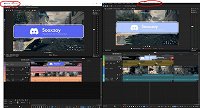
I noticed a huge issue with the Pro 23 Build as you can see in the attached picture.

I used the same files and copy pasted them from Vegas Pro 23 to 22 and the colour difference is huge! It seems like Vegas Pro 23 is not able to correctly show the original colours. Its not only for my discord animation but also for other animations like my logo.
Comments

yoo-changyun wrote on 9/10/2025, 8:12 AM

"I’m facing many of the same problems as well. For me, this issue happens with ProRes 4444. It’s frustrating — why wasn’t something so easy to catch tested properly before release?"

안녕하세요,

22버전을 그대로 유지하면서 Vegas Pro 23을 설치하는 데 성공했습니다.

첨부된 사진에서 볼 수 있는 Pro 23 Build에 큰 문제가 있는 것을 발견했습니다.

Vegas Pro 23에서 22로 동일한 파일을 복사하여 코팅한 것과 색상 차이가 정말 말도 안 돼요! Vegas Pro 23이 원래 색상을 제대로 보여 주는 것 같아요. 제 디스코드 카니발의 로고와 같은 다른 애니메이션에도 이와 같은 문제가 있습니다..


Sooxzay wrote on 9/10/2025, 8:41 AM

"I’m facing many of the same problems as well. For me, this issue happens with ProRes 4444. It’s frustrating — why wasn’t something so easy to catch tested properly before release?"

안녕하세요,

22버전을 그대로 유지하면서 Vegas Pro 23을 설치하는 데 성공했습니다.

첨부된 사진에서 볼 수 있는 Pro 23 Build에 큰 문제가 있는 것을 발견했습니다.

Vegas Pro 23에서 22로 동일한 파일을 복사하여 코팅한 것과 색상 차이가 정말 말도 안 돼요! Vegas Pro 23이 원래 색상을 제대로 보여 주는 것 같아요. 제 디스코드 카니발의 로고와 같은 다른 애니메이션에도 이와 같은 문제가 있습니다..


YES! It seems like ProRes is the issue here. My animations are ProRes aswell.

As long as this won't be fixed, I will stick with Vegas Pro 22. Sadly. I was really hyped about the new version..

RogerS wrote on 9/10/2025, 9:06 AM

I'm sure it will be fixed but for now you might need to stay with 22 or use a format like PNG, TIFF, etc.

Sirio wrote on 11/30/2025, 9:51 AM

I have the same problem. A TIFF in 8 bits, it's OK, the colours are respected, but if I impoprt a 16bits TIFF, there is a problem with colours.

RogerS wrote on 11/30/2025, 11:00 PM

@Sirio That may not be the same problem as it's ProRes specific..
I just took a tiff I have of a test chart, converted it to 16 bit and loaded both files into VP 23. They look identical. Can you share a problem TIFF? Does it matter what kind of compression it was made with?

Sirio wrote on 12/1/2025, 3:59 AM

Here a print screen where you can see the real colours on the left (exprorer preview) and the darker and more saturated colours on the VP23 on the right.

Here the same project on VP20

By this link you can download the original 16bit Tiff image used in the project:
https://www.swisstransfer.com/d/f2bd3bb4-a9f5-4a2d-aba4-597017294d72

If I transform this TIFF in 8bits, the colours are respected.

andyrpsmith wrote on 12/1/2025, 4:13 AM

This is what I get in V23 and V20:

V23:

V20:

They look the same to me.

In V23 I have the new colour transform thing disabled in the internal menu and full 8 bit colour in project settings.

Last changed by andyrpsmith on 12/1/2025, 4:19 AM, changed a total of 2 times.

(Intel 3rd gen i5@4.1GHz, 32GB RAM, SSD, 1080Ti GPU, Windows 10) Not now used with Vegas.

13th gen i913900K - water cooled, 96GB RAM, 4TB M2 drive, 4TB games SSD, 2TB video SSD, GPU RTX 4080 Super, Windows 11 pro

Sirio wrote on 12/1/2025, 4:29 AM

I cannot set the project settings on 8bit just because VP23 wrongs colours. VP20 manage perfectly 16bit TIFF with 32-bit-floating point setted on project settings. Then it's still a bug on VP23:

VP23 setted at 32-bit-floating point

VP20 setted at 32-bit-floating point

andyrpsmith wrote on 12/1/2025, 4:34 AM

Yes I get same as you when on 32bit (All my media is 8 bit colour in normal use).

3POINT wrote on 12/1/2025, 4:48 AM

IMO In VP23 video levels is equal full range for 8bit and also for 32bit, at least on my PC I do not see a difference when switching between video levels and full range.

RogerS wrote on 12/1/2025, 6:09 AM

Are these symptoms of the extended color space doing automatic transformations in 8 bit and 32 bit video modes?

andyrpsmith wrote on 12/1/2025, 7:12 AM

I have the automatic transform disabled and it does change the colour to the more saturated version when changing the project setting from 8bit to 32bit.

(Intel 3rd gen i5@4.1GHz, 32GB RAM, SSD, 1080Ti GPU, Windows 10) Not now used with Vegas.

13th gen i913900K - water cooled, 96GB RAM, 4TB M2 drive, 4TB games SSD, 2TB video SSD, GPU RTX 4080 Super, Windows 11 pro

Howard-Vigorita wrote on 12/1/2025, 10:10 AM

When I was doing color grading on my most recent project with b302, high level peaks bumped up over the top on the scopes switching from 8bit full to 32full, even though all the other project settings matched. Never saw it do that before. Scopes & internal settings did not affect it. Thought it might be a scopes bug because I couldn't see highs burning out in the preview. Performance was decent so to play it safe I just completed the project in 32bit full.

RogerS wrote on 12/2/2025, 12:28 AM

Thanks for the clarification of the problem being with the 32-bit modes and 16 bit TIFFs. I can confirm this problem with a 16 bit TIFF while an 8-bit one is fine.