4K preview playback stutter, even in V23 .302

m1ke_a wrote on 11/10/2025, 2:05 AM

Hi all.

I could never play 4K files in V19 without having to transcode to something else via Shutterencoder so took the plunge to upgrade to V23 at the weekend, thinking the new version would resolve this.

Unfortunately not.

I'm shooting with a Canon R6 II, Clog3 enabled and switching between HD or 4K IBP files. Have no problems playing and editting HD clips but 4K ones still stutter. I've tried adjusting Dynamic Ram and File I/O on off without effect. The clips play absolutely fine in external progs like MPC-BE.
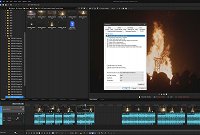
Interestingly the 4K files I've shot on my OnePlus 9 Pro mobile play without issue, so is this some weird Canon bug?

TVM

Comments

RogerS wrote on 11/10/2025, 7:17 AM

Could you share the MediaInfo details? I can see it's high data rate HEVC but nothing more. My guess is it's 10 bit and if its 422 your GPU can't decode it

m1ke_a wrote on 11/11/2025, 1:55 AM

Could you share the MediaInfo details? I can see it's high data rate HEVC but nothing more. My guess is it's 10 bit and if its 422 your GPU can't decode it

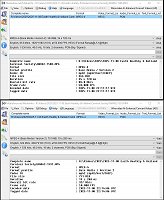
@RogerS Hi, yes they are 10 bit 422. But I can't work out why Vegas struggles with the 4K files when ShutterEncoder and MPC (and other viewers) play them fine? I only shoot for fun and am trying to avoid reencoding 4K files.


HD file

General
Complete name                            : R:\Videos\2025\2025-11-08 Easth Hoathly & Halland Carnival Society\MAR62-1588.MP4
Format                                   : MPEG-4
Format profile                           : Base Media / Version 2
Codec ID                                 : mp42 (mp42/hvc1/CAEP)
File size                                : 364 MiB
Duration                                 : 34 s 720 ms
Overall bit rate                         : 88.0 Mb/s
Frame rate                               : 50.000 FPS
Encoded date                             : 2025-11-08 22:11:17 UTC
Tagged date                              : 2025-11-08 22:11:17 UTC

Video
ID                                       : 1
Format                                   : HEVC
Format/Info                              : High Efficiency Video Coding
Format profile                           : Format Range@L5.1@High
Codec ID                                 : hvc1
Codec ID/Info                            : High Efficiency Video Coding
Duration                                 : 34 s 720 ms
Bit rate                                 : 85.8 Mb/s
Width                                    : 1 920 pixels
Height                                   : 1 080 pixels
Display aspect ratio                     : 16:9
Frame rate mode                          : Constant
Frame rate                               : 50.000 FPS
Color space                              : YUV
Chroma subsampling                       : 4:2:2
Bit depth                                : 10 bits
Bits/(Pixel*Frame)                       : 0.828
Stream size                              : 355 MiB (98%)
Language                                 : English
Encoded date                             : 2025-11-08 22:11:17 UTC
Tagged date                              : 2025-11-08 22:11:17 UTC
Color range                              : Full
Color primaries                          : BT.2020
Matrix coefficients                      : BT.2020 non-constant
Codec configuration box                  : hvcC

Audio
ID                                       : 2
Format                                   : PCM
Format settings                          : Big / Signed
Codec ID                                 : twos
Duration                                 : 34 s 720 ms
Bit rate mode                            : Constant
Bit rate                                 : 1 536 kb/s
Channel(s)                               : 2 channels
Sampling rate                            : 48.0 kHz
Bit depth                                : 16 bits
Stream size                              : 6.36 MiB (2%)
Language                                 : English
Encoded date                             : 2025-11-08 22:11:17 UTC
Tagged date                              : 2025-11-08 22:11:17 UTC

Other
ID                                       : 3
Type                                     : Time code
Format                                   : QuickTime TC
Duration                                 : 34 s 720 ms
Bit rate mode                            : Constant
Frame rate                               : 50.000 FPS
Time code of first frame                 : 00:57:51:12
Time code of last frame                  : 00:58:25:47
Time code, stripped                      : No
Language                                 : English
Encoded date                             : 2025-11-08 22:11:17 UTC
Tagged date                              : 2025-11-08 22:11:17 UTC


4K file

General
Complete name                            : R:\Videos\2025\2025-11-08 Easth Hoathly & Halland Carnival Society\MAR62-1591.MP4
Format                                   : MPEG-4
Format profile                           : Base Media / Version 2
Codec ID                                 : mp42 (mp42/hvc1/CAEP)
File size                                : 751 MiB
Duration                                 : 19 s 280 ms
Overall bit rate                         : 327 Mb/s
Frame rate                               : 50.000 FPS
Encoded date                             : 2025-11-08 22:14:06 UTC
Tagged date                              : 2025-11-08 22:14:06 UTC

Video
ID                                       : 1
Format                                   : HEVC
Format/Info                              : High Efficiency Video Coding
Format profile                           : Format Range@L5.2@High
Codec ID                                 : hvc1
Codec ID/Info                            : High Efficiency Video Coding
Duration                                 : 19 s 280 ms
Bit rate                                 : 324 Mb/s
Width                                    : 3 840 pixels
Height                                   : 2 160 pixels
Display aspect ratio                     : 16:9
Frame rate mode                          : Constant
Frame rate                               : 50.000 FPS
Color space                              : YUV
Chroma subsampling                       : 4:2:2
Bit depth                                : 10 bits
Bits/(Pixel*Frame)                       : 0.781
Stream size                              : 745 MiB (99%)
Language                                 : English
Encoded date                             : 2025-11-08 22:14:06 UTC
Tagged date                              : 2025-11-08 22:14:06 UTC
Color range                              : Full
Color primaries                          : BT.2020
Matrix coefficients                      : BT.2020 non-constant
Codec configuration box                  : hvcC

Audio
ID                                       : 2
Format                                   : PCM
Format settings                          : Big / Signed
Codec ID                                 : twos
Duration                                 : 19 s 280 ms
Bit rate mode                            : Constant
Bit rate                                 : 1 536 kb/s
Channel(s)                               : 2 channels
Sampling rate                            : 48.0 kHz
Bit depth                                : 16 bits
Stream size                              : 3.53 MiB (0%)
Language                                 : English
Encoded date                             : 2025-11-08 22:14:06 UTC
Tagged date                              : 2025-11-08 22:14:06 UTC

Other
ID                                       : 3
Type                                     : Time code
Format                                   : QuickTime TC
Duration                                 : 19 s 280 ms
Bit rate mode                            : Constant
Frame rate                               : 50.000 FPS
Time code of first frame                 : 01:00:40:38
Time code of last frame                  : 01:01:00:01
Time code, stripped                      : No
Language                                 : English
Encoded date                             : 2025-11-08 22:14:06 UTC
Tagged date                              : 2025-11-08 22:14:06 UTC


Reyfox wrote on 11/11/2025, 2:03 AM

@m1ke_a we have fairly similar computer builds. If you can provide a sample of both types of files to the cloud, I'll give it go.


Newbie😁

Vegas Pro 23 B356 (VP18-22 also installed)

Win 11 Pro 23H2 (Build 22631.6199)

AMD Ryzen 9 5950X 16 cores / 32 threads

64GB DDR4 3200 Patriot Viper

Sapphire RX6700XT 12GB Driver: 25.12.1

Gigabyte X570 Elite Motherboard

Panasonic G9, G7, FZ300

Boris FX Continuum Complete 2026, Newblue FX Total FX360, Ignite Pro V5, proDAD Vitascene V5 Pro and Mercalli V6 OFX

m1ke_a wrote on 11/11/2025, 3:27 AM

@m1ke_a we have fairly similar computer builds. If you can provide a sample of both types of files to the cloud, I'll give it go.


@Reyfox thanks very much. I don't actively use cloud storage but have hopefully put 2 files here - https://drive.google.com/drive/folders/1nBwhIEJ1J3KeyTbiJkBVvT5uZtwXdVNU?usp=drive_link

andyrpsmith wrote on 11/11/2025, 4:17 AM

Here we go, on my system see sig on V23 the 4K footage plays back at 3 fps, HD plays back at 30fps. On V22 the 4K plays back at 50 fps, HD plays back at 50fps. So much for the new faster engine. This is all at Best full.

Last changed by andyrpsmith on 11/11/2025, 4:18 AM, changed a total of 1 times.

(Intel 3rd gen i5@4.1GHz, 32GB RAM, SSD, 1080Ti GPU, Windows 10) Not now used with Vegas.

13th gen i913900K - water cooled, 96GB RAM, 4TB M2 drive, 4TB games SSD, 2TB video SSD, GPU RTX 4080 Super, Windows 11 pro

Reyfox wrote on 11/11/2025, 4:26 AM

@m1ke_a ok... just dumped the 2 files on the timeline, which was set to the 4K from your 4K clip.

Below is a screenshot of what was happening. The GPU was doing really nothing. The heavy lifting (timeline playback) was handled by the CPU. As you can see, my CPU was really starting to get used with the 4K clip. With the 1080HD clip, the CPU was about 27%, and playback was smooth at 50fps. With the 4K clip, upper 40-50fps and it was smooth. Preview was set to Best>Auto.

Now, if you want to edit a little smoother, you can set your timeline to 1080HD with your 4K video. When you finish your editing, change it back to 4K and render. Or, play with the different Preview settings. With playback even in the 20-30fps range on my computer, while it wasn't the smoothest, it certainly wasn't choppy.

Last changed by Reyfox on 11/11/2025, 4:34 AM, changed a total of 1 times.

Newbie😁

Vegas Pro 23 B356 (VP18-22 also installed)

Win 11 Pro 23H2 (Build 22631.6199)

AMD Ryzen 9 5950X 16 cores / 32 threads

64GB DDR4 3200 Patriot Viper

Sapphire RX6700XT 12GB Driver: 25.12.1

Gigabyte X570 Elite Motherboard

Panasonic G9, G7, FZ300

Boris FX Continuum Complete 2026, Newblue FX Total FX360, Ignite Pro V5, proDAD Vitascene V5 Pro and Mercalli V6 OFX

m1ke_a wrote on 11/11/2025, 4:35 AM

All

thanks very much for your replies so far 👍.

I mainly shoot stills and these bonfire events are typically shot at ISO 10,000 or more. I haven't played with noise reduction or much grading as yet but thought it best to start with the highest quality original footage I could capture.

I have previously encoded to Prores but the files are huge so any suggestions on a Vegas friendly format that I can still do some basic grading on? - I haven't really got my head around proxies.

And @andyrpsmith where can I check playback speed in my timeline please?

Reyfox wrote on 11/11/2025, 4:41 AM

@m1ke_a you can see your playback speed in the Preview window at the bottom on the right. See my image above. The playback is the red lettered.

Newbie😁

Vegas Pro 23 B356 (VP18-22 also installed)

Win 11 Pro 23H2 (Build 22631.6199)

AMD Ryzen 9 5950X 16 cores / 32 threads

64GB DDR4 3200 Patriot Viper

Sapphire RX6700XT 12GB Driver: 25.12.1

Gigabyte X570 Elite Motherboard

Panasonic G9, G7, FZ300

Boris FX Continuum Complete 2026, Newblue FX Total FX360, Ignite Pro V5, proDAD Vitascene V5 Pro and Mercalli V6 OFX

m1ke_a wrote on 11/11/2025, 5:02 AM

@m1ke_a you can see your playback speed in the Preview window at the bottom on the right. See my image above. The playback is the red lettered.

Cheers. Just checked mine and the HD clips were around 46fps and the GPU was showing around 20% usage. The GPU dropped to 5% and less than 4fps on the 4K clip.

BUT

I've just transcoded the 4K file to Prores and that only plays back at 2 - 3 fps in VP23. It plays back fine in VP19.....😒 One step forward, two steps sideways and one step back


Reyfox wrote on 11/11/2025, 5:11 AM

What did you use to transcode to Prores? Just the 4K clip?

Newbie😁

Vegas Pro 23 B356 (VP18-22 also installed)

Win 11 Pro 23H2 (Build 22631.6199)

AMD Ryzen 9 5950X 16 cores / 32 threads

64GB DDR4 3200 Patriot Viper

Sapphire RX6700XT 12GB Driver: 25.12.1

Gigabyte X570 Elite Motherboard

Panasonic G9, G7, FZ300

Boris FX Continuum Complete 2026, Newblue FX Total FX360, Ignite Pro V5, proDAD Vitascene V5 Pro and Mercalli V6 OFX

m1ke_a wrote on 11/11/2025, 6:34 AM

What did you use to transcode to Prores? Just the 4K clip?

Shutter Encoder v18.6, straight conversion with no other tweaks. - This is what I've done on previous clips for VP19

Reyfox wrote on 11/11/2025, 10:24 AM

Tied up at the moment. But will test and report back.

@andyrpsmith you have 2 systems listed in your Signature. I am guessing you used the 3900K and 4080? What was your Preview setting?

There wasn't much variance between VP22 and VP23 for me with the same Preview/Project settings.

Last changed by Reyfox on 11/11/2025, 10:27 AM, changed a total of 1 times.

Newbie😁

Vegas Pro 23 B356 (VP18-22 also installed)

Win 11 Pro 23H2 (Build 22631.6199)

AMD Ryzen 9 5950X 16 cores / 32 threads

64GB DDR4 3200 Patriot Viper

Sapphire RX6700XT 12GB Driver: 25.12.1

Gigabyte X570 Elite Motherboard

Panasonic G9, G7, FZ300

Boris FX Continuum Complete 2026, Newblue FX Total FX360, Ignite Pro V5, proDAD Vitascene V5 Pro and Mercalli V6 OFX

andyrpsmith wrote on 11/11/2025, 12:11 PM

The preview was best full and all other settings the same for both V23 and V22. This is on the i9 13900K/4080 super system. I am no fan of HEVC and never need to use it. For all my renders I use AV1 which is superior to HEVC in every way.

Howard-Vigorita wrote on 11/12/2025, 4:43 PM

The problem isn't hevc... it's the hevc 4:2:2 chroma sub-sampling which is only supported by Vegas at the moment on Intel Arcs and late-model Intel igpus. 422 hevc is supposedly supported by Nvidia 5000-series but not yet by Vegas. But if the Nvidia acceleration is anything like with Intel Arcs, it might not be that great. I personally think 422 is a no-gain effort unless the footage is from a 3CCD camera sensor that actually captures more pixels than the 420 sensors like the one in a Canon R6. The Sony PXW-Z300 is one of the few. Otherwise, it's more marketing hype than anything else.