*FIXED - Overlaying multiple videos is producing black flicker.

daniel-g wrote on 4/18/2020, 10:15 AM

This video explains what I think is happening as the rest of the render seems to be fine,

This video shows my settings.

And here is some info on the source files,
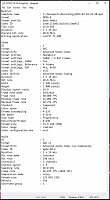
I just want to be able to render this video without having to deal with a black flicker. I've tried many ideas, turning GPU off, updating codex... Any help would be greatly appreciated.

*FIXED - I went into my graphics card settings, and I enabled a setting on it called "OpenGL Triple Buffering" and for some reason that worked paired with some OpenGL settings in Options>Preference Shift Click> internal turned to FALSE.

Comments

j-v wrote on 4/18/2020, 10:35 AM

Your video source has a very variable bitrate of 15-60 fps. Vegas software does not like such files. Those files you have to convert first to Constant Bitrate.

met vriendelijke groet
Marten

Camera : Pan X900, GoPro Hero7 Hero Black, DJI Osmo Pocket, Samsung Galaxy A8
Desktop :MB Gigabyte Z390M, W11 home version 24H2, i7 9700 4.7Ghz,16 DDR4 GB RAM, Gef. GTX 1660 Ti with driver
566.14 Studiodriver and Intel HD graphics 630 with driver 31.0.101.2130
Laptop  :Asus ROG Str G712L, W11 home version 25H2, CPU i7-10875H, 16 GB RAM, NVIDIA GeForce RTX 2070 with Studiodriver 591.86 and Intel UHD Graphics 630 with driver 26.20.100.7985
Vegas software: VP 10 to 23 and VMS(pl) 10,12 to 17.
TV      :LG 4K 55EG960V

My slogan is: BE OR BECOME A STEM CELL DONOR!!! (because it saved my life in 2016)


Howard-Vigorita wrote on 4/18/2020, 11:38 AM

Not sure if this applies here but I used to see a snowy effect in black areas in blue rays I authored whenever I used gpu-assisted fx. Turning off the gpu alone helped but did not make it totally go away. Going back in and replacing each fx, selecting only from the 32-bit floating point section, did the trick.

rraud wrote on 4/18/2020, 5:53 PM

I had a fade-to-black flickering issue recently on parts of the project after rendering an AVC. After tearing my hair out (what little I have left), I discovered it was the media players on the particular PC I was using. MPC and the Win Media player exhibited the behavior, VLC and another did not. It was ok on other computers as well. All was fine after YT's re-encode too