Clips not snapping to grid perfectly

John-Rodgers wrote on 11/5/2025, 9:12 PM

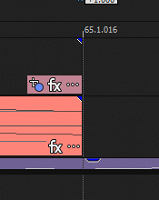
Okay for some reason, I have my project set to Measures and Beats, I have Grid Spacing set to 16th Notes, I have Enable Snapping, Snap to Grid, Snap to Marker, and Snap to All Events turned on, and I have Quantize to Frames turned off. However, when I add a clip to the grid, it doesn't snap perfectly when I zoom in. It used to do that before, but now it does it for me. Any idea on how fix this? I'm using Vegas Pro 21.
Comments

Steve_Rhoden wrote on 11/8/2025, 2:24 PM

@John-Rodgers In that Default Layout, try it with Quantize to Frames turned on and see.

John-Rodgers wrote on 11/12/2025, 12:47 PM

Now it's doing it in both layouts again

John-Rodgers wrote on 11/14/2025, 8:31 PM

I just realized it only does it from time to time

DMT3 wrote on 12/5/2025, 1:32 PM

There is NO REASON to ever turn off QUANTIZE TO FRAMES when editing video. They should remove that option. Video always has to edit on a frame, period.

Howard-Vigorita wrote on 12/5/2025, 2:09 PM

There is NO REASON to ever turn off QUANTIZE TO FRAMES when editing video. They should remove that option. Video always has to edit on a frame, period.

@DMT3 They would need to exempt region-marking... video frame quantization is too course for accurate control over audio events. There's an option to not quantize audio-only edits but it doesn't apply to region-marking audio envelopes which is an essential part of my workflow. Only workaround I've found is to turn off video quantization while doing audio volume, mute, pan, and fx envelope edits. Without accurate region-marking, the only workaround would be to tediously insert 4-point envelope regions one point at a time.

DMT3 wrote on 12/5/2025, 2:16 PM

@Howard-Vigorita Yeah, I mentioned when editing video. It should be a video rule, with audio exceptions. But audio has its "frames" also. They are the samples. You cannot edit less than a sample in audio, but since a sample is so short, in most cases it is not an issue.

John-Rodgers wrote on 12/14/2025, 12:43 PM

I also realized that when I zoom in on an event, it aligns with the grid markers inconsistently when too close. It also does that when I scroll vertically while zoomed in at the max amount. So I don't think Quantize to Frames is the cause, since I still have it turned off.