Help! Every 30th frame is clear, rest have glitch, patches & artifacts

Old_Boy wrote on 12/14/2025, 4:21 AM

Hello,
I encountered a wierd bug, all the videos from one particular mobile phone when imported in Vegas 23 gets glitchy. Only every 30th frame being clear i.e. 1st, 30th, 60th........ and so on. Rest of frames have wierd glitch, patches & unusual visual artifacts. Original video plays fine outside of vegas. Patches are seen once I import the video in vegas, both in timeline and preview, rendered video also shows the same patches. Attaching Screenshots.
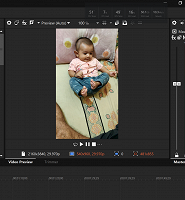
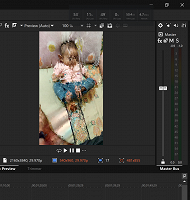
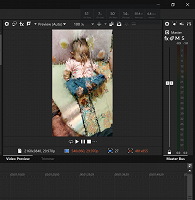
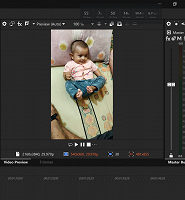
Can someone please help and provide a solution for this.

System Details :-
Intel i7 14700k, AMD 6900 XTX, 128 Gb Ram, Windows 11.

Comments

RogerS wrote on 12/14/2025, 6:01 AM

Could you share a sample file for testing? Does checking legacy AVC in preferences/ file io help? If you shared MediaInfo we could provide more specific advice.

Old_Boy wrote on 12/14/2025, 6:29 AM

Please post MediaInfo on one of the files. Instructions here https://www.vegascreativesoftware.info/us/forum/faq-how-to-post-mediainfo-and-vegas-pro-file-properties--104561/

General
  Name: VID_20231013_203807.mp4
  Folder: E:\All Videos\Grogu\Nitish's 27.05.2023 to 26.03.2024 Phone Camera\vertical
  Type: ISO Base
  Size: 285.46 MB (292,312,278 bytes)
  Created: Saturday, January 20, 2024, 7:48:21 AM
  Modified: Friday, October 13, 2023, 8:39:04 PM
  Accessed: Sunday, December 14, 2025, 5:57:34 PM
  Attributes: Archive

Media information
  Stream format: MPEG-4
  Video stream #1
    Video format: AVC
    Resolution: 3840 x 2160 px
    Aspect ratio: 16:9
    Color depth: 8 bit
    Frame rate: 30.108 fps
    Scan type: Progressive
    Bit rate: 42021462 bps
  Audio stream #1
    Audio format: AAC
    Sampling rate: 48000 Hz
    Channels: 2 channels
    Bit rate mode: Constant

Streams
  Video: 00:00:55.355, 29.970 fps progressive, 3840x2160x32, AVC
  Audio: 00:00:55.381, 48000 Hz, 16 Bits, Stereo, AAC

ACID information
  ACID chunk: no
  Stretch chunk: no
  Stretch list: no
  Stretch info2: no
  Beat markers: no
  Detected beats: no

Other metadata
  Regions/markers: no
  Command markers: no

Media manager
  Media tags: no

Plug-In
  Name: mxcompoundplug.dll
  Folder: C:\Program Files\VEGAS\VEGAS Pro 23.0\FileIO Plug-Ins\mxcompoundplug
  Format: MAGIX AVC
  Version: Version 23.0 (Build 302)
  Company: MAGIX Computer Products Intl. Co.

Old_Boy wrote on 12/14/2025, 6:32 AM

Please post MediaInfo on one of the files. Instructions here https://www.vegascreativesoftware.info/us/forum/faq-how-to-post-mediainfo-and-vegas-pro-file-properties--104561/

Another file with same problem.


General
  Name: VID_20231202_094056.mp4
  Folder: E:\All Videos\Grogu\Nitish's 27.05.2023 to 26.03.2024 Phone Camera\vertical
  Type: ISO Base
  Size: 81.13 MB (83,078,774 bytes)
  Created: Saturday, January 20, 2024, 7:50:31 AM
  Modified: Saturday, December 2, 2023, 9:41:13 AM
  Accessed: Sunday, December 14, 2025, 6:00:07 PM
  Attributes: Archive

Media information
  Stream format: MPEG-4
  Video stream #1
    Video format: AVC
    Resolution: 3840 x 2160 px
    Aspect ratio: 16:9
    Color depth: 8 bit
    Frame rate: 30.108 fps
    Scan type: Progressive
    Bit rate: 42032477 bps
  Audio stream #1
    Audio format: AAC
    Sampling rate: 48000 Hz
    Channels: 2 channels
    Bit rate mode: Constant

Streams
  Video: 00:00:15.682, 29.970 fps progressive, 3840x2160x32, AVC
  Audio: 00:00:15.701, 48000 Hz, 16 Bits, Stereo, AAC

ACID information
  ACID chunk: no
  Stretch chunk: no
  Stretch list: no
  Stretch info2: no
  Beat markers: no
  Detected beats: no

Other metadata
  Regions/markers: no
  Command markers: no

Media manager
  Media tags: no

Plug-In
  Name: mxcompoundplug.dll
  Folder: C:\Program Files\VEGAS\VEGAS Pro 23.0\FileIO Plug-Ins\mxcompoundplug
  Format: MAGIX AVC
  Version: Version 23.0 (Build 302)
  Company: MAGIX Computer Products Intl. Co.

Old_Boy wrote on 12/14/2025, 6:39 AM

Please post MediaInfo on one of the files. Instructions here https://www.vegascreativesoftware.info/us/forum/faq-how-to-post-mediainfo-and-vegas-pro-file-properties--104561/

General
Complete name                            : Z:\attach\VID_20231013_203807.mp4
Format                                   : MPEG-4
Format profile                           : Base Media / Version 2
Codec ID                                 : mp42 (isom/mp42)
File size                                : 279 MiB
Duration                                 : 55 s 401 ms
Overall bit rate                         : 42.2 Mb/s
Frame rate                               : 30.108 FPS
Encoded date                             : 2023-10-13 15:09:04 UTC
Tagged date                              : 2023-10-13 15:09:04 UTC
Recorded location                        : 22.3428°N 82.7002°E
Writing operating system                 : Google Android 12

Video
ID                                       : 1
Format                                   : AVC
Format/Info                              : Advanced Video Codec
Format profile                           : High@L1
Format settings                          : CABAC / 1 Ref Frames
Format settings, CABAC                   : Yes
Format settings, Reference frames        : 1 frame
Format settings, GOP                     : M=1, N=30
Codec ID                                 : avc1
Codec ID/Info                            : Advanced Video Coding
Duration                                 : 55 s 367 ms
Source duration                          : 55 s 367 ms
Bit rate                                 : 42.0 Mb/s
Width                                    : 3 840 pixels
Height                                   : 2 160 pixels
Display aspect ratio                     : 16:9
Rotation                                 : 90°
Frame rate mode                          : Variable
Frame rate                               : 30.108 FPS
Minimum frame rate                       : 23.101 FPS
Maximum frame rate                       : 43.332 FPS
Real frame rate                          : 30.000 FPS
Standard                                 : NTSC
Color space                              : YUV
Chroma subsampling                       : 4:2:0
Bit depth                                : 8 bits
Scan type                                : Progressive
Bits/(Pixel*Frame)                       : 0.168
Stream size                              : 277 MiB (99%)
Source stream size                       : 277 MiB (99%)
Title                                    : VideoHandle
Language                                 : English
Encoded date                             : 2023-10-13 15:09:04 UTC
Tagged date                              : 2023-10-13 15:09:04 UTC
Color range                              : Limited
colour_range_Original                    : Full
Color primaries                          : BT.2020
colour_primaries_Original                : BT.601 PAL
Transfer characteristics                 : BT.709
transfer_characteristics_Original        : BT.601
Matrix coefficients                      : BT.2020 non-constant
matrix_coefficients_Original             : BT.470 System B/G
mdhd_Duration                            : 55367
Codec configuration box                  : avcC

Audio
ID                                       : 2
Format                                   : AAC LC
Format/Info                              : Advanced Audio Codec Low Complexity
Codec ID                                 : mp4a-40-2
Duration                                 : 55 s 401 ms
Source duration                          : 55 s 381 ms
Bit rate mode                            : Constant
Nominal bit rate                         : 156 kb/s
Channel(s)                               : 2 channels
Channel layout                           : L R
Sampling rate                            : 48.0 kHz
Frame rate                               : 46.875 FPS (1024 SPF)
Compression mode                         : Lossy
Source stream size                       : 1.03 MiB (0%)
Title                                    : SoundHandle
Language                                 : English
Encoded date                             : 2023-10-13 15:09:04 UTC
Tagged date                              : 2023-10-13 15:09:04 UTC
mdhd_Duration                            : 55401

Old_Boy wrote on 12/14/2025, 6:43 AM

Could you share a sample file for testing? Does checking legacy AVC in preferences/ file io help? If you shared MediaInfo we could provide more specific advice.

Just tried enabling legacy AVC in file io, it doesn't solve the issue. I have shared the mediainfo. Trying to upload the video file here.

Old_Boy wrote on 12/14/2025, 6:44 AM

Could you share a sample file for testing? Does checking legacy AVC in preferences/ file io help? If you shared MediaInfo we could provide more specific advice.


Old_Boy wrote on 12/14/2025, 6:51 AM

Could you share a sample file for testing? Does checking legacy AVC in preferences/ file io help? If you shared MediaInfo we could provide more specific advice.

Below is the link for 2 such sample files.

https://drive.google.com/drive/folders/1e5GC100ddamE7mKe6zORBRmQfPccuDqs?usp=sharing

RogerS wrote on 12/14/2025, 6:55 AM

Interesting that legacy AVC didn't help.

The file is variable framerate which is common for cell footage.
These color characteristics are pretty strange.

Color primaries                          : BT.2020
colour_primaries_Original                : BT.601 PAL
Transfer characteristics                 : BT.709
transfer_characteristics_Original        : BT.601
Matrix coefficients                      : BT.2020 non-constant
matrix_coefficients_Original             : BT.470 System B/G
mdhd_Duration                            : 55367
Codec configuration box                  : avcC

Please upload it somewhere we can download it from, not the forum (Dropbox, Google Drive, etc.) Thank you, happy to take a look at it.
Edit: I see you uploaded files. Thanks.

Last changed by RogerS on 12/14/2025, 6:57 AM, changed a total of 1 times.

Custom PC (2022) Intel i5-13600K with UHD 770 iGPU with latest driver, MSI z690 Tomahawk motherboard, 64GB Corsair DDR5 5200 ram, NVIDIA 5070 (12GB) with latest studio driver, 2TB Hynix P41 SSD and 2TB Samsung 980 Pro cache drive, Windows 11 Pro 64 bit https://pcpartpicker.com/b/rZ9NnQ

ASUS Zenbook Pro 14 Intel i9-13900H with Intel graphics iGPU with latest ASUS driver, NVIDIA 4060 (8GB) with latest studio driver, 48GB system ram, Windows 11 Home, 1TB Samsung SSD.

VEGAS Pro 21.208
VEGAS Pro 22.250
VEGAS Pro 23.302

Try the
VEGAS 4K "sample project" benchmark (works with VP 16+): https://forms.gle/ypyrrbUghEiaf2aC7
VEGAS Pro 20 "Ad" benchmark (works with VP 20+): https://forms.gle/eErJTR87K2bbJc4Q7

Dexcon wrote on 12/14/2025, 6:59 AM

From the latest MediaInfo report, there's a large difference between the low and high fps of your phone media.

Phone video has always been an issue in Vegas Pro with 'Variable Frame Rate' (VFR) - 23 to 43 fps in your case -- try transcoding the VFR phone video to 'Constant Frame Rate' (CFR) by using Vegas Pro or a 3rd party transcoder like Handbrake or Shutter Encoder.

Cameras: Sony FDR-AX100E; GoPro Hero 11 Black Creator Edition; Samsung S23 Ultra smart phone

Installed: Vegas Pro 13, 15, 16, 17, 18, 19, 20, 21, 22 & 23, HitFilm Pro 2021.3, DaVinci Resolve Studio 20.3, BCC 2026, Mocha Pro 2026, NBFX TotalFX 7, Neat NR 6, DVD Architect 6.0, MAGIX Travel Maps, Sound Forge Pro 16, SpectraLayers Pro 12, iZotope RX11 Advanced and many other iZ plugins, Vegasaur 4.0

Windows 11 25H2

Dell Alienware Aurora 11:

10th Gen Intel i9 10900KF - 10 cores (20 threads) - 3.7 to 5.3 GHz

NVIDIA GeForce RTX 2080 SUPER 8GB GDDR6 - liquid cooled

64GB RAM - Dual Channel HyperX FURY DDR4 XMP at 3200MHz

C drive: 2TB Samsung 990 PCIe 4.0 NVMe M.2 PCIe SSD

D: drive: 4TB Samsung 870 SATA SSD (used for media for editing current projects)

E: drive: 2TB Samsung 870 SATA SSD

F: drive: 6TB WD 7200 rpm Black HDD 3.5"

Dell Ultrasharp 32" 4K Color Calibrated Monitor


LAPTOP:

Dell Inspiron 5310 EVO 13.3"

i5-11320H CPU

C Drive: 1TB Corsair Gen4 NVMe M.2 2230 SSD (upgraded from the original 500 GB SSD)

Monitor is 2560 x 1600 @ 60 Hz

Old_Boy wrote on 12/14/2025, 7:02 AM

Interesting that legacy AVC didn't help.

The file is variable framerate which is common for cell footage.
These color characteristics are pretty strange.

Color primaries                          : BT.2020
colour_primaries_Original                : BT.601 PAL
Transfer characteristics                 : BT.709
transfer_characteristics_Original        : BT.601
Matrix coefficients                      : BT.2020 non-constant
matrix_coefficients_Original             : BT.470 System B/G
mdhd_Duration                            : 55367
Codec configuration box                  : avcC

Please upload it somewhere we can download it from, not the forum (Dropbox, Google Drive, etc.) Thank you, happy to take a look at it.

https://drive.google.com/drive/folders/1e5GC100ddamE7mKe6zORBRmQfPccuDqs?usp=sharing

I've uploaded and shared the files. Thanks for taking the effort to help. :)

RogerS wrote on 12/14/2025, 7:02 AM

In VP 21.208 decoding with my Intel iGPU, the file loads and plays fine.
In VP 23 decoding with my NVIDIA RTX 5070 the file also loads and plays fine.

Maybe it's an issue with AMD GPUs? If you set hardware decoding to off in preferences, file io (legacy AVC unchecked) does it display normally?

Old_Boy wrote on 12/14/2025, 7:08 AM

In VP 21.208 decoding with my Intel iGPU, the file loads and plays fine.
In VP 23 decoding with my NVIDIA RTX 5070 the file also loads and plays fine.

Maybe it's an issue with AMD GPUs? If you set hardware decoding to off in preferences, file io (legacy AVC unchecked) does it display normally?

How exactly do I set hardware decoding to off in Vegas 23 ? There are too many options in preferences.. can you please guide me a bit more.

Old_Boy wrote on 12/14/2025, 7:20 AM

From the latest MediaInfo report, there's a large difference between the low and high fps of your phone media.

Phone video has always been an issue in Vegas Pro with 'Variable Frame Rate' (VFR) - 23 to 43 fps in your case -- try transcoding the VFR phone video to 'Constant Frame Rate' (CFR) by using Vegas Pro or a 3rd party transcoder like Handbrake or Shutter Encoder.

I just exported these files using Topaz Video Ai, new files have 30 fps and now it works fine in Vegas. This adds an extra step but at least now i can edit the files. Thanks.

RogerS wrote on 12/14/2025, 7:27 AM

It is in options/preferences/ file io. Look for hardware decoder to use.

Personally I'd use ShutterEncoder to do conversions.

3POINT wrote on 12/14/2025, 10:38 AM

In VP 21.208 decoding with my Intel iGPU, the file loads and plays fine.
In VP 23 decoding with my NVIDIA RTX 5070 the file also loads and plays fine.

Maybe it's an issue with AMD GPUs? If you set hardware decoding to off in preferences, file io (legacy AVC unchecked) does it display normally?

Same at my PC, no issues in VP22 and VP23 with NVIDIA GTX2080.

john_dennis wrote on 12/14/2025, 11:16 AM

No issues here with the on-die Intel UHD770 video adapter in my 13-900k. Has any other AMD user reported?