VEGAS Pro 23 Crash When MOV File Load. MOV File Attached

iEmby wrote on 12/28/2025, 3:55 AM

Please check this clip to see how it happened.
this the clip.

https://drive.google.com/file/d/1yAbCn3nK3clS9TzBvBU9Iw6R4p830gmE/view?usp=sharing

PROCESSOR
     

Operating System: Windows 11 Pro 64-bit (Always Updated)
System Manufacturer: ASUS
12th Gen Intel(R) Core(TM) i7-12700 (20 CPUs), ~2.1GHz - 4.90GHz
Memory: 32GB RAM
Page File: 11134MB used, 7934MB Available
DirectX Version: DirectX 12

-----------------------------------------------

MOTHERBOARD


ASUS PRIME H610-CS D4
Intel® H610 (LGA 1700)
Ready for 12th Gen Intel® Processors
Micro-ATX Motherboard with DDR4
Realtek 1 Gb Ethernet
PCH Heatsink
PCIe 4.0 | M.2 slot (32Gbps) 
HDMI® | D-Sub | USB 3.2 Gen 1 ports
SATA 6 Gbps | COM header
LPT header | TPM header
Luminous Anti-Moisture Coating
5X Protection III
(Multiple Hardware Safeguards
For all-round protection)

-----------------------------------------------
EXTERNAL GRAPHIC CARD
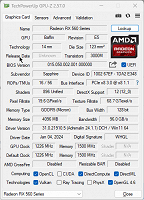
-----------------------------------------------

INTERNAL GRAPHIC CARD (iGPU)
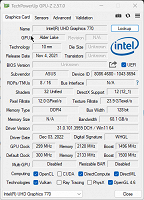
------------------------------------------------

LED - MONITOR

Monitor Name: Generic PnP Monitor
Monitor Model: HP 22es
Monitor Id: HWP331B
Native Mode: 1920 x 1080(p) (60.000Hz)
Output Type: HDMI

-----------------------------------------------

STORAGE DRIVE

Drive: C:
Free Space: 182.3 GB
Total Space: 253.9 GB
File System: NTFS
Model: WD Blue SN570 1TB (NVMe)

---------------O----------------

My System Info (PDF File).

https://drive.google.com/open?id=1-eoLmuXzshTRH_8RunAYAuNocKpiLoiV&usp=drive_fs


Also Check

Some useful creations by me including VEGAS Scripts

https://getopensofts.blogspot.com/


My YouTube Channel Dedicated to Only VEGAS Pro Tutorials

EDITROOM : My YouTube Channel (For VEGAS Tutorials)

Comments

3POINT wrote on 12/28/2025, 5:14 AM

I cannot confirm, logo footage doesn't crash my VP23B302.

Dexcon wrote on 12/28/2025, 5:41 AM

Same here. No problem importing that video event into VP23 build 302.

I see from your signature that your GPU is an RX 560 which is now getting rather elderly. Try turning off GPU acceleration in either or both Options/Preferences/File I/O and Tabs to see if any of those on/off combinations make a difference.

Cameras: Sony FDR-AX100E; GoPro Hero 11 Black Creator Edition; Samsung S23 Ultra smart phone

Installed: Vegas Pro 13, 15, 16, 17, 18, 19, 20, 21, 22 & 23, HitFilm Pro 2021.3, DaVinci Resolve Studio 20.3, BCC 2026, Mocha Pro 2026, NBFX TotalFX 7, Neat NR 6, DVD Architect 6.0, MAGIX Travel Maps, Sound Forge Pro 16, SpectraLayers Pro 12, iZotope RX11 Advanced and many other iZ plugins, Vegasaur 4.0

Windows 11 25H2

Dell Alienware Aurora 11:

10th Gen Intel i9 10900KF - 10 cores (20 threads) - 3.7 to 5.3 GHz

NVIDIA GeForce RTX 2080 SUPER 8GB GDDR6 - liquid cooled

64GB RAM - Dual Channel HyperX FURY DDR4 XMP at 3200MHz

C drive: 2TB Samsung 990 PCIe 4.0 NVMe M.2 PCIe SSD

D: drive: 4TB Samsung 870 SATA SSD (used for media for editing current projects)

E: drive: 2TB Samsung 870 SATA SSD

F: drive: 6TB WD 7200 rpm Black HDD 3.5"

Dell Ultrasharp 32" 4K Color Calibrated Monitor


LAPTOP:

Dell Inspiron 5310 EVO 13.3"

i5-11320H CPU

C Drive: 1TB Corsair Gen4 NVMe M.2 2230 SSD (upgraded from the original 500 GB SSD)

Monitor is 2560 x 1600 @ 60 Hz

RogerS wrote on 12/28/2025, 7:21 AM

First off, it's important to know what we are dealing with. It's ProRes 4444. 23 has had so many issues with ProRes- I'd stay in 22 if that's what you are working with (gamma issues and more).

I can confirm it crashes my 23.356 (testing with RTX 5070 desktop).

General
Complete name                  : Animated LOGO.mov
Format                         : QuickTime
Format/Info                    : Original Apple specifications
File size                      : 176 MiB
Duration                       : 10 s 67 ms
Overall bit rate mode          : Variable
Overall bit rate               : 146 Mb/s
Frame rate                     : 30.000 FPS
Encoded date                   : 2025-01-28 17:45:50 UTC
Tagged date                    : 2025-01-28 17:45:50 UTC

Video
ID                             : 1
Format                         : ProRes
Format version                 : Version 1
Format profile                 : 4444 XQ
Codec ID                       : ap4x
Duration                       : 10 s 67 ms
Bit rate mode                  : Variable
Bit rate                       : 146 Mb/s
Width                          : 1 080 pixels
Height                         : 1 080 pixels
Display aspect ratio           : 1.000
Frame rate mode                : Constant
Frame rate                     : 30.000 FPS
Color space                    : YUVA
Chroma subsampling             : 4:4:4
Scan type                      : Progressive
Bits/(Pixel*Frame)             : 4.180
Stream size                    : 176 MiB (100%)
Writing library                : magx
Language                       : English
Encoded date                   : 2025-01-28 17:45:50 UTC
Tagged date                    : 2025-01-28 17:45:50 UTC
Color primaries                : BT.709
Transfer characteristics       : BT.709
Matrix coefficients            : BT.709

-------------------------------------------

Problem Description
   Application Name:    VEGAS Pro
   Application Version: Version 23.0 (Build 356)
   Problem:             Unmanaged Exception (0xc0000005)
   Fault Module:        C:\Program Files\VEGAS\VEGAS Pro 23.0\FileIO Plug-Ins\mxcompoundplug\APPLEPRORES.dll
   Fault Address:       0x00007FFDB6061029
   Fault Offset:        0x0000000000041029

Fault Process Details
   Process Path:        C:\Program Files\VEGAS\VEGAS Pro 23.0\vegas230.exe
   Process Version:     Version 23.0 (Build 356)
   Process Description: VEGAS Pro
   Process Image Date:  2025-12-12 (Fri Dec 12) 09:35:22

Last changed by RogerS on 12/28/2025, 7:25 AM, changed a total of 1 times.

Custom PC (2022) Intel i5-13600K with UHD 770 iGPU with latest driver, MSI z690 Tomahawk motherboard, 64GB Corsair DDR5 5200 ram, NVIDIA 5070 (12GB) with latest studio driver, 2TB Hynix P41 SSD and 2TB Samsung 980 Pro cache drive, Windows 11 Pro 64 bit https://pcpartpicker.com/b/rZ9NnQ

ASUS Zenbook Pro 14 Intel i9-13900H with Intel graphics iGPU with latest ASUS driver, NVIDIA 4060 (8GB) with latest studio driver, 48GB system ram, Windows 11 Home, 1TB Samsung SSD.

VEGAS Pro 21.208
VEGAS Pro 22.250
VEGAS Pro 23.302

Try the
VEGAS 4K "sample project" benchmark (works with VP 16+): https://forms.gle/ypyrrbUghEiaf2aC7
VEGAS Pro 20 "Ad" benchmark (works with VP 20+): https://forms.gle/eErJTR87K2bbJc4Q7

3POINT wrote on 12/28/2025, 7:42 AM

First off, it's important to know what we are dealing with. It's ProRes 4444. 23 has had so many issues with ProRes- I'd stay in 22 if that's what you are working with (gamma issues and more).

Or turn back to VP23.302 since VP23.356 is withdrawn due to several issues, especially with ProRes.

It makes no sense to report issues with a build that doesn't exist (anymore).

Last changed by 3POINT on 12/28/2025, 7:44 AM, changed a total of 1 times.

3POINT, Theo Houben, Vegasuser since version 5 and co-founder and moderator of the Dutch Vegasforum https://vegasvideoforum.nl/index.php

Recware: Samsung S24, DJI Osmo Pocket 1+3, DJI Mavic Mini, GoproHero7Black, PanasonicFZ300

Software: Vegaspro365+Vegasaur, Davinci Resolve 20, PowerDirector365

Hardware: i910900k, 32GB, GTX2080super, 2x1920x1200 display

Playware: Samsung Qled QE65Q6FN

RogerS wrote on 12/28/2025, 7:48 AM

302 isn't really a good option for ProRes as certain ProRes4444 with transparency are also broken. So I can't recommend it. Literally every public build of 23 has significant problems with ProRes.

Release history