Down Quality and Blue color in final video

gamesfullpro wrote on 8/28/2017, 8:47 PM

Hello I am Games Full Pro,

I need help with my problem,

2 weeks ago, I could render with vegas Pro 14, the final video had 1920X1080 60fps quality but in this moment went i try render I have problems the video lost quality and have a blue color.

This is the original video

This is the final video

My configuration proyect is this:
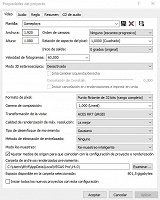
And configuration render
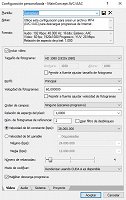
I want to you help me, thanks


Comments

Musicvid wrote on 8/28/2017, 9:08 PM

Looks like something changed on your timeline before you saved it. Find your backup.veg file (location varies with OS) and see if that restores it.

Beyond that, we would need to see render properties for both renders to address your quality question.

gamesfullpro wrote on 8/28/2017, 9:37 PM

Musicvid Thanks for your quick response,

Looks like something changed on your timeline before you saved it. Find your backup.veg file (location varies with OS) and see if that restores it.

Beyond that, we would need to see render properties for both renders to address your quality question.

This is the properties Original Video:

General
Complete name                            : C:\Action!\Video\Video 28-08-2017 18-11-01.avi
Format                                   : AVI
Format/Info                              : Audio Video Interleave
File size                                : 13.1 MiB
Duration                                 : 13 s 783 ms
Overall bit rate                         : 7 982 kb/s

Video
ID                                       : 0
Format                                   : FICV
Codec ID                                 : FICV
Duration                                 : 13 s 783 ms
Bit rate                                 : 6 253 kb/s
Width                                    : 1 920 pixels
Height                                   : 1 080 pixels
Display aspect ratio                     : 16:9
Frame rate                               : 60.000 FPS
Bits/(Pixel*Frame)                       : 0.050
Stream size                              : 10.3 MiB (78%)

Audio
ID                                       : 1
Format                                   : PCM
Format settings, Endianness              : Little
Format settings, Sign                    : Signed
Codec ID                                 : 1
Duration                                 : 13 s 780 ms
Bit rate mode                            : Constant
Bit rate                                 : 1 536 kb/s
Channel(s)                               : 2 channels
Sampling rate                            : 48.0 kHz
Bit depth                                : 16 bits
Stream size                              : 2.52 MiB (19%)
Alignment                                : Aligned on interleaves
Interleave, duration                     : 10  ms (0.60 video frame)

This is the properties Final Video:

General
Complete name                            : C:\Users\dfcif\Documents\Sin título.mp4
Format                                   : MPEG-4
Format profile                           : Base Media / Version 2
Codec ID                                 : mp42 (mp42/isom)
File size                                : 23.9 MiB
Duration                                 : 13 s 797 ms
Overall bit rate mode                    : Variable
Overall bit rate                         : 14.5 Mb/s
Encoded date                             : UTC 2017-08-29 01:19:45
Tagged date                              : UTC 2017-08-29 01:19:45

Video
ID                                       : 2
Format                                   : AVC
Format/Info                              : Advanced Video Codec
Format profile                           : High@L4.2
Format settings, CABAC                   : Yes
Format settings, RefFrames               : 2 frames
Format settings, GOP                     : M=2, N=30
Muxing mode                              : Container profile=High@4.0
Codec ID                                 : avc1
Codec ID/Info                            : Advanced Video Coding
Duration                                 : 13 s 797 ms
Bit rate mode                            : Variable
Bit rate                                 : 14.4 Mb/s
Maximum bit rate                         : 26.0 Mb/s
Width                                    : 1 920 pixels
Height                                   : 1 080 pixels
Display aspect ratio                     : 16:9
Frame rate mode                          : Constant
Frame rate                               : 59.940 (60000/1001) FPS
Color space                              : YUV
Chroma subsampling                       : 4:2:0
Bit depth                                : 8 bits
Scan type                                : Progressive
Bits/(Pixel*Frame)                       : 0.116
Stream size                              : 23.7 MiB (99%)
Language                                 : English
Encoded date                             : UTC 2017-08-29 01:19:45
Tagged date                              : UTC 2017-08-29 01:19:45

Audio
ID                                       : 1
Format                                   : AAC
Format/Info                              : Advanced Audio Codec
Format profile                           : LC
Codec ID                                 : 40
Duration                                 : 13 s 781 ms
Bit rate mode                            : Constant
Bit rate                                 : 128 kb/s
Channel(s)                               : 2 channels
Channel positions                        : Front: L R
Sampling rate                            : 48.0 kHz
Frame rate                               : 46.875 FPS (1024 SPF)
Compression mode                         : Lossy
Stream size                              : 215 KiB (1%)
Language                                 : English
Encoded date                             : UTC 2017-08-29 01:19:45
Tagged date                              : UTC 2017-08-29 01:19:45

I going to find the file .veg thanks for you help.

fr0sty wrote on 8/28/2017, 11:25 PM

I see the problem. You are using 32 bit floating point, full range in your project settings. Switch that to 8 bit and you'll notice the contrast issue goes away. When you switch to 32 bit, all of the levels are different and if you don't apply the right settings to the video, all of your video will come out looking much darker than what you are looking for. There are tutorial videos on youtube that will walk you through how to use the levels adjustments and such to get proper contrast levels in 32 bit video, but the easiest way is to just keep it 8 bit, especially if your output format is going to be 8bit (which most are).

Since it appears gaming is your primary use for Vegas, you don't really need to be editing in 32 bit mode anyway. Most games use 8 bit color (unless gaming in HDR), and the vast majority of affordable video capture cards and apps only use 8 bit as well.

Last changed by fr0sty on 8/28/2017, 11:29 PM, changed a total of 4 times.

Systems:

Desktop

AMD Ryzen 7 1800x 8 core 16 thread at stock speed

64GB 3000mhz DDR4

Geforce RTX 3090

Windows 10

Laptop:

ASUS Zenbook Pro Duo 32GB (9980HK CPU, RTX 2060 GPU, dual 4K touch screens, main one OLED HDR)

Musicvid wrote on 8/29/2017, 2:29 AM

That's a good catch, Fr0sty!

gamesfullpro wrote on 8/29/2017, 11:07 AM

I see the problem. You are using 32 bit floating point, full range in your project settings. Switch that to 8 bit and you'll notice the contrast issue goes away. When you switch to 32 bit, all of the levels are different and if you don't apply the right settings to the video, all of your video will come out looking much darker than what you are looking for. There are tutorial videos on youtube that will walk you through how to use the levels adjustments and such to get proper contrast levels in 32 bit video, but the easiest way is to just keep it 8 bit, especially if your output format is going to be 8bit (which most are).

Since it appears gaming is your primary use for Vegas, you don't really need to be editing in 32 bit mode anyway. Most games use 8 bit color (unless gaming in HDR), and the vast majority of affordable video capture cards and apps only use 8 bit as well.

fr0sty thanks for your help,

I changed the configuration proyect to 8 bits, The blue color in the final video has already been corrected, thanks again 😀

But, the quality doesn't improve, I tried render with diferents editing programs but I get the same result.

This makes me think, if something in my operating system is unconfigured, you know that settings are necessary in windows 10 for a correct rendering

Original Video

Final video

NickHope wrote on 8/29/2017, 11:11 AM
...But, the quality doesn't improve, I tried render with diferents editing programs but I get the same result.

See here: https://www.vegascreativesoftware.info/us/forum/faq-how-can-i-improve-the-quality-of-my-avc-h-264-renders--104642/