My VEGAS Pro 17 Hangs Without Any Reason, Can't Solve This Problem Yet

iEmby wrote on 2/24/2020, 3:24 PM

This was my last thread related to this.. I sent in this screenshot of error occurred. please check following link.

https://www.vegascreativesoftware.info/us/forum/help-help-please-help-my-vegas-crashes-randomly-for-no-reason--118236/

now I record vegas while i am working till it hangs as i said.. so after i continues work for 25 minutes it crashes or hangs .. i am sending you last 2 minutes for more information. Neither face problem while opening Vegas nor face problem while rendering only while i am editing/working.

& it happened in VEGAS Pro 16.0 to VEGAS Pro 17.0 (In Every Update)

my system detail is in my signature & error screenshot in above link thread.

please now help me..

check out this video...

PROCESSOR
     

Operating System: Windows 11 Pro 64-bit (Always Updated)
System Manufacturer: ASUS
12th Gen Intel(R) Core(TM) i7-12700 (20 CPUs), ~2.1GHz - 4.90GHz
Memory: 32GB RAM
Page File: 11134MB used, 7934MB Available
DirectX Version: DirectX 12

-----------------------------------------------

MOTHERBOARD


ASUS PRIME H610-CS D4
Intel® H610 (LGA 1700)
Ready for 12th Gen Intel® Processors
Micro-ATX Motherboard with DDR4
Realtek 1 Gb Ethernet
PCH Heatsink
PCIe 4.0 | M.2 slot (32Gbps) 
HDMI® | D-Sub | USB 3.2 Gen 1 ports
SATA 6 Gbps | COM header
LPT header | TPM header
Luminous Anti-Moisture Coating
5X Protection III
(Multiple Hardware Safeguards
For all-round protection)

-----------------------------------------------
EXTERNAL GRAPHIC CARD
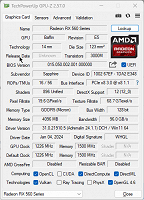
-----------------------------------------------

INTERNAL GRAPHIC CARD (iGPU)
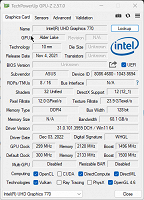
------------------------------------------------

LED - MONITOR

Monitor Name: Generic PnP Monitor
Monitor Model: HP 22es
Monitor Id: HWP331B
Native Mode: 1920 x 1080(p) (60.000Hz)
Output Type: HDMI

-----------------------------------------------

STORAGE DRIVE

Drive: C:
Free Space: 182.3 GB
Total Space: 253.9 GB
File System: NTFS
Model: WD Blue SN570 1TB (NVMe)

---------------O----------------

Some useful creations by me including VEGAS Scripts

https://www.getopensofts.in/

My YouTube Channel Dedicated to Only VEGAS Pro Tutorials

EDITROOM : My YouTube Channel (For VEGAS Tutorials)

Comments

fr0sty wrote on 2/24/2020, 5:24 PM

Read the "Information Required to Help You" (Specifically Section B) thread and post what it asks for.

Systems:

Desktop

AMD Ryzen 7 1800x 8 core 16 thread at stock speed

64GB 3000mhz DDR4

Geforce RTX 3090

Windows 10

Laptop:

ASUS Zenbook Pro Duo 32GB (9980HK CPU, RTX 2060 GPU, dual 4K touch screens, main one OLED HDR)

Kinvermark wrote on 2/24/2020, 8:45 PM

Yes, more info (especially footage) is required, but sure looks like your system is laboring, and once it starts to "chug" then rapid UI movements can lead to lockups. Can also see this when dumping huge loads of HEVC footage on a timeline (or even HDV in the old days; hence the invention of cineform.)

Have you tried using a lightweight (low compression) proxy or intermediate that scrubs easily?

Former user wrote on 2/25/2020, 2:58 AM

I think you cut out a section and auto ripple was on, moving playhead on to new footage, and that caused vegas to crash? If that's what can be seen, vegas just does that. it's not stable, quick movements of timeline after cut at playhead cause it. Set vegas to auto save as frequently as you can without it annoying you

Musicvid wrote on 2/25/2020, 3:11 AM

Your white screen crash is often a smoking gun.

1. Install the latest video drivers for your card.

2. If that doesn't fix it completely, disable "GPU Acceleration of Video Processing" in Preferences. That should get you going.

VEGASDerek wrote on 2/25/2020, 8:57 AM

You system information indicates that your c: drive is an SSD, but based on the video, the footage is not on that drive. You might want to elaborate on where that footage is being pulled from.