Timecoded BWF Audio Files don't show Timecode IN information [bug]

AVsupport wrote on 7/6/2018, 9:35 PM

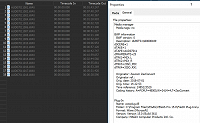
I was checking some (Poly) Broadcast Wave Files I had recorded with a professional Zaxcom MAXX recorder, and couldn't help myself noticing that proper Timecode IN information is not recognized in the Project Media (remember: we had the same thing recently for XAVC-S files).

This information is definitely there (in the file) but doesn't get seen by this VP15.361

Maintaining valid Timecode information is essential for synchronizing split recording system files up in the edit.
my current Win10/64 system (latest drivers, water cooled) :

Intel Coffee Lake i5 Hexacore (unlocked, but not overclocked) 4.0 GHz on Z370 chipset board,

32GB (4x8GB Corsair Dual Channel DDR4-2133) XMP-3000 RAM,

Intel 600series 512GB M.2 SSD system drive running Win10/64 home automatic driver updates,

Crucial BX500 1TB EDIT 3D NAND SATA 2.5-inch SSD

2x 4TB 7200RPM NAS HGST data drive,

Intel HD630 iGPU - currently disabled in Bios,

nVidia GTX1060 6GB, always on latest [creator] drivers. nVidia HW acceleration enabled.

main screen 4K/50p 1ms scaled @175%, second screen 1920x1080/50p 1ms.

Comments

Red Prince wrote on 7/6/2018, 10:04 PM

Didn’t we go through this recently?

He who knows does not speak; he who speaks does not know.
                    — Lao Tze in Tao Te Ching

Can you imagine the silence if everyone only said what he knows?
                    — Karel Čapek (The guy who gave us the word “robot” in R.U.R.)

Former user wrote on 7/6/2018, 10:05 PM

You have to use the IMPORT BWF function.

AVsupport wrote on 7/7/2018, 1:05 AM

Geez, thanks guys, I never know This ('Import Broadcast Wave Format') existed..! Strange! As if BWF isn't 'Media' like everything else..IMO this would be better handled differently (Options greyed out if not avail).

Result: Yes, I could load the clips onto their place in the timeline; However, I still DON'T have a TC IN in the attributes for each clip in the Project Media window details...this smells fishy...or am I missing something??

my current Win10/64 system (latest drivers, water cooled) :

Intel Coffee Lake i5 Hexacore (unlocked, but not overclocked) 4.0 GHz on Z370 chipset board,

32GB (4x8GB Corsair Dual Channel DDR4-2133) XMP-3000 RAM,

Intel 600series 512GB M.2 SSD system drive running Win10/64 home automatic driver updates,

Crucial BX500 1TB EDIT 3D NAND SATA 2.5-inch SSD

2x 4TB 7200RPM NAS HGST data drive,

Intel HD630 iGPU - currently disabled in Bios,

nVidia GTX1060 6GB, always on latest [creator] drivers. nVidia HW acceleration enabled.

main screen 4K/50p 1ms scaled @175%, second screen 1920x1080/50p 1ms.

Red Prince wrote on 7/7/2018, 10:29 AM

I never know This ('Import Broadcast Wave Format') existed..!

Neither did I until the thread I linked. It looks almost as an afterthought, which they threw in just so the can say they support TC. But that support is cursory at best.

He who knows does not speak; he who speaks does not know.
                    — Lao Tze in Tao Te Ching

Can you imagine the silence if everyone only said what he knows?
                    — Karel Čapek (The guy who gave us the word “robot” in R.U.R.)

Musicvid wrote on 7/7/2018, 4:20 PM

It looks almost as an afterthought, which they threw in just so the can say they support TC. But that support is cursory at best.

Yes, Sony did that maybe 5-7 years ago, and broadcast pros weren't any more impressed by it than they are today. I recall that rraud and I felt a little of the disappointment and chagrin with the new "feature."

Fortunately for us now, as then, our old warhorse named Wave Agent is still available and free.

https://www.sounddevices.com/products/accessories/software/wave-agent

AVsupport wrote on 7/7/2018, 5:42 PM

Thanks @Musicvid for pointing that out..yet another 'workaround' for something that should be easy & straight forward..? I wasn't necessarily expecting a upmarket feature like 'Read LTC from audio track', 'autosync' or a 'Timecode Calculator', but just maintaining data integrity would be nice ;-)

my current Win10/64 system (latest drivers, water cooled) :

Intel Coffee Lake i5 Hexacore (unlocked, but not overclocked) 4.0 GHz on Z370 chipset board,

32GB (4x8GB Corsair Dual Channel DDR4-2133) XMP-3000 RAM,

Intel 600series 512GB M.2 SSD system drive running Win10/64 home automatic driver updates,

Crucial BX500 1TB EDIT 3D NAND SATA 2.5-inch SSD

2x 4TB 7200RPM NAS HGST data drive,

Intel HD630 iGPU - currently disabled in Bios,

nVidia GTX1060 6GB, always on latest [creator] drivers. nVidia HW acceleration enabled.

main screen 4K/50p 1ms scaled @175%, second screen 1920x1080/50p 1ms.

Musicvid wrote on 7/7/2018, 5:57 PM

Yes, and preserving metadata in bwf is something Vegas has never done completely or correctly.

And you have my full support for getting this revisited, although I'm retired from my limited broadcast gig.

AVsupport wrote on 7/7/2018, 8:02 PM

well it's just that I'm exploring future workflows for multicam and split recording systems and how I can implement it (without having to resort to other third party NLEs, plugins or software); and since I provide that (TC) kind of service to my clients, it would only be prudent to a) check on integrity b) be able to do the same thing as I am recommending

my current Win10/64 system (latest drivers, water cooled) :

Intel Coffee Lake i5 Hexacore (unlocked, but not overclocked) 4.0 GHz on Z370 chipset board,

32GB (4x8GB Corsair Dual Channel DDR4-2133) XMP-3000 RAM,

Intel 600series 512GB M.2 SSD system drive running Win10/64 home automatic driver updates,

Crucial BX500 1TB EDIT 3D NAND SATA 2.5-inch SSD

2x 4TB 7200RPM NAS HGST data drive,

Intel HD630 iGPU - currently disabled in Bios,

nVidia GTX1060 6GB, always on latest [creator] drivers. nVidia HW acceleration enabled.

main screen 4K/50p 1ms scaled @175%, second screen 1920x1080/50p 1ms.

Musicvid wrote on 7/7/2018, 8:22 PM

+1

Thanks for escalating to a bug report.

AVsupport wrote on 7/7/2018, 8:38 PM

I wonder if @NickHope might be interested to adding this into the existing list of Known Issues perhaps?

my current Win10/64 system (latest drivers, water cooled) :

Intel Coffee Lake i5 Hexacore (unlocked, but not overclocked) 4.0 GHz on Z370 chipset board,

32GB (4x8GB Corsair Dual Channel DDR4-2133) XMP-3000 RAM,

Intel 600series 512GB M.2 SSD system drive running Win10/64 home automatic driver updates,

Crucial BX500 1TB EDIT 3D NAND SATA 2.5-inch SSD

2x 4TB 7200RPM NAS HGST data drive,

Intel HD630 iGPU - currently disabled in Bios,

nVidia GTX1060 6GB, always on latest [creator] drivers. nVidia HW acceleration enabled.

main screen 4K/50p 1ms scaled @175%, second screen 1920x1080/50p 1ms.

fawtz wrote on 1/31/2019, 9:50 PM

Revisiting the subject: ran into this while in another forum. Software to tinker with your BWF files. I know it's another workaround but well, it's here if you ever need it. Can do pretty things.

https://www.videotoolshed.com/product/bwfmerge/