Z-raw in Vegas 17

GeoffreyDean33 wrote on 2/15/2020, 12:10 PM

I'm trying out my new Z-cam E2 cinema camera. With the latest update it shoots "zRaw." The makers provide software that converts the zRaw files into "easy to edit DNxHD" codec. I can choose between YUV422 and YUV444. I choose 422 but the transcoded file doesn't play in Vegas Pro 17 Build 387. It shows up as a clip in the Vegas Explorer window and even displays a proper thumbnail clip.
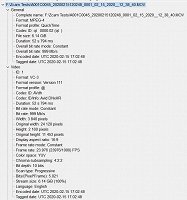
The Zraw software also makes a Proxy file at the same time. This file of course plays just fine in Vegas and when I apply one of the Z-Cam provided Zraw LUTs, it looks beautiful.

The workflow is pretty easy. I never thought I'd shoot Log, let alone Raw but I'd really like to see if I can get this to work in Vegas. Thanks for any insight.

Comments

Musicvid wrote on 2/15/2020, 12:22 PM

Is the DNxHD file a .MOV or .MXF? It's important.

If it's .MOV, you can download the latest Avid LE Codecs and enable Quicktime 7 in the Deprecated tab in Preferences.

If it's MXF, I'm not sure Vegas supports it yet. It "may" open with Import Assist in Happy Otter Scripts, otherwise your camera software is the best bet.

GeoffreyDean33 wrote on 2/15/2020, 12:26 PM

Is the DNxHD file a .MOV or .MXF? It's important.

If it's .MOV, you can download the latest Avid LE Codecs and enable Quicktime 7 in the Deprecated tab in Preferences.

If it's MXF, I'm not sure Vegas supports it yet. It "may" open with Import Assist in Happy Otter Scripts, otherwise Handbrake probably does the trick.

Yes. MOV. Let me see if I can figure out your solution....

GeoffreyDean33 wrote on 2/15/2020, 12:31 PM

You're a genius! Thanks.

Holy cow, what a camera this is!

Musicvid wrote on 2/15/2020, 2:18 PM

Enjoy!

Show us a screenshot from your camera?

GeoffreyDean33 wrote on 2/15/2020, 2:30 PM

Enjoy!

Show us a screenshot from your camera?

Nothing fancy. Set exposure with false color. Got my skin in the silver/gray tone. Maybe one spot of yellow on the highlight on my forehead.

Shot in zRaw. transcoded to DNxHD. Rec709 Lut applied. Voila.