Aliasing / poor quality?

JCPB wrote on 7/29/2018, 1:57 PM

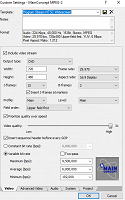
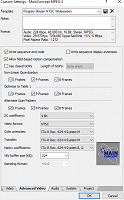
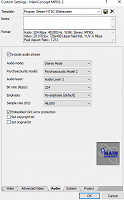
I'm trying to render a project for dvd on Sony Vegas Pro 14, but for some reason there is a weird thing happening that I cant fix and have no idea how to. I've looked everywhere for a fix but can't find anything. I really need help! Please see attached photos.
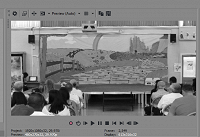
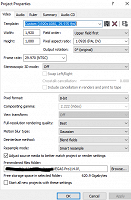
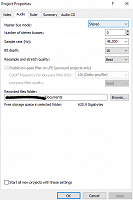
It appears very laggy when rendered, and i think the rolling shutter (since it was filmed on a Canon eos 700d) makes it worse.

Any way to fix it would be amazing.


Thanks

Joel

Comments

JCPB wrote on 7/29/2018, 2:01 PM

EDIT: The first image is in Preview (auto) but i rendered the project it Best (full)

Former user wrote on 7/29/2018, 2:04 PM

May not make a difference, but UNCHECK that adjust source media option.

JCPB wrote on 7/29/2018, 2:08 PM

@Former user Thanks, I tried that but doesn't seem to change anything

Musicvid wrote on 7/29/2018, 2:58 PM

Your project properties say interlaced anamorphic 1920x1080.

Patently Absurd.

Match Media Properties.

JCPB wrote on 7/29/2018, 3:00 PM

Hi @Musicvid ! Could you please elaborate on that?


Thanks

Musicvid wrote on 7/29/2018, 3:11 PM

Search this forum for "Match Media Settings."

That's where you need to start with a new project.


THEN, render to the DVD ARCHITECT NTSC OR PAL TEMPLATE, not a program stream.

THEN, render a SEPARATE AC3 DVD AUDIO STREAM, not mpeg audio

Here is how we make a DVD in Vegas, it's not improv....

Good luck.

https://www.vegascreativesoftware.info/us/tutorials/basic-training-for-dvd-architect--106103/

Former user wrote on 7/29/2018, 4:51 PM

Change your pixel aspect to square rather than PALxx