How do I change invidivual colors in the vectorscope to be accurate?

Teagan wrote on 6/27/2020, 1:14 PM

For example in davinci resolve I make a mask to only show the main colors on my color card and then use the hue-to-hue tool to move the colors up or down to be accurate to what they should be in the vectorscope. For example see this picture:
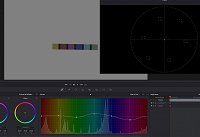
 

Now how do I do either the same or something similar in Vegas Pro 17? When I bezier mask the colors and only show them in vegas pro the whole color grading panel is greyed out, so there's not much I can do unless I'm doing something wrong. Also, I'm in HDR10 mode, grading bt.2020 footage, if that matters.

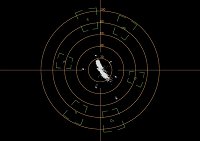
Here's my vectorscope in vegas pro. As you can see it's not really accurate.
Comments

Alan-Tutt wrote on 6/27/2020, 6:39 PM

One of the main tools for this is the Color Correction (secondary) plugin. You select the color you want to change, then adjust the hue to taste. You'd need a separate instance of the plugin for each color you want to adjust, so it's not nearly as convenient as the Davinci Resolve approach. The good news is that once you have the corrections for a camera/lens/lightsource in place, you can save the effect chain as a filter preset, so you won't have to start all over again next time.

RogerS wrote on 6/28/2020, 7:53 AM

I do a lot of this in Vegas, though none of the tools are ideal. You can use "Selective Hue" , a bundled NewBlue Fx tool, for each color. Color Correction (secondary) is similar with a worse interface.

AAV Color Lab (free) gives a quicker way to do it, though isn't totally precise with how the colors can be selected (just RGBCMY).

Finally, what I do now is Graide Color Curves which costs money but has an interface very similar that to Resolve above for Hue vs Hue, Hue Vs Sat, etc. I was skeptical of it, but now regret putting off my purchase for so long.

Musicvid wrote on 6/28/2020, 8:24 AM

It looks like you are trying to match the luminance (Y') of some pastel color swatches (not primaries), without attention to chroma values.

I believe you could do this in Vegas with the Waveform display and Curves plugin or Color panel.

Accurate colors are a different consideration, however, since primaries, matrix transforms, gamma, and chroma subsampling are not straight lines. It's an appealing academic experiment, though.

I guess it "could" be done in the vectorscope, but seems kind of tedious to me.


Marco. wrote on 6/28/2020, 9:20 AM

»Finally, what I do now is Graide Color Curves …«

I love Graide Color Curves and it HSY' mode. Also plug-ins like DFT offer various FX to adjust luma and chroma of particular zones (while you could view each of the zones via a matte view).

Yelandkeil wrote on 6/28/2020, 10:09 AM

Er versuchte, das Ding auf falsche Transform oder Bildschirm zu justieren. Ich hab mal einen Vorschlag gegeben, wurde aber abgelehnt. Weiß nicht warum.

ASUS TUF Gaming B550plus (BIOS ver.3634)
- Thermaltake TOUGHPOWER GF1 850W 
- ADATA XPG GAMMIX S11PRO; 512GB/sys, 2TB/data 
- G.SKILL F4-3200C16Q-64GFX 
- AMD Ryzen9 5950x + LiquidFreezer II-360 
- XFX Speedster-MERC319-RX6900XT <-AdrenalinEdition 25.12.1
Samsung 2xLU28R55 HDR10 (300CD/m², 1499Nits/peak) ->2xDPort
ROCCAT Kave 5.1Headset/Mic ->Analog (AAFOptimusPack 6.0.9403.1)
LG DSP7 Surround 5.1Soundbar ->TOSLINK

Lumix DC-GH6/5s: HLG4k60p/30p, AWB, shutter=125, ISO=auto (250 - 6400)
DJI Mini 4 Pro: HLG4k60p, AWB, shutter=auto, ISO=auto
HERO5: ProtuneFlat2.7k60pLinear, WB=4800K, Shutter=auto, ISO=800

Win11Pro: 25H2-26200.7462; Direct3D API=12.2
VEGASPro23 + XMediaRecode/Handbrake + DVDArchi7 
AcidPro10 + SoundForgePro14.0.065 + SpectraLayersPro7 
K-LitecodecPack19.2.5 (MPC Video Renderer for HDR10 Playback on PC)