How to mask?

FayFen wrote on 10/17/2017, 3:26 AM

I have trial V15 , and I'm trying to mask with an image.
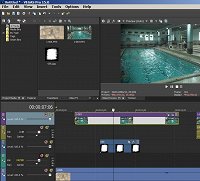
But I don't see here the parent tool (as there was on the VMS14)

What I want to learn is how to mask different clips that are on the same track.

Thank you.

** I see the mask in the pan/crop but I don't see an option to load a mask on that menu.

Comments

Marco. wrote on 10/17/2017, 4:14 AM

In Vegas Pro it works exactly same way as already discussed -> here.

If this does not work, turn GPU acceleration off in Options/Preferences/Video.

Dexcon wrote on 10/17/2017, 4:35 AM

If you're looking for the parent/child switches on the track headers, click on the so-called hamburger icon (3 horizontal lines) on the far left of the track header and you can then select a number of the track header selections that used to appear automatically in earlier VP versions.

Edit Visible Button Set at the bottom of that window allows you to select which icons you want to appear on all the track headers in that project.

Cameras: Sony FDR-AX100E; GoPro Hero 11 Black Creator Edition; Samsung S23 Ultra smart phone

Installed: Vegas Pro 13, 15, 16, 17, 18, 19, 20, 21, 22 & 23, HitFilm Pro 2021.3, DaVinci Resolve Studio 20.3, BCC 2026, Mocha Pro 2026, NBFX TotalFX 7, Neat NR 6, DVD Architect 6.0, MAGIX Travel Maps, Sound Forge Pro 16, SpectraLayers Pro 12, iZotope RX11 Advanced and many other iZ plugins, Vegasaur 4.0

Windows 11 25H2

Dell Alienware Aurora 11:

10th Gen Intel i9 10900KF - 10 cores (20 threads) - 3.7 to 5.3 GHz

NVIDIA GeForce RTX 2080 SUPER 8GB GDDR6 - liquid cooled

64GB RAM - Dual Channel HyperX FURY DDR4 XMP at 3200MHz

C drive: 2TB Samsung 990 PCIe 4.0 NVMe M.2 PCIe SSD

D: drive: 4TB Samsung 870 SATA SSD (used for media for editing current projects)

E: drive: 2TB Samsung 870 SATA SSD

F: drive: 6TB WD 7200 rpm Black HDD 3.5"

Dell Ultrasharp 32" 4K Color Calibrated Monitor


LAPTOP:

Dell Inspiron 5310 EVO 13.3"

i5-11320H CPU

C Drive: 1TB Corsair Gen4 NVMe M.2 2230 SSD (upgraded from the original 500 GB SSD)

Monitor is 2560 x 1600 @ 60 Hz

FayFen wrote on 10/17/2017, 5:28 AM

OK, got it to work now. So I'm disappointed that all this method is still track based. This silliness I just can't comprehend.

I got the impression Marco that it will be done differently in V15.

Marco. wrote on 10/17/2017, 5:46 AM

"I got the impression Marco that it will be done differently in V15."

How comes?

FayFen wrote on 10/17/2017, 5:56 AM

From your answer here last month.

https://www.vegascreativesoftware.info/us/forum/masks-correct-me-if-i-m-wrong--108572/

Vegas Pro 15 offers clip based FX for such kind of processes but it's a brand new feature of version 15 there. Before, it had same limitation as Movie Studio.


Marco. wrote on 10/17/2017, 7:46 AM

I see what the confusion is about. I thought that would have refered mainly to the movement of video which in VP15 now you can do by using the "Picture in Picture FX" instead of using "Track Motion".

FayFen wrote on 10/17/2017, 9:16 AM

it's a pity, I don't understand how Vegas users lives with such track waste.

** I also found that V15 has end freeze. boy that is so dumb. I don't know of any other NLE that has it (less the daughter VMS) and one can't un-defult this


Musicvid wrote on 10/17/2017, 9:44 PM

@Marco.

Youve got an intelligent life-form in FayFen. Seize the opportunity.

@FayFen

Be patient. None of us are the solution, but only a utilitarian part of the process. That would include you, if you have the patience...