Intermediate Codecs - Vegas Pro 17

GeoffreyDean33 wrote on 2/19/2020, 10:54 AM

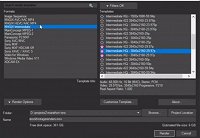
I've just learned that Vegas is able to produce Intermediate Files that presumably would play better on the Vegas timeline.

I'm trying to figure out the work flow. Drag all your clips to the timeline, render to Intermediate file, then delete everything on the timeline and start editing with the new files??

Are there pros and cons in regards to using proxy files vs trans-coded intermediate files?
Comments

fr0sty wrote on 2/19/2020, 1:13 PM

The intermediate files won't play as well on the timeline as if you had selected "build proxy" from the right click menu on a clip or group of clips (reminder, proxies only work when Vegas' preview is set to "preview" or "Draft"), but it will certainly be higher quality.

Intermediates are used when you need to render out a mixdown of tracks and want to keep quality as high as possible (which nested projects have kinda rendered obsolete), or when you need to send assets to someone else for further editing, they're not really meant to take the place of proxies. They favor quality over speed.

Last changed by fr0sty on 2/19/2020, 1:14 PM, changed a total of 1 times.

Systems:

Desktop

AMD Ryzen 7 1800x 8 core 16 thread at stock speed

64GB 3000mhz DDR4

Geforce RTX 3090

Windows 10

Laptop:

ASUS Zenbook Pro Duo 32GB (9980HK CPU, RTX 2060 GPU, dual 4K touch screens, main one OLED HDR)

Musicvid wrote on 2/19/2020, 1:32 PM

A proxy is generally lower resolution than the original, so not suited for final viewing or render. I think of them as single-use.

A lossless intermediate is often larger than the original, and is intended to be re-used rendered for delivery with minimal losses.

For storing your files, I really think the original format is best.