Vegas Pro 17 & NBFX transitions5flow - presets missing

redpaw wrote on 8/9/2019, 3:54 PM

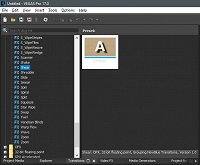
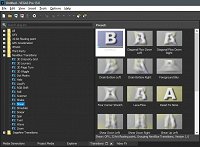
So, I bit the bullet and got the vp17... installed the flow5 pack form NB that came with it, but each transtion doesnt show any presets except for the 'default' where there usually is around 10 different presets there... happens for every single one transition from the pack.
I obviously tried to uninstall and install it again - no luck.
It works fine in vegas 15. Any ideas?
Comments

vkmast wrote on 8/9/2019, 6:29 PM

This was similar already in VP 16. Only the list in the FX window to choose from.

redpaw wrote on 8/10/2019, 3:00 AM

thanks @vkmast... i checked the presets above that and it was only default as well, didnt think about checking the plugin's presets...

might need to asign a day to go through all of them and manually add them to vegas presets so can see the previews

bitman wrote on 8/12/2019, 1:26 PM

@redpaw you said you can manually add them to vegas presets so can see the previews, how do you do this?

APPS: VIDEO: VP23 (b356), VP 365 suite (VP 22 build 250), VP 21 build 315, VP 365 20, VP 19 post (latest build -651), (uninstalled VP 12,13,14,15,16 Suite,17, VP18 post), Vegasaur, a lot of NEWBLUE plugins, Mercalli 6.0, Respeedr, Vasco Da Gamma 18 HDpro XXL, Boris Continuum 2026, Davinci Resolve Studio 20,
SOUND: RX 10 advanced Audio Editor, Sound Forge Pro 18, Spectral Layers Pro 12, Audacity,
FOTO: Zoner studio X, DXO photolab (9), Luminar, Topaz...

  • OS: Windows 11 Pro 64, version 25H2
  • CPU: i9-13900K with Air Cooler: Noctua NH-D15 G2 HBC
  • RAM: DDR5 Corsair 64GB (5600-40 Vengeance)
  • Graphics card: Gigabyte GeForce RTX 5090 Aorus Xtreme WF AIO 32GB
  • Monitor: LG UltraGear 45GX950A 44.5" WUHD 5K2K OLED monitor (21:9), Resolution: 5120x2160, 165 Hz
  • C-drive: Corsair MP600 PRO XT NVMe SSD 4TB (PCIe Gen. 4)
  • Video drives: Samsung NVMe SSD 2TB (980 pro and 970 EVO plus) each 2TB
  • Mass Data storage & Backup: WD gold 6TB + WD Yellow 4TB
  • MOBO: Gigabyte Z690 AORUS MASTER
  • PSU: Corsair HX1500i, Case: Fractal Design Define 7 (PCGH edition)
  • Misc.: Logitech G915, Evoluent Vertical Mouse, shuttlePROv2


redpaw wrote on 8/12/2019, 1:33 PM

@bitman  here's a little video i made to show it... easier then trying to explain in words.. hope it's clear.

bitman wrote on 8/12/2019, 2:05 PM

@redpaw crystal clear! Thanks, I wonder if you can just copy/import the presets from Vegas 15 without having to create them again?

APPS: VIDEO: VP23 (b356), VP 365 suite (VP 22 build 250), VP 21 build 315, VP 365 20, VP 19 post (latest build -651), (uninstalled VP 12,13,14,15,16 Suite,17, VP18 post), Vegasaur, a lot of NEWBLUE plugins, Mercalli 6.0, Respeedr, Vasco Da Gamma 18 HDpro XXL, Boris Continuum 2026, Davinci Resolve Studio 20,
SOUND: RX 10 advanced Audio Editor, Sound Forge Pro 18, Spectral Layers Pro 12, Audacity,
FOTO: Zoner studio X, DXO photolab (9), Luminar, Topaz...

  • OS: Windows 11 Pro 64, version 25H2
  • CPU: i9-13900K with Air Cooler: Noctua NH-D15 G2 HBC
  • RAM: DDR5 Corsair 64GB (5600-40 Vengeance)
  • Graphics card: Gigabyte GeForce RTX 5090 Aorus Xtreme WF AIO 32GB
  • Monitor: LG UltraGear 45GX950A 44.5" WUHD 5K2K OLED monitor (21:9), Resolution: 5120x2160, 165 Hz
  • C-drive: Corsair MP600 PRO XT NVMe SSD 4TB (PCIe Gen. 4)
  • Video drives: Samsung NVMe SSD 2TB (980 pro and 970 EVO plus) each 2TB
  • Mass Data storage & Backup: WD gold 6TB + WD Yellow 4TB
  • MOBO: Gigabyte Z690 AORUS MASTER
  • PSU: Corsair HX1500i, Case: Fractal Design Define 7 (PCGH edition)
  • Misc.: Logitech G915, Evoluent Vertical Mouse, shuttlePROv2


redpaw wrote on 8/12/2019, 2:08 PM

@bitman i have no idea... i wish it was possible, but i tried to search for the presets in the folders but couldnt find them anywhere...

bitman wrote on 8/12/2019, 2:20 PM

@redpaw maybe hidden somewhere in AppData ?

APPS: VIDEO: VP23 (b356), VP 365 suite (VP 22 build 250), VP 21 build 315, VP 365 20, VP 19 post (latest build -651), (uninstalled VP 12,13,14,15,16 Suite,17, VP18 post), Vegasaur, a lot of NEWBLUE plugins, Mercalli 6.0, Respeedr, Vasco Da Gamma 18 HDpro XXL, Boris Continuum 2026, Davinci Resolve Studio 20,
SOUND: RX 10 advanced Audio Editor, Sound Forge Pro 18, Spectral Layers Pro 12, Audacity,
FOTO: Zoner studio X, DXO photolab (9), Luminar, Topaz...

  • OS: Windows 11 Pro 64, version 25H2
  • CPU: i9-13900K with Air Cooler: Noctua NH-D15 G2 HBC
  • RAM: DDR5 Corsair 64GB (5600-40 Vengeance)
  • Graphics card: Gigabyte GeForce RTX 5090 Aorus Xtreme WF AIO 32GB
  • Monitor: LG UltraGear 45GX950A 44.5" WUHD 5K2K OLED monitor (21:9), Resolution: 5120x2160, 165 Hz
  • C-drive: Corsair MP600 PRO XT NVMe SSD 4TB (PCIe Gen. 4)
  • Video drives: Samsung NVMe SSD 2TB (980 pro and 970 EVO plus) each 2TB
  • Mass Data storage & Backup: WD gold 6TB + WD Yellow 4TB
  • MOBO: Gigabyte Z690 AORUS MASTER
  • PSU: Corsair HX1500i, Case: Fractal Design Define 7 (PCGH edition)
  • Misc.: Logitech G915, Evoluent Vertical Mouse, shuttlePROv2